
适合父母的FFImageloading
适合父母的FFImageloading
提问于 2017-04-20 07:51:39
我正在用mvvmcross框架在Xamarin中创建一个android应用程序。
我试图从服务器显示图片给我们的用户(图片是Urls)。但是这些照片拒绝缩放来填满他们的父母。如何实现对这些图像的正确匹配?,我使用宽度标签上的FillParent。但是这些图像拒绝缩放到容器的大小。
我现在的设置
   <FFImageLoading.Cross.MvxImageLoadingView
    android:id="@+id/my_plannymap_listitem_title_picture"
    android:layout_width="fill_parent"
    android:layout_height="150dp"
    local:MvxBind="DataLocationUri ImageUrl; Click OpenDetailCommand" />
上面的代码创建了(对于卷的事情很抱歉),因为您可以看到图像没有填充,它们仍然是“原始”大小。
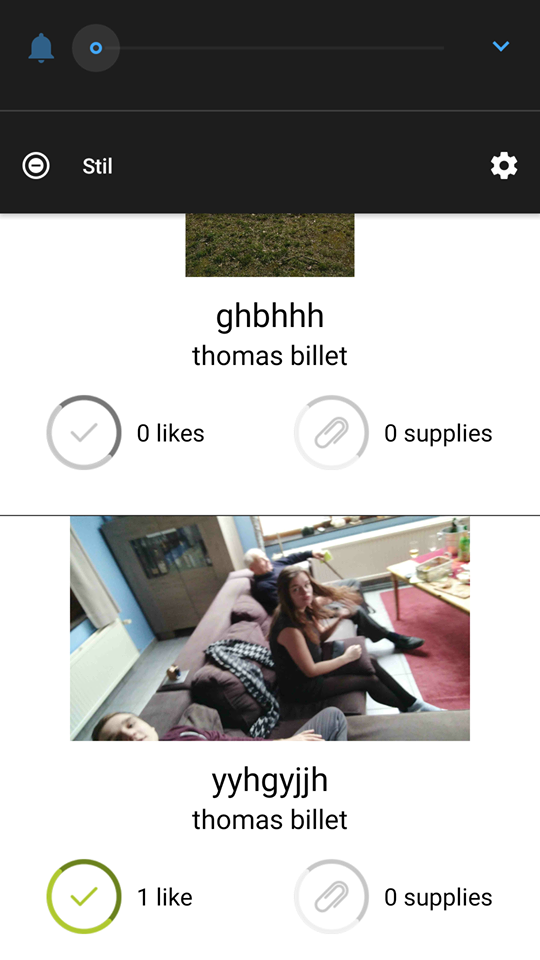
其他活动(这里有相同的问题)
    <FFImageLoading.Cross.MvxImageLoadingView
            android:layout_width="fill_parent"
            android:layout_height="150dp"
            android:scaleType="fitCenter"
            android:id="@+id/overview_image"
            android:background="#580AB0"
            local:MvxBind="DataLocationUri ImageUrl"
            TransparencyEnabled="false"
DownSampleToFit="true" />回答 1
Stack Overflow用户
回答已采纳
发布于 2017-04-20 08:27:13
听起来,您想要将高度修正为150 of,并将宽度固定到父级的宽度。如果是这样的话,这是可以做到的,但它将拉伸任何图像,这不是正确的纵横比开始。
<FFImageLoading.Cross.MvxImageLoadingView
    android:id="@+id/my_plannymap_listitem_title_picture"
    android:layout_width="match_parent"
    android:layout_height="150dp"
    android:scaleType="fitXY"
local:MvxBind="DataLocationUri ImageUrl; Click OpenDetailCommand" />(注:我使用了match_parent,因为fill_parent是已弃用)
如果您不希望图像以一种奇怪的方式拉伸,并且无法保证传入图像的纵横比与布局的纵横比相匹配,则需要选择一个方面(宽度或高度)来决定另一个方面的大小,这样的比例将保持不变。您可以这样做(在本例中,您正在决定宽度,并根据图像的高宽比计算高度):
<FFImageLoading.Cross.MvxImageLoadingView
    android:id="@+id/my_plannymap_listitem_title_picture"
    android:layout_width="match_parent"
    android:layout_height="wrap_content"
    local:MvxBind="DataLocationUri ImageUrl; Click OpenDetailCommand" />
在几乎所有的情况下,当你不能保证缩放图像的纵横比时,第二个选项提供了比第一个更好的结果。
页面原文内容由Stack Overflow提供。腾讯云小微IT领域专用引擎提供翻译支持
原文链接:
https://stackoverflow.com/questions/43513390
复制相关文章
相似问题
腾讯云开发者

Copyright © 2013 - 2026 Tencent Cloud. All Rights Reserved. 腾讯云 版权所有
深圳市腾讯计算机系统有限公司 ICP备案/许可证号:粤B2-20090059  粤公网安备44030502008569号
腾讯云计算(北京)有限责任公司 京ICP证150476号 | 京ICP备11018762号