
CGAffineTransform优于其他视图
CGAffineTransform优于其他视图
提问于 2017-04-20 07:22:48
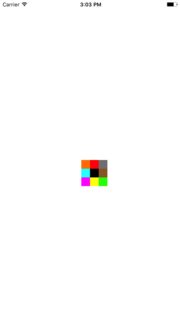
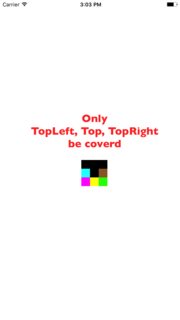
在我看来,有九个子视图。(topLeft,顶部,topRight,左,中,右,bottomLeft,底部,bottomRight)。当我做animation时,CGAffineTransform在中间的子视图中。
这是个棘手的问题。中心顶部的子视图将被覆盖,其他视图将不被覆盖。为什么?
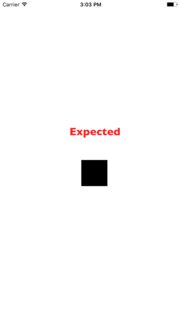
如何覆盖动画中的所有子视图?
    override func viewDidLoad() {
        super.viewDidLoad()

        let top = UIView()
        top.backgroundColor = .red
        top.frame = CGRect(x: self.view.frame.width/2, y: self.view.frame.height/2, width: 20, height: 20)
        top.layer.masksToBounds = true
        view.addSubview(top)

        let topLeft = UIView()
        topLeft.backgroundColor = .orange
        topLeft.frame = CGRect(x: self.view.frame.width/2 - 20, y: self.view.frame.height/2, width: 20, height: 20)
        topLeft.layer.masksToBounds = true
        view.addSubview(topLeft)

        let topRight = UIView()
        topRight.backgroundColor = .gray
        topRight.frame = CGRect(x: self.view.frame.width/2 + 20, y: self.view.frame.height/2, width: 20, height: 20)
        topRight.layer.masksToBounds = true
        view.addSubview(topRight)

        let center = UIView()
        center.backgroundColor = .black
        center.frame = CGRect(x: self.view.frame.width/2, y: self.view.frame.height/2 + 20, width: 20, height: 20)
        view.addSubview(center)

        let left = UIView()
        left.backgroundColor = .cyan
        left.frame = CGRect(x: self.view.frame.width/2 - 20, y: self.view.frame.height/2 + 20, width: 20, height: 20)
        view.addSubview(left)

        let right = UIView()
        right.backgroundColor = .brown
        right.frame = CGRect(x: self.view.frame.width/2 + 20, y: self.view.frame.height/2 + 20 , width: 20, height: 20)
        view.addSubview(right)

        let bottom = UIView()
        bottom.backgroundColor = .yellow
        bottom.frame = CGRect(x: self.view.frame.width/2 , y: self.view.frame.height/2 + 20 + 20, width: 20, height: 20)
        view.addSubview(bottom)

        let bottomLeft = UIView()
        bottomLeft.backgroundColor = .magenta
        bottomLeft.frame = CGRect(x: self.view.frame.width/2 - 20, y: self.view.frame.height/2 + 20 + 20, width: 20, height: 20)
        view.addSubview(bottomLeft)


        let bottomRight = UIView()
        bottomRight.backgroundColor = .green
        bottomRight.frame = CGRect(x: self.view.frame.width/2 + 20, y: self.view.frame.height/2 + 20 + 20, width: 20, height: 20)
        view.addSubview(bottomRight)

        view.addGestureRecognizer(UITapGestureRecognizer(target: self, action: #selector(handleTap)))

    }

    func handleTap(gesture: UITapGestureRecognizer) {
        let location = gesture.location(in: view)
        for subview in view.subviews {
            if subview.frame.contains(location) {
                let scaleUp = CGAffineTransform(scaleX: 3, y: 3)

                UIView.animate(withDuration: 0.5, animations: {
                    subview.transform = scaleUp
                }) { (success: Bool) in
                //subview.transform = .identity
                }
            }
        }
}回答 1
Stack Overflow用户
回答已采纳
发布于 2017-04-20 07:24:52
bringSubviewToFront在应用转换之前。它将凌驾于所有其他子视图之上,并将涵盖它们。
页面原文内容由Stack Overflow提供。腾讯云小微IT领域专用引擎提供翻译支持
原文链接:
https://stackoverflow.com/questions/43512812
复制相关文章
相似问题
腾讯云开发者

Copyright © 2013 - 2026 Tencent Cloud. All Rights Reserved. 腾讯云 版权所有
深圳市腾讯计算机系统有限公司 ICP备案/许可证号:粤B2-20090059  粤公网安备44030502008569号
腾讯云计算(北京)有限责任公司 京ICP证150476号 | 京ICP备11018762号