
在WPF中,在每张页中打印多个FixedPage的FixedPage
在WPF中,在每张页中打印多个FixedPage的FixedPage
提问于 2017-04-17 08:08:53
我有一个非常简单的WPF应用程序,只有一个按钮在上面。
<Button x:Name="btnPrintCard" Grid.Row="2" HorizontalAlignment="Center" Content="Print Card" MinWidth="140" Foreground="White"
                Cursor="Hand" Background="#008080" Click="btnPrintCard_Click" />
我正在尝试打印多张大小为3.370×2.125的卡片在典型的A4页面上。如果安排得当,从左到右,每张纸应装10张卡片。完全一样,adobe阅读器打印命令,并将自定义页每页设置为2x5。
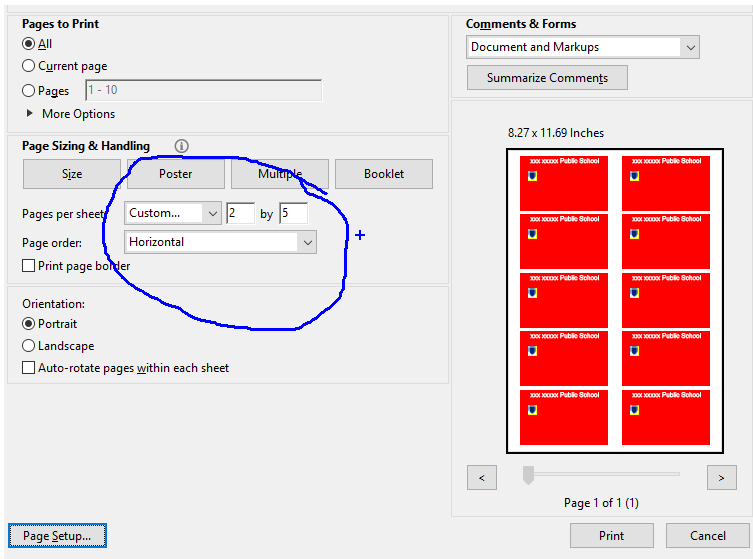
我正在使用以下代码生成和打印卡片:
private void btnPrintCard_Click(object sender, RoutedEventArgs e)
{
    try
    {
        PrintDialog printDialog = new PrintDialog();
        bool? pdResult = printDialog.ShowDialog();
        if (pdResult != null && pdResult.Value)
        {
            FixedDocument document = CreateFixedDocument();
            printDialog.PrintDocument(document.DocumentPaginator, "ID Card Printing");
        }
        MessageBox.Show("Printing done.");
    }
    catch (Exception ex)
    {
        Debug.WriteLine(ex.Message + " :: " + ex.InnerException);
    }
}

private FixedDocument CreateFixedDocument()
{
    FixedDocument fixedDocument = new FixedDocument();
    // fixedDocument.DocumentPaginator.PageSize = new Size(96 * 3.370, 96 *2.125);
    fixedDocument.DocumentPaginator.PageSize = new Size(96 * 8.5, 96 * 11);

    for (int i = 0; i < 10; i++)
    {
        PageContent page = new PageContent();
        FixedPage fixedPage = CreateOneFixedPage();
        ((IAddChild)page).AddChild(fixedPage);
        fixedDocument.Pages.Add(page);
    }
    return fixedDocument;
}

private FixedPage CreateOneFixedPage()
{
    FixedPage page = new FixedPage();
    page.Background = Brushes.Red;
    page.Width = 96 * 3.370;
    page.Height = 96 * 2.125;

    TextBlock tbTitle = new TextBlock();
    tbTitle.Text = "xxx xxxxx Public School";
    tbTitle.FontSize = 24;
    tbTitle.Foreground = new SolidColorBrush(Colors.White);
    tbTitle.FontFamily = new FontFamily("Arial");
    FixedPage.SetLeft(tbTitle, 96 * 0.4); // left margin
    FixedPage.SetTop(tbTitle, 96 * 0.04); // top margin
    page.Children.Add((UIElement)tbTitle);

    Image image = new Image
    {
        Source = new BitmapImage(new Uri("http://www.ready-range.co.uk/_assets/images/products/BHSRR40R0R.jpg")),
        Height = 30,
        Width = 30
    };

    Border b = new Border();
    b.BorderThickness = new Thickness(1);
    b.BorderBrush = Brushes.Yellow;
    b.Child = image;

    FixedPage.SetLeft(b, 96 * 0.3);
    FixedPage.SetTop(b, 96 * 0.6); // top margin
    page.Children.Add((UIElement)b);

    //measure size of the layout
    Size sz = new Size(96 * 3.370, 96 * 2.125);
    page.Measure(sz);
    page.Arrange(new Rect(new Point(), sz));
    page.UpdateLayout();

    return page;
}
它可以成功地打印,但是每页每张卡片都是这样:
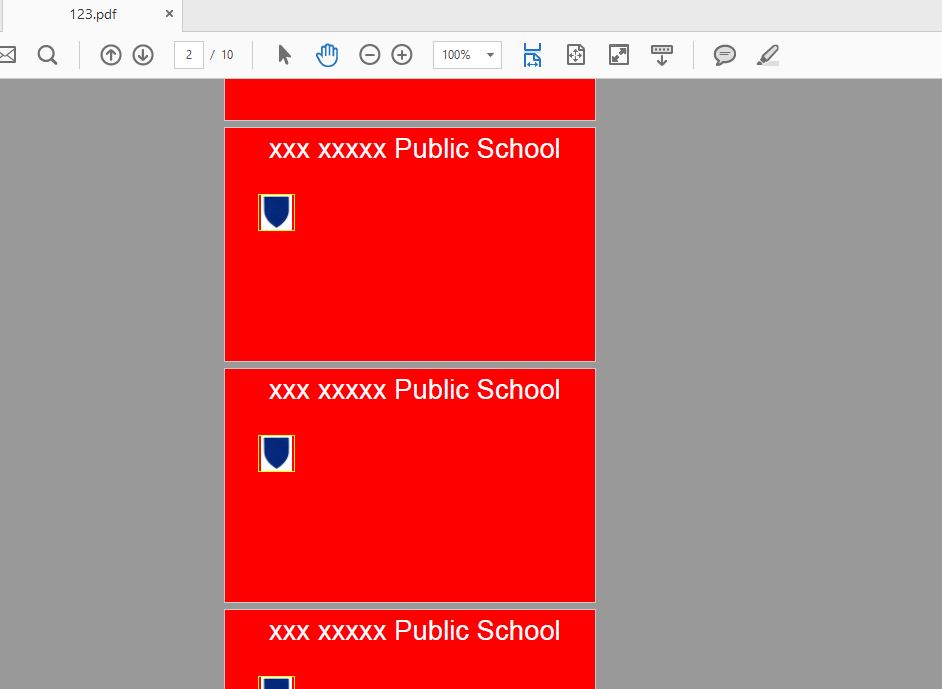
问题是,我想打印像上面的第一张图像,即定制2乘5每页。
非常感谢。
回答 1
Stack Overflow用户
回答已采纳
发布于 2017-04-18 09:45:36
来自另一个堆栈溢出问题的This answer提供了很大帮助。为了获得所需的结果,我做了一些修改,这就是在WpfPrint类中添加我自己的方法。
/// <summary>
/// Add fixed page to current fixed document
/// </summary>
/// <param name="card"></param>
/// <param name="flags"></param>
public void AddFixedPage(FixedPage card, ElementFlags flags)
{
    card.Measure(_infiniteSize);
    if (CurX > _fixedDocument.DocumentPaginator.PageSize.Width - MarginX)
    {
        CurY += card.DesiredSize.Height + MarginY;
        CurX = MarginX;
    }
    double extraCheck = 0;
    if ((flags & ElementFlags.BottomCheck2) == ElementFlags.BottomCheck2)
        extraCheck = card.DesiredSize.Height;
    if (CurY > _fixedDocument.DocumentPaginator.PageSize.Height - MarginY - extraCheck)
        StartPage();


    _curCanvas.Children.Add(card);
    card.SetValue(Canvas.LeftProperty, CurX);
    card.SetValue(Canvas.TopProperty, CurY);


    CurX += card.DesiredSize.Width + MarginX; //Added margin x for proper display

    if (((flags & ElementFlags.NewLine) == ElementFlags.NewLine)  || CurX + card.DesiredSize.Width > _fixedDocument.DocumentPaginator.PageSize.Width)
    {
        CurX = MarginX;
        CurY += card.DesiredSize.Height + MarginY;
    }
}
现在我们可以这样做:
WpfPrint printer = new WpfPrint(new Size(96 * 9, 96 * 11));
printer.CurrentElementMargin = new Thickness(4);
printer.CurrentFontFamily = new FontFamily("Arial");
printer.MarginX = 20;
printer.MarginY = 10;
现在我们可以循环遍历每个FixedPage:
 for (int i = 0; i < 10; i++)
    printer.AddFixedPage(CreateOneFixedPage(), WpfPrint.ElementFlags.BottomCheck2);
最后,发送如下的print命令:
PrintDialog printDialog = new PrintDialog();
bool? pdResult = printDialog.ShowDialog();
if (pdResult != null && pdResult.Value)
    printDialog.PrintDocument(printer.CurrentFixedDocument.DocumentPaginator, "Card Printing");
谢谢。
页面原文内容由Stack Overflow提供。腾讯云小微IT领域专用引擎提供翻译支持
原文链接:
https://stackoverflow.com/questions/43447660
复制相关文章
相似问题
腾讯云开发者

Copyright © 2013 - 2026 Tencent Cloud. All Rights Reserved. 腾讯云 版权所有
深圳市腾讯计算机系统有限公司 ICP备案/许可证号:粤B2-20090059  粤公网安备44030502008569号
腾讯云计算(北京)有限责任公司 京ICP证150476号 | 京ICP备11018762号