
旋转PathGeometry的动画
旋转PathGeometry的动画
提问于 2017-04-16 18:22:36
我有一个有三个定义PathGeometries的路径:一个圆、一个连接线和一个代表风扇叶片的路径。我想使用path的标记属性来触发一个旋转风扇叶片几何形状的动画。因为我需要重复多次,所以如果可能的话,我还想把路径和故事板放在一个单一的风格中。
到目前为止,我已经建立了路径,创建了一个故事板,在我想要旋转的PathGeometry上创建了一个旋转转换,并创建了必要的触发器。
我不明白为什么以下内容不起作用:
 <Style x:Key="fanPath" TargetType="{x:Type Path}">
        <Setter Property="Stroke" Value="Black"/>
        <Setter Property="StrokeThickness" Value="1"/>
        <Setter Property="Data">
            <Setter.Value>
                <GeometryGroup>
                    <PathGeometry>
                        <PathFigure StartPoint="15,30" IsFilled="False">
                            <LineSegment Point="15,50"/>
                        </PathFigure>
                    </PathGeometry>
                    <EllipseGeometry Center="15,15" RadiusX="15" RadiusY="15"/>
                    <!-- Want to rotate the following -->
                    <PathGeometry>
                        <PathGeometry.Transform>
                            <RotateTransform x:Name="rotate" CenterX="15" CenterY="15"/>
                        </PathGeometry.Transform>
                        <PathFigure StartPoint="10,5" IsClosed="True">
                            <LineSegment Point="20,5"/>
                            <LineSegment Point="10,25"/>
                            <LineSegment Point="20,25"/>
                        </PathFigure>
                        <PathFigure StartPoint="5,10" IsClosed="True">
                            <LineSegment Point="5,20"/>
                            <LineSegment Point="25,10"/>
                            <LineSegment Point="25,20"/>
                        </PathFigure>
                    </PathGeometry>
                </GeometryGroup>
            </Setter.Value>
        </Setter>
        <Style.Triggers>
            <Trigger Property="Tag" Value="True">
                <Trigger.EnterActions>
                    <BeginStoryboard Name="fanRotate">
                        <Storyboard>
                            <DoubleAnimation Storyboard.TargetProperty="rotate.Angle" From="0"
                                 To="90" RepeatBehavior="Forever"/>
                        </Storyboard>
                    </BeginStoryboard>
                </Trigger.EnterActions>
                <Trigger.ExitActions>
                    <StopStoryboard BeginStoryboardName="fanRotate"/>
                </Trigger.ExitActions>
            </Trigger>
        </Style.Triggers>
    </Style>
我已经检查了是否正确设置了标记属性,并检查了手动更改旋转转换的角属性是否正常工作。我认为我的问题在于将Storyboard.TargetProperty属性链接到适当的位置(rotate.Angle),但我不知道我遇到了什么核心问题。
回答 1
Stack Overflow用户
回答已采纳
发布于 2017-04-16 23:33:54
您需要通过如下路径访问您的Angle属性:
Storyboard.TargetProperty="(Path.Data).(GeometryGroup.Children)[2].(PathGeometry.Transform).Angle"这能满足你的需要:
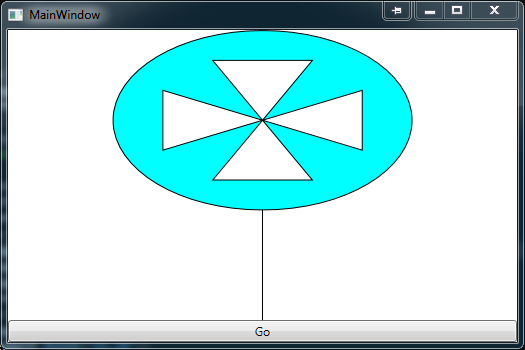
<Window x:Class="WpfApplication2.MainWindow"
        xmlns="http://schemas.microsoft.com/winfx/2006/xaml/presentation"
        xmlns:x="http://schemas.microsoft.com/winfx/2006/xaml"
        xmlns:d="http://schemas.microsoft.com/expression/blend/2008"
        xmlns:mc="http://schemas.openxmlformats.org/markup-compatibility/2006"
        xmlns:local="clr-namespace:WpfApplication2"
        mc:Ignorable="d"
        Title="MainWindow" Height="350" Width="525">
    <Window.Resources>
        <Style x:Key="fanPath" TargetType="{x:Type Path}">
            <Setter Property="Stroke" Value="Black"/>
            <Setter Property="StrokeThickness" Value="1"/>
            <Setter Property="Data">
                <Setter.Value>
                <GeometryGroup>
                    <PathGeometry>
                        <PathFigure StartPoint="15,30" IsFilled="False">
                            <LineSegment Point="15,50"/>
                        </PathFigure>
                    </PathGeometry>
                    <EllipseGeometry Center="15,15" RadiusX="15" RadiusY="15"/>
                    <!-- Want to rotate the following -->
                    <PathGeometry>
                        <PathGeometry.Transform>
                            <RotateTransform x:Name="rotate" CenterX="15" CenterY="15"/>
                        </PathGeometry.Transform>
                        <PathFigure StartPoint="10,5" IsClosed="True">
                            <LineSegment Point="20,5"/>
                            <LineSegment Point="10,25"/>
                            <LineSegment Point="20,25"/>
                        </PathFigure>
                        <PathFigure StartPoint="5,10" IsClosed="True">
                            <LineSegment Point="5,20"/>
                            <LineSegment Point="25,10"/>
                            <LineSegment Point="25,20"/>
                        </PathFigure>
                    </PathGeometry>
                </GeometryGroup>
                </Setter.Value>
            </Setter>
            <Style.Triggers>
                <Trigger Property="Tag" Value="True">
                    <Trigger.EnterActions>
                        <BeginStoryboard Name="fanRotate">
                            <Storyboard>
                                <DoubleAnimation Storyboard.TargetProperty="(Path.Data).(GeometryGroup.Children)[2].(PathGeometry.Transform).Angle" From="0"
                                 To="90" RepeatBehavior="Forever"/>
                            </Storyboard>
                        </BeginStoryboard>
                    </Trigger.EnterActions>
                    <Trigger.ExitActions>
                        <StopStoryboard BeginStoryboardName="fanRotate"/>
                    </Trigger.ExitActions>
                </Trigger>
            </Style.Triggers>
        </Style>
    </Window.Resources>
    <Grid>
        <Grid.RowDefinitions>
            <RowDefinition Height="*"/>
            <RowDefinition Height="Auto"/>
        </Grid.RowDefinitions>
        <Path x:Name="paththing" Width="300" Height="300" Fill="Aqua" Stretch="Fill" Style="{StaticResource fanPath}"/>
        <Button Grid.Row="1" x:Name="button" Content="Go" VerticalAlignment="Bottom">
            <Button.Triggers>
                <EventTrigger RoutedEvent="Button.Click">
                    <BeginStoryboard>
                        <Storyboard>
                            <ObjectAnimationUsingKeyFrames Storyboard.TargetName="paththing" Storyboard.TargetProperty="Tag">
                                <DiscreteObjectKeyFrame KeyTime="0:0:0" Value="True"/>
                            </ObjectAnimationUsingKeyFrames>
                        </Storyboard>
                    </BeginStoryboard>
                </EventTrigger>
            </Button.Triggers>
        </Button>
    </Grid>
</Window>页面原文内容由Stack Overflow提供。腾讯云小微IT领域专用引擎提供翻译支持
原文链接:
https://stackoverflow.com/questions/43440556
复制相关文章
相似问题
腾讯云开发者

Copyright © 2013 - 2026 Tencent Cloud. All Rights Reserved. 腾讯云 版权所有
深圳市腾讯计算机系统有限公司 ICP备案/许可证号:粤B2-20090059  粤公网安备44030502008569号
腾讯云计算(北京)有限责任公司 京ICP证150476号 | 京ICP备11018762号