
溢出:滚动;CSS向页面边缘添加边框?
溢出:滚动;CSS向页面边缘添加边框?
提问于 2017-04-16 04:58:04
我有一个带有以下css的div:
overflow: scroll;
但是,浏览器似乎添加了一个边框(?)如果滚动条是可见的(即使它是不可见的),它应该出现在哪里。我已经检查了dev工具中的css,并且找不到对这种样式的引用。如何隐藏这个滚动条的样式?
这里是一个例子截图-红色箭头指向屏幕的右边,我没有添加那个边框样式。如果我删除overflow: scroll;样式规则,它就会消失。
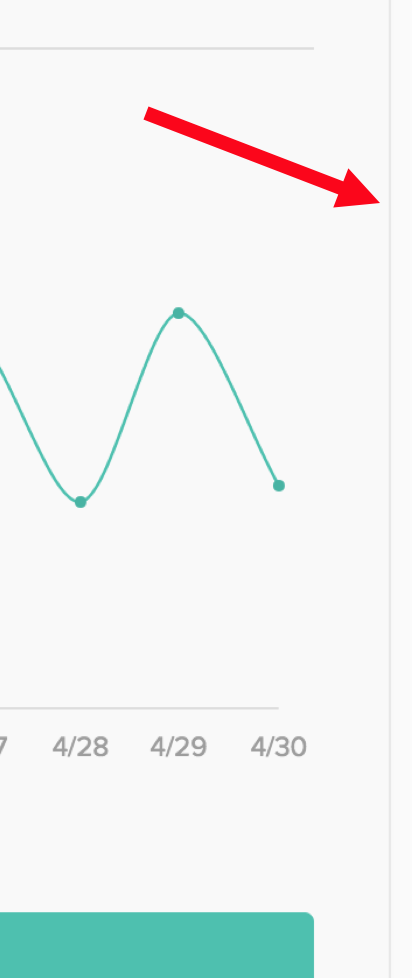
注意,我在Chrome和Safari (两者的最新版本)中都看到了这种行为。
回答 1
Stack Overflow用户
回答已采纳
发布于 2017-04-16 06:37:14
将溢出属性设置为“滚动”将内容剪辑为“大小”。这可以防止内容在水平和垂直方向上超过其容器边界。它还放置水平和垂直滚动条,无论是否需要滚动条。
这将显示两个滚动条:
<div id="div1">
  Content
</div>

#div1 {
    overflow:scroll;
}
“auto”值将按需要垂直、水平或同时显示滚动条。
将CSS更改为:
#div1 {
    overflow:auto;
}
还可以仅为水平或垂直设置溢出属性。如果您想要保证不存在垂直滚动条,您可以在auto上使用它。
将CSS更改为:
#div1 {
    overflow-x:scroll; /* Set the overflow horizontal property to clip the content
and display a horizontal scroll bar. */
}
    overflow-y:hidden; /* Set the overflow vertical property to clip the content,
hide the vertical scroll bar and any content outside of the top/bottom borders. */
} 页面原文内容由Stack Overflow提供。腾讯云小微IT领域专用引擎提供翻译支持
原文链接:
https://stackoverflow.com/questions/43433865
复制相关文章
相似问题
腾讯云开发者

Copyright © 2013 - 2026 Tencent Cloud. All Rights Reserved. 腾讯云 版权所有
深圳市腾讯计算机系统有限公司 ICP备案/许可证号:粤B2-20090059  粤公网安备44030502008569号
腾讯云计算(北京)有限责任公司 京ICP证150476号 | 京ICP备11018762号