
如何使子div取父div的大小
如何使子div取父div的大小
提问于 2017-04-15 10:46:21
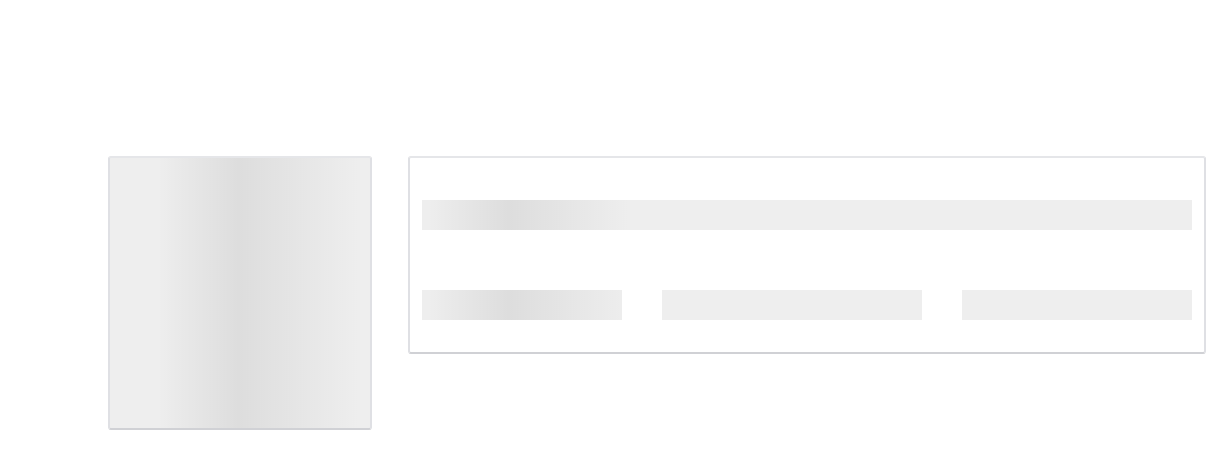
在加载实际页面之前,我正在尝试创建页面的占位符视图。
我希望这个div 元素具有它的父元素 div的大小。
<div class="col-md-1 col-sm-1 col-xs-1 col-md-push-3 col-sm-push-3 col-xs-push-3 property-masker-sub-four-one"></div>检查片段。这是一条薄的绿线。我希望它是它的母公司 div的大小,我会给它一个白色的颜色,这样它看起来就像一个空白和灰色闪烁的区域,在它看起来像一个button之前。
@keyframes placeHolderShimmer{
    0%{
        background-position: -368px 0
    }
    100%{
        background-position: 368px 0
    }
}

.calendar-wrapper, .property-wrapper, .paid-wrapper, .details-wrapper{
    border: 2px solid;
    border-color: #e5e6e9 #dfe0e4 #d0d1d5;
    border-radius: 3px;
    min-height: 250px;
    /*margin-left: 40px;*/
}

.paid-wrapper{
    min-height: 160px;
}

.calendar-wrapper{
    animation-duration: 1s;
    animation-fill-mode: forwards;
    animation-iteration-count: infinite;
    animation-name: placeHolderShimmer;
    animation-timing-function: linear;
    background: #f6f7f8;
    background: linear-gradient(to right, #eeeeee 8%, #dddddd 18%, #eeeeee 33%);
    background-size: 800px 104px;
}

.paid-wrapper{
    animation-duration: 1s;
    animation-fill-mode: forwards;
    animation-iteration-count: infinite;
    animation-name: placeHolderShimmer;
    animation-timing-function: linear;
    background: #f6f7f8;
    background: linear-gradient(to right, #eeeeee 8%, #dddddd 18%, #eeeeee 33%);
    background-size: 800px 104px;
}

.property-wrapper{
	min-height: 150px;
}

.details-wrapper{
    min-height: 350px;
}

.property-animated-background, .details-animated-background {
    animation-duration: 1s;
    animation-fill-mode: forwards;
    animation-iteration-count: infinite;
    animation-name: placeHolderShimmer;
    animation-timing-function: linear;
    background: #f6f7f8;
    background: linear-gradient(to right, #eeeeee 8%, #dddddd 18%, #eeeeee 33%);
    background-size: 800px 104px;
    height: 170px;
}

.details-animated-background{
    height: 350px;
}

.property-masker-one{
	padding: 15px 0;
    background-color: white;
}

.property-masker-two{
    padding: 17px 0;
}

.property-masker-three{
    padding: 20px 0;
    background-color: white;
}

.property-masker-four{
    padding: 17px 0;
}

.property-masker-sub-four-one{
    background-color: green;
}

.property-masker-five{
    padding: 16px 0;
    background-color: white;
}<link href="https://maxcdn.bootstrapcdn.com/bootstrap/3.3.7/css/bootstrap.min.css" rel="stylesheet"/>
<body>
<div class="container">
<div class="row">
<div class="col-md-3 col-sm-3 col-xs-3 calendar-wrapper"></div>
<div class="col-md-9 col-sm-9 col-xs-9 property-wrapper">
<div class="property-animated-background">
<div class="property-masker-one"></div>
<div class="property-masker-two"></div>
<div class="property-masker-three"></div>
<div class="property-masker-four">
<div class="col-md-1 col-sm-1 col-xs-1 col-md-push-3 col-sm-push-3 col-xs-push-3 property-masker-sub-four-one"></div>
</div>
<div class="property-masker-five"></div>
</div>
</div>
</div>
<div class="row">
<div class="col-md-3 col-sm-3 col-xs-3 paid-wrapper"></div>
<div class="col-md-9 col-sm-9 col-xs-9 details-wrapper">
<div class="details-animated-background">
</div>
</div>
</div>
</div>
</body>
<script src="https://ajax.googleapis.com/ajax/libs/jquery/3.1.1/jquery.min.js"></script>
<script src="https://maxcdn.bootstrapcdn.com/bootstrap/3.3.7/js/bootstrap.min.js"></script>
我想要这样
回答 1
Stack Overflow用户
发布于 2017-04-15 11:50:21
看看这个书法家。
获取其父div大小的div元素。
<div id="wrapper" class="col-sm-5">
<div class="row row-eq-height">

 <div class="col-sm-2"><i class="fa fa-pied-piper fa-4x" aria-hidden="true"></i></div>

<div class="col-sm-10">
  <h1>Pied Piper</h1>Pied Piper takes all your files and makes them smaller for when you need a “little help”! It’s built on a universal compression engine that stacks on any file, data, video or image no matter what size.
  <p></p>
 </div>

</div>
</div>页面原文内容由Stack Overflow提供。腾讯云小微IT领域专用引擎提供翻译支持
原文链接:
https://stackoverflow.com/questions/43425098
复制相关文章
相似问题
腾讯云开发者

Copyright © 2013 - 2026 Tencent Cloud. All Rights Reserved. 腾讯云 版权所有
深圳市腾讯计算机系统有限公司 ICP备案/许可证号:粤B2-20090059  粤公网安备44030502008569号
腾讯云计算(北京)有限责任公司 京ICP证150476号 | 京ICP备11018762号