
从屏幕顶部到中央的动画视图
从屏幕顶部到中央的动画视图
提问于 2017-04-13 12:14:46
我试图使用翻译动画将图像视图从屏幕顶部移动到屏幕的中心或中间,即当活动启动时,图像视图从屏幕顶部开始移动到屏幕的中部或中央,其中图像视图空间的顶部和图像视图空间的底部在屏幕上显示相等,就像在相对布局中一样,在xml布局文件中使用父文档中的标记中心。一般来说,我们在facebook和whatsapp应用程序中发现了这些动画,它们用于图像翻译或移动图像视图动画。我尝试了很多这样的问题和答案,也在谷歌上搜索,但没有找到合适的解决方案。到目前为止,我在following.Please方面所做的工作帮助我解决了这些issue.thanks。
public class MainActivity extends AppCompatActivity {

    ImageView imageview;


    @Override
    protected void onCreate(Bundle savedInstanceState) {
        super.onCreate(savedInstanceState);
        setContentView(R.layout.activity_main);

        imageview = (ImageView) findViewById(R.id.imagview);

        RelativeLayout root = (RelativeLayout) findViewById(R.id.rel);


        TranslateAnimation anim = new TranslateAnimation(0, 0, 0, 50);
        anim.setInterpolator((new AccelerateDecelerateInterpolator()));
        anim.setAnimationListener(new MyAnimationListener());
        anim.setDuration(500);
        anim.setFillAfter(true);
        imageview.startAnimation(anim);


            }
        });


}回答 2
Stack Overflow用户
回答已采纳
发布于 2017-04-13 12:42:10
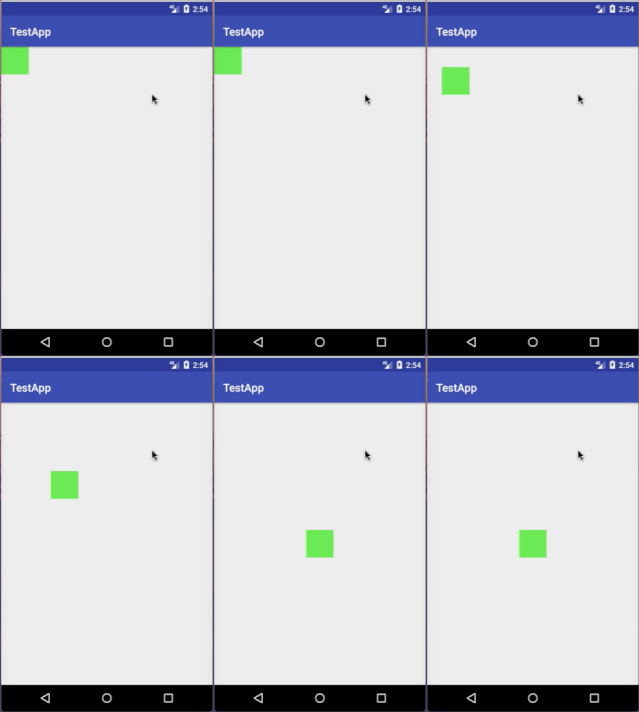
假设您有一个位于屏幕左上角的View,我们希望将它动画到屏幕的中心。
布局文件:
<FrameLayout
        xmlns:android="http://schemas.android.com/apk/res/android"
        android:layout_width="match_parent"
        android:layout_height="match_parent"
        android:id="@+id/root">

    <View
            android:id="@+id/animated_view"
            android:layout_width="50dp"
            android:background="#6eed57"
            android:layout_height="50dp"/>

</FrameLayout>在onCreate()中
final View root = findViewById(R.id.root);
final View animatedView = findViewById(R.id.animated_view);

root.setOnClickListener(new View.OnClickListener() {
    @Override
    public void onClick(final View v) {
        animatedView.animate()
                    .translationX((root.getWidth() - animatedView.getWidth()) / 2)
                    .translationY((root.getHeight() - animatedView.getHeight()) / 2)
                    .setInterpolator(new AccelerateInterpolator())
                    .setDuration(500);
    }
});
结果:
Stack Overflow用户
发布于 2017-04-13 12:25:46
您不会在onCreate()中启动动画,因为屏幕对用户不是完全可见的。如果根视图使用屏幕的整个区域,也不需要获取根视图。
boolean hasAnimationStarted;

public void onWindowFocusChanged(boolean hasFocus) {
    super.onWindowFocusChanged(hasFocus);
    if (hasFocus && !hasAnimationStarted) {
        hasAnimationStarted=true;
        DisplayMetrics metrics = getResources().getDisplayMetrics();
        ObjectAnimator translationY = ObjectAnimator.ofFloat(imageview, "y", metrics.heightPixels / 2 - imageview.getHeight() / 2); // metrics.heightPixels or root.getHeight()
        translationY.setDuration(500);
        translationY.start();
    }
}页面原文内容由Stack Overflow提供。腾讯云小微IT领域专用引擎提供翻译支持
原文链接:
https://stackoverflow.com/questions/43392069
复制相关文章
相似问题
腾讯云开发者

Copyright © 2013 - 2026 Tencent Cloud. All Rights Reserved. 腾讯云 版权所有
深圳市腾讯计算机系统有限公司 ICP备案/许可证号:粤B2-20090059  粤公网安备44030502008569号
腾讯云计算(北京)有限责任公司 京ICP证150476号 | 京ICP备11018762号