
如何在不影响消息UIMenuItem的情况下禁用默认UIMenuItem?
如何在不影响消息UIMenuItem的情况下禁用默认UIMenuItem?
提问于 2017-04-13 09:47:12
有一种方法可以禁用默认的UIMenuItem
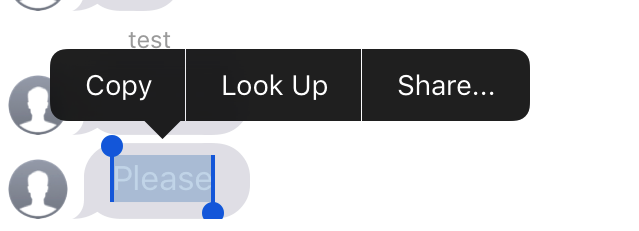
而不影响消息UIMenuItem?
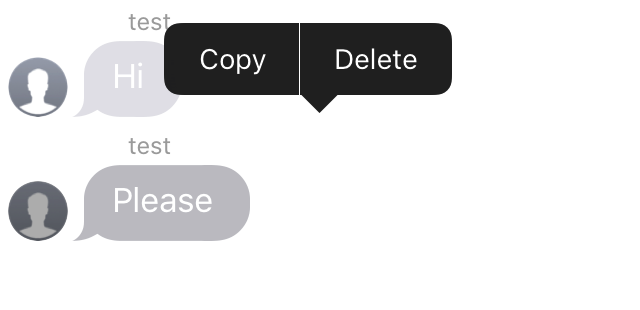
ViewDidLoad:
JSQMessagesCollectionViewCell.registerMenuAction(#selector(UIResponderStandardEditActions.delete(_:)))
UIMenuController.shared.menuItems = [UIMenuItem.init(title: "Delete", action: Selector(("delete")))]回答 2
Stack Overflow用户
回答已采纳
发布于 2017-04-13 10:28:24
使用
cell.textView.selectable = false in cellForRow方法
Stack Overflow用户
发布于 2017-04-16 21:46:32
在这里,您可以选择长时间按messageBubble时会出现的内容。
override func collectionView(_ collectionView: UICollectionView, canPerformAction action: Selector, forItemAt indexPath: IndexPath, withSender sender: Any?) -> Bool {

    if (action == #selector(UIResponderStandardEditActions.copy(_:))) {

        if(messages[indexPath.row].isMediaMessage) {
            return false
        } else {
            return true
        }
    }
    if (action == #selector(UIResponderStandardEditActions.cut(_:))) {

        if(messages[indexPath.row].isMediaMessage) {
            return false
        } else {
            return false
        }
    }
    if (action == #selector(UIResponderStandardEditActions.paste(_:))) {

        if(messages[indexPath.row].isMediaMessage) {
            return false
        } else {
            return false
        }
    }

    if (action == #selector(UIResponderStandardEditActions.delete(_:))) {

        if(messages[indexPath.row].isMediaMessage) {
            return true
        } else {
            return true
        }
    }

    return super.canPerformAction(action, withSender: sender)
}
然后在你选择你想要的物品之后会发生什么,
 override func collectionView(_ collectionView: UICollectionView, performAction action: Selector, forItemAt indexPath: IndexPath, withSender sender: Any?) {

    if (action == #selector(UIResponderStandardEditActions.delete(_:))) {
        print("deleted")
        print(indexPath.row)

        let messageKey = messages[indexPath.row].keyID

        print("messageKey")
        print(messageKey!)

        messages.remove(at: indexPath.row)
        collectionView.reloadData()
    }
    if (action == #selector(UIResponderStandardEditActions.copy(_:))) {
        // do stuff
    }
}
}
页面原文内容由Stack Overflow提供。腾讯云小微IT领域专用引擎提供翻译支持
原文链接:
https://stackoverflow.com/questions/43388885
复制相关文章
相似问题
腾讯云开发者

Copyright © 2013 - 2026 Tencent Cloud. All Rights Reserved. 腾讯云 版权所有
深圳市腾讯计算机系统有限公司 ICP备案/许可证号:粤B2-20090059  粤公网安备44030502008569号
腾讯云计算(北京)有限责任公司 京ICP证150476号 | 京ICP备11018762号