
从dataDirectory文件路径设置为img的src
我正在尝试从文件的字符串路径在html上设置一个src的<img>。
该路径来自cordova.file.dataDirectory cordova插件on Ionic2 (Typescript),如下所示:
编辑以显示我的代码:
--这是profile.ts代码的相关部分
...
import {Camera} from "ionic-native";
...
import {API} from "../../services/api";
import {ImageAdquistionService} from "../../services/imageAdquisition.service";
...
import {Network,File} from 'ionic-native';


declare let cordova: any;


@Component({
  selector:    'page-profile',
  templateUrl: 'profile.html'
})

export class ProfilePage implements OnInit{


  connected:boolean = false;

  imagePath: string = "./assets/img/pio.jpg";
  userInfo: User = new User();


  constructor(

              private api:API,
              private imageAdquistionService: ImageAdquistionService,
              ){

    //seleted tab by default
    this.tabs="info";

    this.connected = Network.type !== "none";

  }

  ngOnInit(): void {

    this.localStorageService.getUserInfo().then(user => {
      this.userInfo = user;
      if (this.userInfo.imagenPerfil !== "defAlert") {

        File.checkFile(cordova.file.dataDirectory,this.userInfo.profileImage).then(result => {
         console.log("exist")
          this.imagePath = cordova.file.dataDirectory + this.userInfo.profileImage;
         })
         .catch(error => {
         console.log("not exist " + JSON.stringify(error))
         })
      }
    });

  }

  presentImageOptions(){

    let actionSheet = this.actionSheetCtrl.create({
      title: 'Select an option',
      buttons: [
        {
          icon: 'camera',
          text: 'photo',
          handler: () => {

            let navTransition = actionSheet.dismiss();
            navTransition.then(() => {
              this.imageAdquistionService.getANewImage(Camera.PictureSourceType.CAMERA).then(imageData => {
                if(imageData.success){
                  this.uploadImage(imageData.fileName, imageData.filePath);
                }
                else{this.presentToast(imageData.message)}
              })
            });
            return false;
          }
        }, {
          icon: 'image',
          text: 'Gallery',
          handler: () => {

            let navTransition = actionSheet.dismiss();
            navTransition.then(() => {
              this.imageAdquistionService.getANewImage(Camera.PictureSourceType.PHOTOLIBRARY).then(imageData => {
                if(imageData.success){
                  this.uploadImage(imageData.fileName, imageData.filePath);
                }
                else{this.presentToast(imageData.message)}
              });
            });
            return false;
          }
        }, {
          text: 'Close',
          role: 'cancel',
          handler: () => {
            console.log('Cancel clicked');
          }
        }
      ]
    });
    actionSheet.present();
  }


  uploadImage(fileName: string, filePath: string){


    this.presentLoadingCustom();
    this.localStorageService.getAccessToken().then(token  => {

      this.api.uploadFile(fileName,filePath).then(result =>{
        this.loading.dismissAll();
        console.log("uploaded OK);

        this.userInfo.profileImage = fileName;
        this.imagePath = filePath;

          this.api.updateUserPreferences(this.userInfo,token).then(result =>{
            if(result.success) {
              console.log("updated ok");

              this.presentToast("image updated succesfully");
            }
          });

      })
        .catch(error => {
          this.presentToast(error.message)
        })
    })

  }

}这是imageAdquisitionService的相关代码
import { Injectable } from '@angular/core';
import {LocalStorageService} from "./localStorage.service";
import {Platform} from "ionic-angular";
import {Camera, File, FilePath} from "ionic-native";
import {API} from "./api";


declare let cordova: any;

@Injectable()
export class ImageAdquistionService {


  constructor(private storage: LocalStorageService,
              public platform: Platform,
              private api:API) {
  }


  getANewImage(src):Promise<any>{
    let options = {
      quality: 60,
      sourceType: src,
      saveToPhotoAlbum: false,
      correctOrientation: true
    };


    return Camera.getPicture(options).then((imageData) => {

      // Special handling for Android library
      if (this.platform.is('android') && src === Camera.PictureSourceType.PHOTOLIBRARY) {


        return FilePath.resolveNativePath(imageData)
          .then(filePath => {

              let correctPath = filePath.substr(0, filePath.lastIndexOf('/') + 1);
              let currentName = imageData.substring(imageData.lastIndexOf('/') + 1, imageData.lastIndexOf('?'));

                return this.storage.getUserInfo().then(user => {

                    return this.copyFileToLocalDir(correctPath, currentName, this.createFileName(user._id)).then(copyResult => copyResult);


            });

            }, (error) => {
              // Handle error
              return {success: false, message: error.message};
            }
          );
      } else {

        let currentName = imageData.substr(imageData.lastIndexOf('/') + 1);
        let correctPath = imageData.substr(0, imageData.lastIndexOf('/') + 1);

        return this.storage.getUserInfo().then(user => {

            return this.copyFileToLocalDir(correctPath, currentName, this.createFileName(user._id)).then(copyResult => copyResult);

        });
      }
    }, (error) => {
        // Handle error
        return {success: false, message: error.message};
      }
    )
  }
  // Create a new name for the image
  createFileName(id:string) {
    let d = new Date(),
      n = d.getTime(),
      newFileName =  n + ".jpg";

      newFileName = id + "_" + newFileName;
      return newFileName;


  }

// Copy the image to a local folder
  copyFileToLocalDir(namePath, currentName, newFileName):Promise<any> {

    return File.copyFile(namePath, currentName, cordova.file.dataDirectory, newFileName).then(success => {

      console.log("response of copy " + JSON.stringify(success));
      return {success: true, fileName: newFileName, filePath: this.pathForImage(newFileName)};

    }, error => {
      this.api.logIonicView("Error while storing file " + error.message);

      return {success: false, message: error.message};
    });
  }

  // Always get the accurate path to the apps folder
  public pathForImage(img) {
    if (img === null) {
      return '';
    } else {
      return cordova.file.dataDirectory + img;
    }
  }

}这是api服务的相关代码
uploadFile(name:string, path:string):Promise<any>{

    let options = {
      fileKey: "file",
      fileName: name,
      chunkedMode: false,
      mimeType: "multipart/form-data",
      params : {'fileName': name}
    };

    let fileTransfer = new Transfer();

    // Use the FileTransfer to upload the image

    return fileTransfer.upload(path, this.urlBase + "upload", options)
      .then(data => {
        console.log("message on filetransfer "+ JSON.stringify(data.response));

        data})
      .catch(this.handleError);

},这是html代码的相关代码。
<ion-item no-lines class="item-bar-profile">
      <ion-avatar>
        <img class="centered" src="imagePath" (click)="presentOptions();">
      </ion-avatar>
</ion-item>
这是一个使用以下硬类型的默认imagepath的示例:
this.imagepath = "./assets/img/pio.jpg“

A这是通过编程将路径更改为
file:///data/user/0/com.ionicframework.myionicproject494629/files/58db7e92be26f32d4c8c01d2_1491989021049.jpg = this.imagepath
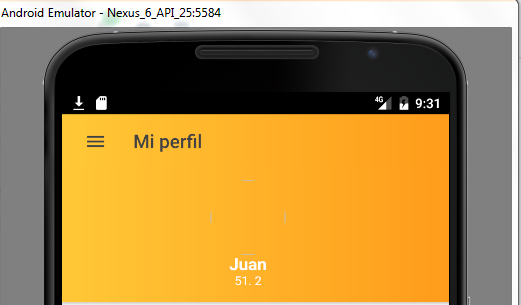
谢谢
回答 3
Stack Overflow用户
发布于 2017-09-11 20:43:29
我也有同样的问题。我意识到,虽然我是在一个android设备上运行,但我是以离子型的方式运行它,而这并不适用于cordova插件。因此,我没有执行ionic cordova run android -l -c,而是运行命令ionic cordova run android。
Stack Overflow用户
发布于 2017-04-12 08:03:11
无论如何,[src]="this.imagepath".No需要在这里使用this,这是错误的。
您可以尝试如下所示。
file.html
[src]="imagepath"Stack Overflow用户
发布于 2017-04-12 08:05:39
您不需要在this中使用[src]="this.imagepath"。
我认为
[src]="imagepath"或
src={{imagepath}}会正常工作的。
注意到:如果file:///usr...package....image.jpg是一个有效的路径,这是可行的。
https://stackoverflow.com/questions/43363480
复制相似问题
腾讯云开发者

Copyright © 2013 - 2026 Tencent Cloud. All Rights Reserved. 腾讯云 版权所有
深圳市腾讯计算机系统有限公司 ICP备案/许可证号:粤B2-20090059  粤公网安备44030502008569号
腾讯云计算(北京)有限责任公司 京ICP证150476号 | 京ICP备11018762号