
如何打开PopupMenuButton?
如何打开PopupMenuButton?
提问于 2017-04-11 14:36:00
如何从第二个小部件打开弹出菜单?
final button = new PopupMenuButton(
    itemBuilder: (_) => <PopupMenuItem<String>>[
          new PopupMenuItem<String>(
              child: const Text('Doge'), value: 'Doge'),
          new PopupMenuItem<String>(
              child: const Text('Lion'), value: 'Lion'),
        ],
    onSelected: _doSomething);

final tile = new ListTile(title: new Text('Doge or lion?'), trailing: button);我想通过点击button来打开tile的菜单。
回答 7
Stack Overflow用户
回答已采纳
发布于 2017-04-13 05:11:31
这是可行的,但不优雅(并且与Rainer上面的解决方案有相同的显示问题:
class _MyHomePageState extends State<MyHomePage> {
  final GlobalKey _menuKey = GlobalKey();

  @override
  Widget build(BuildContext context) {
    final button = PopupMenuButton(
        key: _menuKey,
        itemBuilder: (_) => const<PopupMenuItem<String>>[
              PopupMenuItem<String>(
                  child: Text('Doge'), value: 'Doge'),
              PopupMenuItem<String>(
                  child: Text('Lion'), value: 'Lion'),
            ],
        onSelected: (_) {});

    final tile =
        ListTile(title: Text('Doge or lion?'), trailing: button, onTap: () {
          // This is a hack because _PopupMenuButtonState is private.
          dynamic state = _menuKey.currentState;
          state.showButtonMenu();
        });
    return Scaffold(
      body: Center(
        child: tile,
      ),
    );
  }
}我怀疑你实际上想要的是https://github.com/flutter/flutter/issues/254或https://github.com/flutter/flutter/issues/8277跟踪的东西--将标签与控件关联起来并让标签可点击--这是颤振框架中缺少的特性。
Stack Overflow用户
发布于 2020-01-11 14:28:49
我认为最好这样做,而不是展示一个PopupMenuButton
void _showPopupMenu() async {
  await showMenu(
    context: context,
    position: RelativeRect.fromLTRB(100, 100, 100, 100),
    items: [
      PopupMenuItem<String>(
          child: const Text('Doge'), value: 'Doge'),
      PopupMenuItem<String>(
          child: const Text('Lion'), value: 'Lion'),
    ],
    elevation: 8.0,
  );
}有时,您希望在按下按钮_showPopupMenu的位置显示,并为此使用GestureDetector。
final tile = new ListTile(
  title: new Text('Doge or lion?'),
  trailing: GestureDetector(
    onTapDown: (TapDownDetails details) {
      _showPopupMenu(details.globalPosition);
    },
    child: Container(child: Text("Press Me")),
  ),
);
然后_showPopupMenu就会像
_showPopupMenu(Offset offset) async {
    double left = offset.dx;
    double top = offset.dy;
    await showMenu(
    context: context,
    position: RelativeRect.fromLTRB(left, top, 0, 0),
    items: [
      ...,
    elevation: 8.0,
  );
}Stack Overflow用户
发布于 2021-01-03 09:57:30
截图:
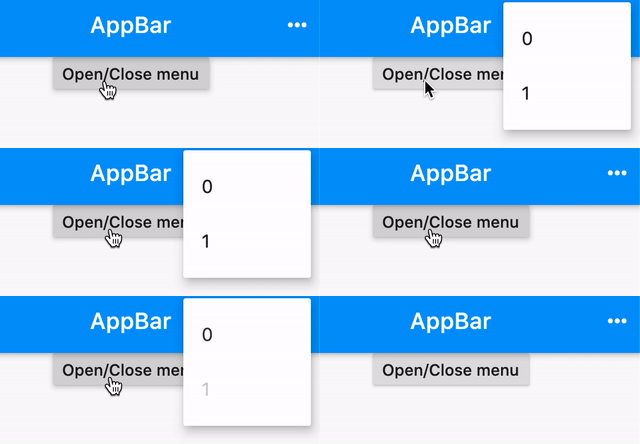
完整代码:
class MyPage extends StatelessWidget {
  final GlobalKey<PopupMenuButtonState<int>> _key = GlobalKey();
  @override
  Widget build(BuildContext context) {
    return Scaffold(
      appBar: AppBar(
        actions: [
          PopupMenuButton<int>(
            key: _key,
            itemBuilder: (context) {
              return <PopupMenuEntry<int>>[
                PopupMenuItem(child: Text('0'), value: 0),
                PopupMenuItem(child: Text('1'), value: 1),
              ];
            },
          ),
        ],
      ),
      body: RaisedButton(
        onPressed: () => _key.currentState.showButtonMenu(),
        child: Text('Open/Close menu'),
      ),
    );
  }
}页面原文内容由Stack Overflow提供。腾讯云小微IT领域专用引擎提供翻译支持
原文链接:
https://stackoverflow.com/questions/43349013
复制相关文章
相似问题
腾讯云开发者

Copyright © 2013 - 2026 Tencent Cloud. All Rights Reserved. 腾讯云 版权所有
深圳市腾讯计算机系统有限公司 ICP备案/许可证号:粤B2-20090059  粤公网安备44030502008569号
腾讯云计算(北京)有限责任公司 京ICP证150476号 | 京ICP备11018762号