
如何在python中正确获得中文目录中的文件名?
如何在python中正确获得中文目录中的文件名?
提问于 2017-04-09 04:10:58
如何在Python中适当地使用中文获取当前工作目录中的名称列表?
例如,在演示文件夹中,我有四个文件:"folder_中文“"folder_a”"folder_b“"folder_c”
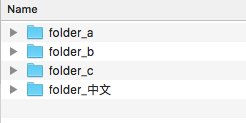
在R中,我可以使用以下命令来实现这一点:
Sys.setlocale(category = "LC_ALL", locale = "zh_cn.utf-8")
setwd("~/desktop/example")
filenames=list.files()
filenames"folder_中文" "folder_a" "folder_b" "folder_c" 但是,我没有在Python中使用Anaconda实现这一点,尽管如果我不将它分配给文件名,输出看起来很好(见下文);中文在文件名中是不正确的。
# -*- coding: utf-8 -*-
import os
os.chdir('/Users/../Desktop/example')
! ls
filenames = ! ls
filenamesfolder_a folder_b folder_c folder_中文
['folder_a', 'folder_b', 'folder_c', 'folder_\xe4\xb8\xad\xe6\x96\x87']但如果我继续打字
print(filenames)
print(filenames[3])
如果我提取这个特定的元素并直接打印出来,就可以观察到中文。
['folder_a', 'folder_b', 'folder_c', 'folder_\xe4\xb8\xad\xe6\x96\x87']
folder_中文
我要强调的最后一件事是,如果我直接输入中文,只有以明确的方式使用打印,我才能正确地看到中文。因此,无论有没有打印,都会产生很大的影响。
print('中文')
'中文'中文
Out[65]: '\xe4\xb8\xad\xe6\x96\x87'我的操作系统是Mac (10.11.5),Anaconda的版本是:
2.7.13 |Anaconda custom (x86_64)| (default, Dec 20 2016, 23:05:08)
[GCC 4.2.1 Compatible Apple LLVM 6.0 (clang-600.0.57)]回答 1
Stack Overflow用户
发布于 2017-04-10 15:35:13
我记得我帮助过的一个关于Python2汉字的问题。Python3没有这个问题。我相信您需要在您的~.bash_profile中添加以下内容:
export LC_ALL=en_US.UTF-8
export LANG=en_US.UTF-8
然后:
source ~/.bash_profile页面原文内容由Stack Overflow提供。腾讯云小微IT领域专用引擎提供翻译支持
原文链接:
https://stackoverflow.com/questions/43302949
复制相关文章
相似问题
腾讯云开发者

Copyright © 2013 - 2026 Tencent Cloud. All Rights Reserved. 腾讯云 版权所有
深圳市腾讯计算机系统有限公司 ICP备案/许可证号:粤B2-20090059  粤公网安备44030502008569号
腾讯云计算(北京)有限责任公司 京ICP证150476号 | 京ICP备11018762号