
安卓6上的ConstraintLayout问题
安卓6上的ConstraintLayout问题
提问于 2017-04-06 08:59:40
在我的项目中,我发现了一个使用ConstraintLayout的非常奇怪的bug。事实上,这个问题只出现在android 6上。
我使用以下XML显示不同登录可能性的按钮列表:
<android.support.constraint.ConstraintLayout xmlns:android="http://schemas.android.com/apk/res/android"
xmlns:app="http://schemas.android.com/apk/res-auto"
xmlns:tools="http://schemas.android.com/tools"
android:layout_width="match_parent"
android:layout_height="match_parent"
android:fitsSystemWindows="true"
tools:context="com.fagets.rainbowsixapp.login.LoginStepOneFragment">

<LinearLayout
    android:id="@+id/linearLayout_login_form"
    android:layout_width="0dp"
    android:layout_height="wrap_content"
    android:orientation="vertical"
    tools:layout_constraintRight_creator="1"
    tools:layout_constraintBottom_creator="1"
    android:layout_marginStart="65dp"
    app:layout_constraintBottom_toBottomOf="parent"
    android:layout_marginEnd="65dp"
    app:layout_constraintRight_toRightOf="parent"
    tools:layout_constraintLeft_creator="1"
    android:layout_marginBottom="18dp"
    app:layout_constraintLeft_toLeftOf="parent"
    android:layout_marginLeft="65dp"
    android:layout_marginRight="65dp">

    <com.facebook.login.widget.LoginButton
        xmlns:facebook="http://schemas.android.com/apk/res-auto"
        android:id="@+id/login_button_facebook"
        style="@style/LoginButton"
        android:paddingTop="15dp"
        android:paddingBottom="15dp"
        facebook:com_facebook_login_text="@string/login_connect_facebook"/>

    <Button
        android:id="@+id/login_button_google"
        style="@style/LoginButton"
        android:textColor="@color/login_button_google_text"
        android:background="@drawable/login_button_shape_google"
        android:text="@string/login_connect_google"/>

    <Button
        android:id="@+id/login_button_anonymous"
        style="@style/LoginButton"
        android:background="@drawable/login_button_shape_anonymous"
        android:text="@string/login_connect_anonymous"/>

    <Button
        android:id="@+id/login_button_about"
        style="@style/LoginButton"
        android:background="@android:color/transparent"
        android:text="@string/login_connect_about"
        android:textColor="@color/login_button_google_text"/>

</LinearLayout>
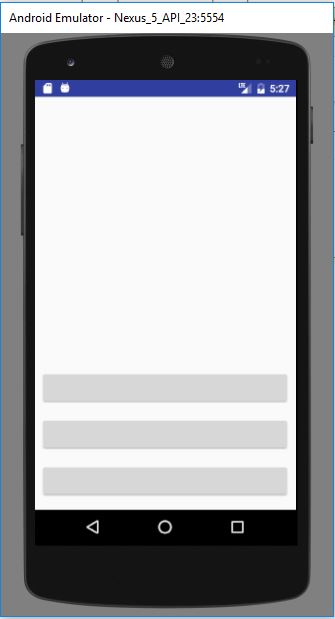
我的问题涉及到LinearLayout中的LinearLayout。在Android6上,LinearLayout被裁剪,而不是粘在底部。它正确地运行在android 7上,甚至在Android4.4.2上。就在那之后,我尝试删除我的LinearLayout,只使用ConstraintLayout,但是我仍然有同样的问题。
以下是Android 7的截图:

在这里,Android 6的问题是:

我做错什么了吗?还是ConstraintLayout库的问题?
谢谢!
回答 1
Stack Overflow用户
发布于 2017-04-06 10:10:35
在使用LinearLayout时,不需要额外的constranintLayout
XML:
<?xml version="1.0" encoding="utf-8"?>
<android.support.constraint.ConstraintLayout xmlns:android="http://schemas.android.com/apk/res/android"
    xmlns:app="http://schemas.android.com/apk/res-auto"
    xmlns:tools="http://schemas.android.com/tools"
    android:layout_width="match_parent"
    android:layout_height="match_parent">

    <Button
        android:id="@+id/button1"
        android:layout_width="0dp"
        android:layout_height="wrap_content"
        app:layout_constraintBottom_toBottomOf="parent"
        android:layout_marginBottom="16dp"
        android:layout_marginRight="8dp"
        app:layout_constraintRight_toRightOf="parent"
        android:layout_marginLeft="8dp"
        app:layout_constraintLeft_toLeftOf="parent" />

    <Button
        android:id="@+id/button2"
        android:layout_width="0dp"
        android:layout_height="wrap_content"
        android:layout_marginRight="8dp"
        app:layout_constraintRight_toRightOf="parent"
        android:layout_marginLeft="8dp"
        app:layout_constraintLeft_toLeftOf="parent"
        app:layout_constraintHorizontal_bias="1.0"
        android:layout_marginBottom="16dp"
        app:layout_constraintBottom_toTopOf="@+id/button1" />

    <Button
        android:id="@+id/button3"
        android:layout_width="0dp"
        android:layout_height="wrap_content"
        android:layout_marginRight="8dp"
        app:layout_constraintRight_toRightOf="parent"
        android:layout_marginLeft="8dp"
        app:layout_constraintLeft_toLeftOf="parent"
        app:layout_constraintHorizontal_bias="1.0"
        android:layout_marginBottom="16dp"
        app:layout_constraintBottom_toTopOf="@+id/button2" />

</android.support.constraint.ConstraintLayout>
页面原文内容由Stack Overflow提供。腾讯云小微IT领域专用引擎提供翻译支持
原文链接:
https://stackoverflow.com/questions/43250450
复制相关文章
相似问题
腾讯云开发者

Copyright © 2013 - 2026 Tencent Cloud. All Rights Reserved. 腾讯云 版权所有
深圳市腾讯计算机系统有限公司 ICP备案/许可证号:粤B2-20090059  粤公网安备44030502008569号
腾讯云计算(北京)有限责任公司 京ICP证150476号 | 京ICP备11018762号