
shinyBS工具提示和弹出字体不可见
shinyBS工具提示和弹出字体不可见
提问于 2017-04-05 20:21:21
我正在尝试使用CRAN包shinyBS向闪亮的元素添加工具提示/弹出。这是我的代码:
ui.R
library(shiny)
library(shinydashboard)
library(shinyBS)

dashboardPage(

  dashboardHeader(title = 'Dashboard', titleWidth = 400),

  dashboardSidebar(width = 400,
                   sidebarMenu(
                     menuItem("Get Data", icon = icon("database"), tabName = "gd"))),

  dashboardBody(

    tabItems(

      tabItem(tabName = "gd",
              fluidRow(

                # add selectInput
                box(selectInput(inputId = "gdselectInput4", label = "Fields", choices = "choice1", "choice2", multiple = TRUE), width = 2, background = "navy"),
                # add tooltip to selectInput element
                bsTooltip(id = "gdselectInput4", title = "Label", placement = "top",trigger = "hover",options = NULL),

                # add checkboxGroupInput
                box(checkboxGroupInput(inputId = "gdcheckboxInput1", label = "Annotation", choices = c("choice1", "choice2"), selected = FALSE), width = 2, background = "navy"),
                # add pop-over to checkboxGroupInput
                bsPopover(id = "gdcheckboxInput1", title = "Select", content = "Whatever", placement = "bottom", trigger = "hover", options = NULL)

              )
      )
    )
  )
)
服务器。R:
shinyServer(function(input, output, session){}) 下面是www/styes.css下的css文件:
.main-header .logo {
  font-weight: bold;
  font-size: 18px;
}

body {
  font-family: "Open Sans";
  font-size: 16px;
  line-height: 1.42857143;
  color: #666666;
}

.popover-title{
    color: #7a0000;
    font-size: 16px;
    background-color: #000000;
}

.popover-header{
    background: #ffff99;
}

.popover-content{
    background: #ffff99;
}

.tooltip .tooltiptext {
    visibility: hidden;
    width: 120px;
    background-color: black;
    color: #000000;
    text-align: center;
    border-radius: 6px;
    padding: 5px 0;
    position: absolute;
    z-index: 1;
    bottom: 100%;
    left: 50%;
    margin-left: -60px;
}

.tooltip:hover .tooltiptext {
    visibility: visible;
    opacity: 1;
}
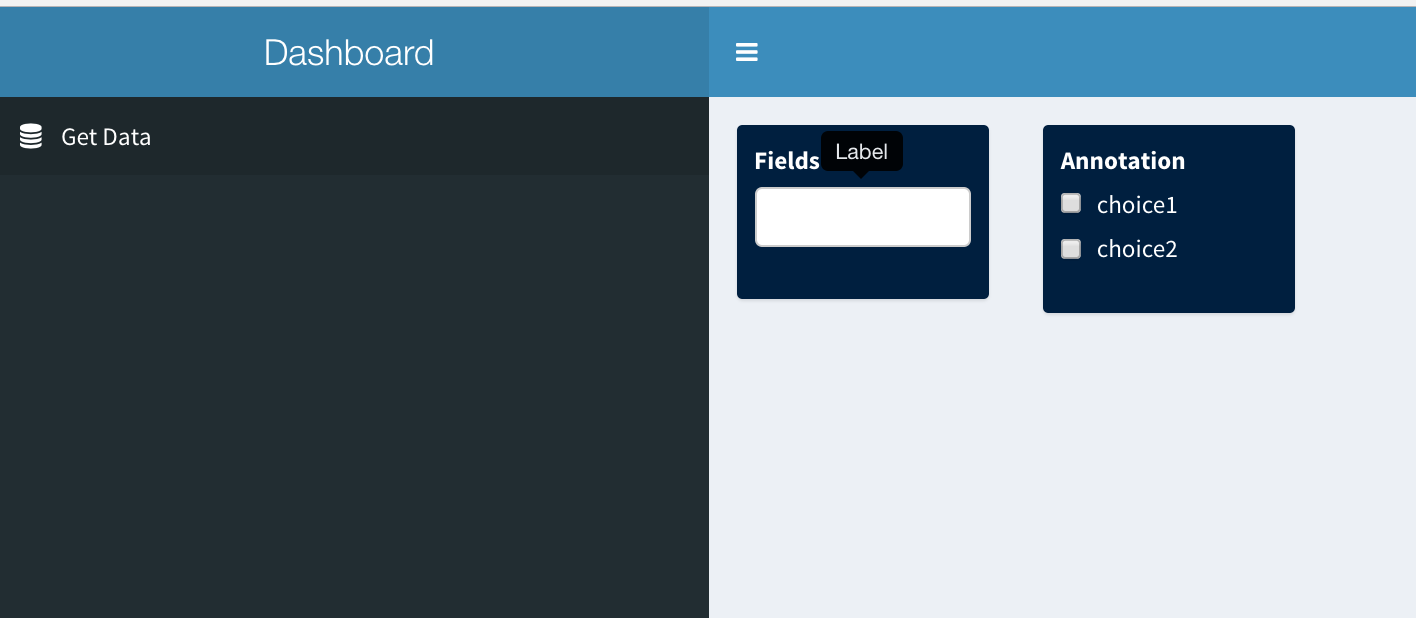
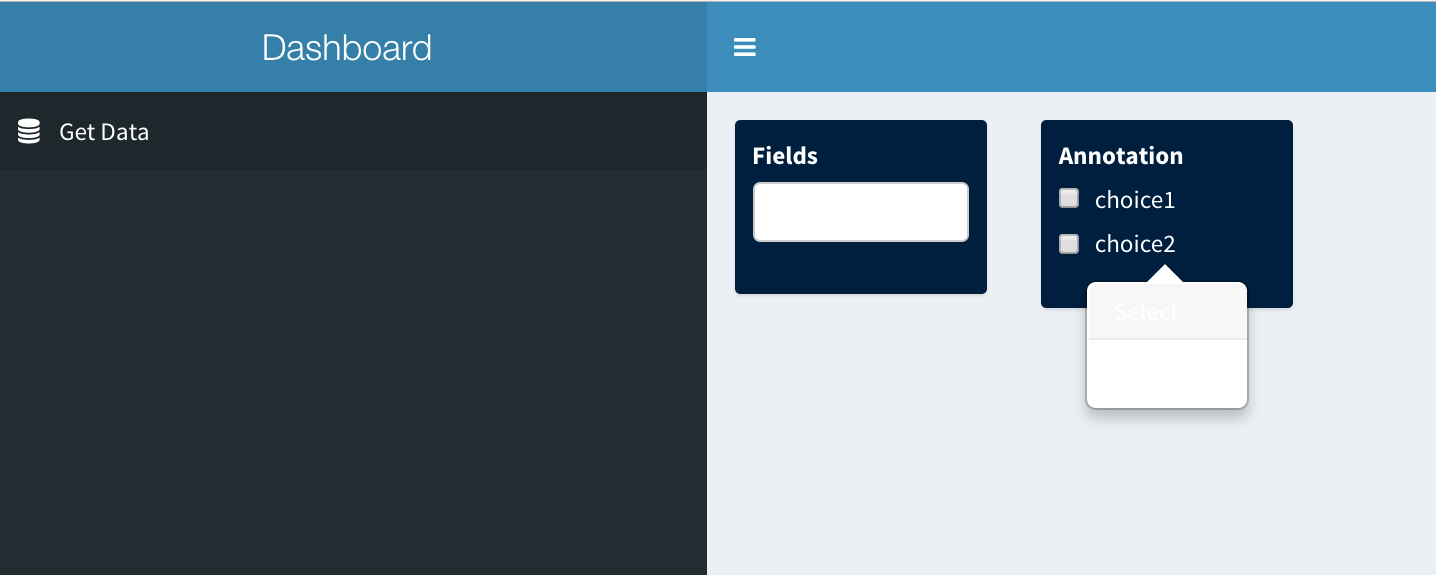
我的问题是我无法设置工具提示和弹出内容的字体颜色和背景色。尽管我在styles.css文件中指定了字体颜色和不透明度,但弹出内容在白色背景上显示为白色字体颜色。此外,工具提示内容似乎是固定的-白色字体颜色的黑色背景.
下面是它的截图:
第一个元素上的工具提示(就在Field旁边,工具提示被标记为Label):
弹出第二个元素:
回答 1
Stack Overflow用户
回答已采纳
发布于 2017-04-06 00:57:53
shinydashboard的文档确实说,您可以添加CSS,但是我也无法让它工作。我相信他们的文档是不正确的,或者我们都错过了它(这也是可能的)。看起来shinydashboard从来不引用这个CSS文件。
但是,您可以将CSS直接包含在闪亮的应用程序中,这是可行的。这将是您提供的CSS的最低工作示例:
library(shiny)
library(shinydashboard)
library(shinyBS)

# Define UI for application that draws a histogram
ui <- dashboardPage(


  dashboardHeader(title = 'Dashboard', titleWidth = 400),

  dashboardSidebar(width = 400,
                   sidebarMenu(
                     menuItem("Get Data", icon = icon("database"), tabName = "gd"))),

  dashboardBody(
    tags$head(tags$style(HTML('
                              .main-header .logo {
                              font-weight: bold;
                              font-size: 18px;
                              }

                              body {
                              font-family: "Open Sans";
                              font-size: 16px;
                              line-height: 1.42857143;
                              color: #666666;
                              }

                              .popover-title{
                              color: #7a0000;
                              font-size: 16px;
                              background-color: #000000;
                              }

                              .popover-header{
                              background: #ffff99;
                              }

                              .popover-content{
                              background: #ffff99;
                              }

                              .tooltip .tooltiptext {
                              visibility: hidden;
                              width: 120px;
                              background-color: black;
                              color: #000000;
                              text-align: center;
                              border-radius: 6px;
                              padding: 5px 0;
                              position: absolute;
                              z-index: 1;
                              bottom: 100%;
                              left: 50%;
                              margin-left: -60px;
                              }

                              .tooltip:hover .tooltiptext {
                              visibility: visible;
                              opacity: 1;
                              }
    '))),

    tabItems(

      tabItem(tabName = "gd",
              fluidRow(

                # add selectInput
                box(selectInput(inputId = "gdselectInput4", label = "Fields", choices = "choice1", "choice2", multiple = TRUE), width = 2, background = "navy"),
                # add tooltip to selectInput element
                bsTooltip(id = "gdselectInput4", title = "Label", placement = "top",trigger = "hover",options = NULL),

                # add checkboxGroupInput
                box(checkboxGroupInput(inputId = "gdcheckboxInput1", label = "Annotation", choices = c("choice1", "choice2"), selected = FALSE), width = 2, background = "navy"),
                # add pop-over to checkboxGroupInput
                bsPopover(id = "gdcheckboxInput1", title = "Select", content = "Whatever", placement = "bottom", trigger = "hover", options = NULL)

              )
      )
    )
  )
)

# Define server logic required to draw a histogram
server <- shinyServer(function(input, output, session){})

# Run the application
shinyApp(ui = ui, server = server) 页面原文内容由Stack Overflow提供。腾讯云小微IT领域专用引擎提供翻译支持
原文链接:
https://stackoverflow.com/questions/43240916
复制相关文章
相似问题
腾讯云开发者

Copyright © 2013 - 2026 Tencent Cloud. All Rights Reserved. 腾讯云 版权所有
深圳市腾讯计算机系统有限公司 ICP备案/许可证号:粤B2-20090059  粤公网安备44030502008569号
腾讯云计算(北京)有限责任公司 京ICP证150476号 | 京ICP备11018762号