
如何将图/表与XSL-FO (FOP 2.1)中页面的顶部或底部对齐
如何将图/表与XSL-FO (FOP 2.1)中页面的顶部或底部对齐
提问于 2017-04-03 12:29:17
在这种情况下,图形或表格稍微大一点,将它们移动到页面的顶部或底部是非常合适的。将表格重放到下一页并重复其标题的能力是很棒的,但并不总是我想要的。在案例表或图表很适合在页面中,它不一定锚定在一个段落,没有理由再流它。最好是将它“浮动”到页面正文之外。
这个答案确实鼓舞人心,但我不知道如何将它应用到我的案例中。如果我能够根据表的@rendition属性进行操作,我会很高兴的。
<fo:layout-master-set>
    <fo:simple-page-master master-name="PageMaster.Title-Page" page-height="{$paper-height}" page-width="{$paper-width}" margin-left="{$margin-left}" margin-right="{$margin-right}" margin-top="{$margin-top}" margin-bottom="{$margin-bottom}">
        <fo:region-body/>
    </fo:simple-page-master>
    <fo:simple-page-master master-name="PageMaster.CopyRight-Page" page-height="{$paper-height}" page-width="{$paper-width}" margin-left="{$margin-left}" margin-right="{$margin-right}" margin-top="{$margin-top}" margin-bottom="{$margin-bottom}">
        <fo:region-body display-align="after"/>
    </fo:simple-page-master>
    <fo:simple-page-master master-name="PageMaster.TOC" page-height="{$paper-height}" page-width="{$paper-width}" margin-left="{$margin-left}" margin-right="{$margin-right}" margin-top="18mm" margin-bottom="{$margin-bottom}">
        <fo:region-body margin="0mm 0mm 0mm 60mm"/>
    </fo:simple-page-master><!-- Whole page left and right masters -->
    <fo:simple-page-master master-name="PageMaster.Page-Right.First" page-height="{$paper-height}" page-width="{$paper-width}" margin-left="{$margin-left}" margin-right="{$margin-right}" margin-top="{$margin-top}" margin-bottom="{$margin-bottom}">
        <fo:region-body margin="8mm 0mm 20mm 0mm" column-count="2" column-gap="5mm"/>
        <fo:region-before region-name="Region-Before-Right" extent="10mm" display-align="after"/>
        <fo:region-after region-name="Region-After-First" extent="20mm" display-align="before"/>
    </fo:simple-page-master>
    <fo:simple-page-master master-name="PageMaster.Page-Left" page-height="{$paper-height}" page-width="{$paper-width}" margin-left="{$margin-left}" margin-right="{$margin-right}" margin-top="{$margin-top}" margin-bottom="{$margin-bottom}">
        <fo:region-body margin="8mm 0mm 20mm 0mm" column-count="2" column-gap="5mm"/>
        <fo:region-before region-name="Region-Before-Left" extent="10mm" display-align="after"/>
    </fo:simple-page-master>
    <fo:simple-page-master master-name="PageMaster.Page-Right" page-height="{$paper-height}" page-width="{$paper-width}" margin-left="{$margin-left}" margin-right="{$margin-right}" margin-top="{$margin-top}" margin-bottom="{$margin-bottom}">
        <fo:region-body margin="8mm 0mm 20mm 0mm" column-count="2" column-gap="5mm"/>
        <fo:region-before region-name="Region-Before-Right" extent="10mm" display-align="after"/>
    </fo:simple-page-master>
    <fo:simple-page-master master-name="PageMaster.Blank" page-height="{$paper-height}" page-width="{$paper-width}" margin-left="{$margin-left}" margin-right="{$margin-right}" margin-top="{$margin-top}" margin-bottom="{$margin-bottom}">
        <fo:region-body margin="8mm 0mm 20mm 0mm" column-count="2" column-gap="5mm"/>
    </fo:simple-page-master><!-- Sequence of even / odd pages -->
    <fo:page-sequence-master master-name="Content-Pages">
        <fo:repeatable-page-master-alternatives>
            <fo:conditional-page-master-reference master-reference="PageMaster.Blank" blank-or-not-blank="blank"/>
            <fo:conditional-page-master-reference master-reference="PageMaster.Page-Right.First" odd-or-even="odd" page-position="first"/>
            <fo:conditional-page-master-reference master-reference="PageMaster.Page-Left" odd-or-even="even"/>
            <fo:conditional-page-master-reference master-reference="PageMaster.Page-Right" odd-or-even="odd"/>
        </fo:repeatable-page-master-alternatives>
    </fo:page-sequence-master>
</fo:layout-master-set>回答 1
Stack Overflow用户
回答已采纳
发布于 2017-04-08 17:21:26
正如托尼·格雷厄姆( Tony )所言,FOP在漂浮之前不支持,但(奇怪的是,它在没有警告的情况下悄悄地吞没了它们)。
但是,您可以使用脚注而不是将表放在引用它们的页面的底部。如果我没记错的话,FOP倾向于将脚注放在全部,而不是添加更多的“流动”内容,因此结果应该是预期的结果。
FO示例:
<?xml version="1.0" encoding="UTF-8"?>
<fo:root xmlns:fo="http://www.w3.org/1999/XSL/Format">
    <fo:layout-master-set>
        <fo:simple-page-master master-name="simple" page-width="14.85cm" page-height="21cm">
            <fo:region-body margin="1in"/>
        </fo:simple-page-master>
    </fo:layout-master-set>

    <fo:page-sequence master-reference="simple">
        <fo:flow flow-name="xsl-region-body" text-align="justify">
            <fo:block>Maecenas lectus nisl, pulvinar at tincidunt a, semper sit amet nibh. Morbi at dolor quis sem porta volutpat. Quisque eget magna lectus. Donec laoreet congue enim ut ullamcorper. Ut vestibulum consequat neque rhoncus laoreet.</fo:block>
            <fo:block>Here is a block referring to a <fo:footnote><fo:inline font-weight="bold">TABLE 1</fo:inline><fo:footnote-body>
                <fo:block font-weight="bold">TABLE 1:</fo:block>
                <fo:table width="100%" table-layout="fixed">
                    <fo:table-column column-width="30%"/>
                    <fo:table-column column-width="70%"/>
                    <fo:table-body>
                        <fo:table-row>
                            <fo:table-cell><fo:block>A</fo:block></fo:table-cell>
                            <fo:table-cell><fo:block>132</fo:block></fo:table-cell>
                        </fo:table-row>
                        <fo:table-row>
                            <fo:table-cell><fo:block>B</fo:block></fo:table-cell>
                            <fo:table-cell><fo:block>556638</fo:block></fo:table-cell>
                        </fo:table-row>
                        <fo:table-row>
                            <fo:table-cell><fo:block>C</fo:block></fo:table-cell>
                            <fo:table-cell><fo:block>574</fo:block></fo:table-cell>
                        </fo:table-row>
                        <fo:table-row>
                            <fo:table-cell><fo:block>D</fo:block></fo:table-cell>
                            <fo:table-cell><fo:block>8893</fo:block></fo:table-cell>
                        </fo:table-row>
                    </fo:table-body>
                </fo:table>
            </fo:footnote-body></fo:footnote>; the table should be in the same page as the bolded part.</fo:block>
            <fo:block>This is another block of content. Lorem ipsum dolor sit amet, consectetur adipiscing elit. In tincidunt ipsum eget nisl iaculis fringilla. Pellentesque sagittis quam tellus, ac varius nisl rutrum non. Phasellus eget imperdiet velit.</fo:block>
            <fo:block>Aenean eleifend, arcu et feugiat facilisis, diam orci luctus lectus, id laoreet ex risus sed nunc. Proin eget scelerisque orci. Donec porttitor tellus libero, a molestie orci vestibulum mattis. Ut eu massa ac massa sagittis molestie. Quisque viverra ipsum vel mauris laoreet aliquet.</fo:block>
            <fo:block>Maecenas lectus nisl, pulvinar at tincidunt a, semper sit amet nibh. Morbi at dolor quis sem porta volutpat. Quisque eget magna lectus. Donec laoreet congue enim ut ullamcorper. Ut vestibulum consequat neque rhoncus laoreet.</fo:block>
            <fo:block> Sed ipsum massa, maximus eget posuere et, pellentesque accumsan nulla. Vestibulum erat mauris, imperdiet at mattis in, rhoncus eget orci. Nullam rhoncus hendrerit magna. </fo:block>
        </fo:flow>
    </fo:page-sequence>
</fo:root>
结果输出:
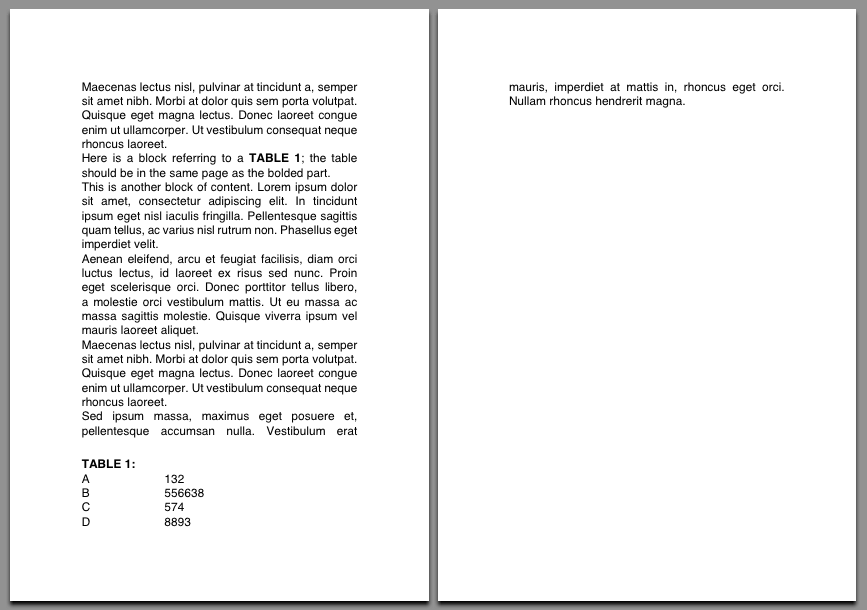
使用脚注的缺点是,对脚注放置的限制是比浮动前的约束更严格的(按照第6.12.2节,可以放置在其锚区域后面的页面中),因此如果输入中有多个段落中引用的表,则可能会出现布局问题(页面中的空白区域)。
(披露:我是一名FOP开发人员,虽然现在不太活跃)
页面原文内容由Stack Overflow提供。腾讯云小微IT领域专用引擎提供翻译支持
原文链接:
https://stackoverflow.com/questions/43184726
复制相关文章
相似问题
腾讯云开发者

Copyright © 2013 - 2026 Tencent Cloud. All Rights Reserved. 腾讯云 版权所有
深圳市腾讯计算机系统有限公司 ICP备案/许可证号:粤B2-20090059  粤公网安备44030502008569号
腾讯云计算(北京)有限责任公司 京ICP证150476号 | 京ICP备11018762号