
UIAlertAction背景色
UIAlertAction背景色
提问于 2017-04-03 00:00:25
我的UIAlertController有问题,它没有正确显示背景色.你能帮帮我吗?
这是代码:
let alert = UIAlertController(title: "Choose qty", message: "", preferredStyle: UIAlertControllerStyle.alert)
let pickerController = PickerQtyController()
alert.setValue(pickerController, forKey: "contentViewController")
// Testing color
alert.view.tintColor=UIColor.blue
let backView = alert.view.subviews.last?.subviews.last
backView?.layer.cornerRadius = 10.0
backView?.backgroundColor = UIColor.blue
// Btns
let saveBtn = UIAlertAction(title: "Save", style: UIAlertActionStyle.default) {
    UIAlertAction in
    print("UIAlertController: Saved")
    pickerController.saveNewValueOfPicker()
}
let cancelBtn = UIAlertAction(title: "Cancel", style: UIAlertActionStyle.cancel) {
    UIAlertAction in
    print("UIAlertController: Canceled")
}
alert.addAction(saveBtn)
alert.addAction(cancelBtn)
self.present(alert, animated: true)
谢谢!
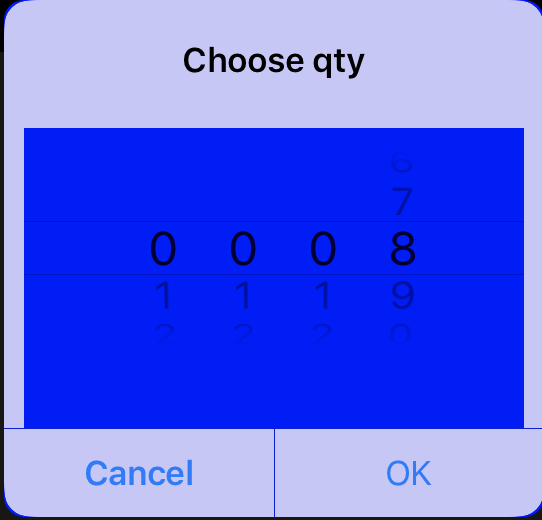
回答 1
Stack Overflow用户
回答已采纳
发布于 2017-04-03 01:21:51
这是丑陋和错误的设计。您应该创建一个自定义视图控制器,并将您的pick控制器添加到其中。将背景更改为透明,并将模态表示样式设置为“超过当前上下文”以显示自定义视图控制器。
self.modalPresentationStyle = UIModalPresentationStyle.OverCurrentContext页面原文内容由Stack Overflow提供。腾讯云小微IT领域专用引擎提供翻译支持
原文链接:
https://stackoverflow.com/questions/43174842
复制相关文章
相似问题
腾讯云开发者

Copyright © 2013 - 2026 Tencent Cloud. All Rights Reserved. 腾讯云 版权所有
深圳市腾讯计算机系统有限公司 ICP备案/许可证号:粤B2-20090059  粤公网安备44030502008569号
腾讯云计算(北京)有限责任公司 京ICP证150476号 | 京ICP备11018762号