
REST服务器挂起大量请求(使用c# HttpClient)
我们最近升级到EMC AppXtender REST服务8.1。当我们在服务器上安装它时,它创建了一个虚拟目录(AppXtenderRest)。
我们通过调用此服务器上可用的REST服务来开发我们的web应用程序。
当我们处于开发阶段时,REST服务器从未挂起。但有一次,当我们开始生产的时候,它就开始挂了。我们现在每2-3个小时在这个服务器上重新设置IIS .
经过一些研究,我们在代码中采取了以下步骤。
- 将所有代码转换为
async/await - 将HttpClient超时设置为30分钟
- 在REST服务器上将no.of工作进程从1增加到4
什么都没起作用。
试图检查是否有任何特定请求正在发出服务器挂起,但看起来不是这样的。除了返回Stream (Tiff/Pdf)的请求外,所有请求都返回JSON。
下面是我们休息塞维斯电话的一个示例:
using (var client = CreateHttpClient())
{
    using (var response = await client.DeleteAsync(string.Format(RestUrls.deletedoc, DataSource, AppId, docId), GetCancelToken()))
    {
        if (response.IsSuccessStatusCode)
        {
            result = await response.Content.ReadAsStringAsync();
        }
        else
        {
            result = await response.Content.ReadAsStringAsync();
            throw new Exception(result);
        }
    }
}
同时,在服务器上附加工作进程请求队列截图,显示在一定时间后( 2-3小时后)挂起的请求。
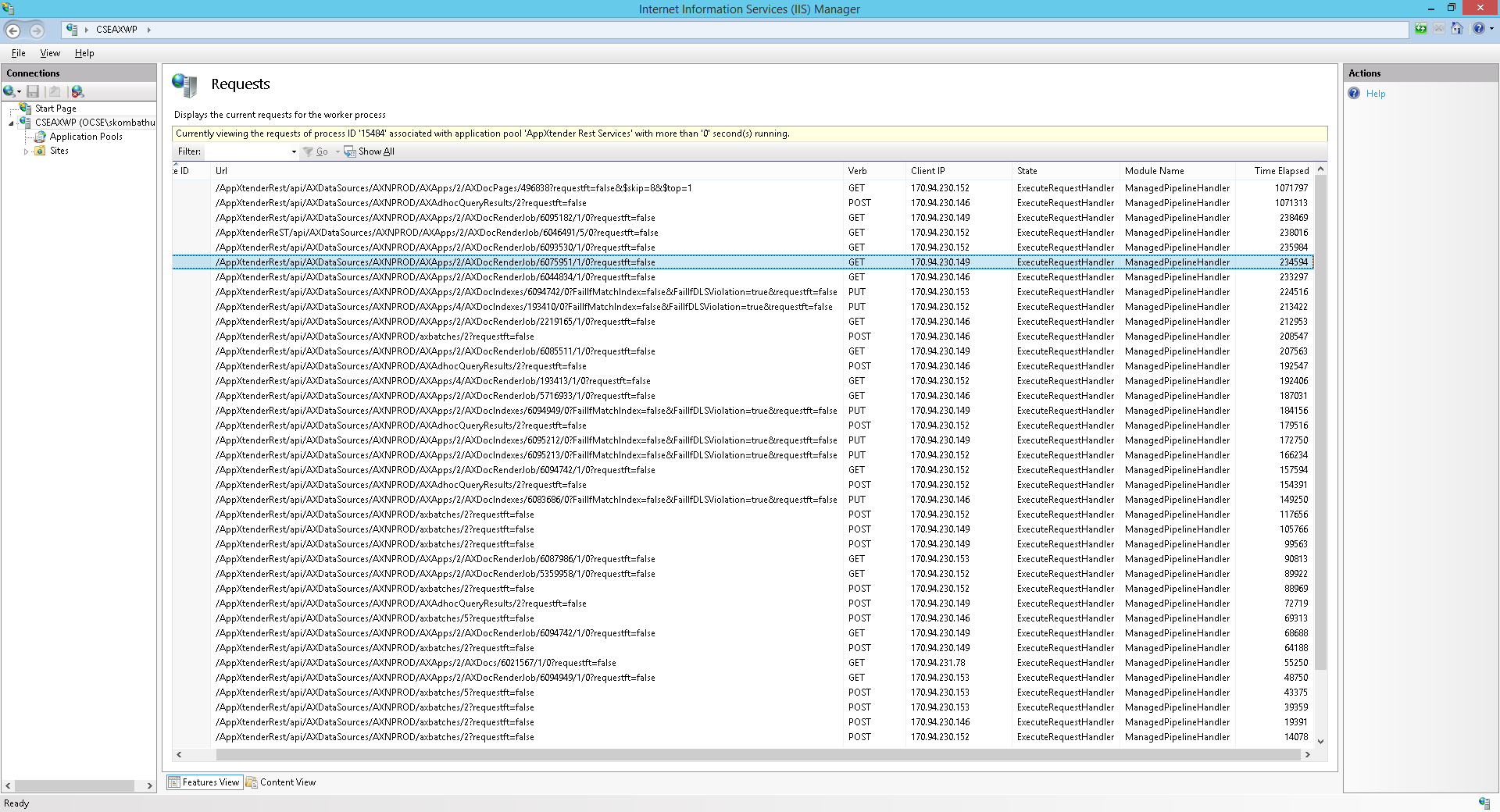
同时,在服务器挂起后,附加从服务器获取的调试分析报告。
https://drive.google.com/open?id=0Bx6jnZk4gj2Ycmw2M1RKM3RiTzg
由于我们现在正在生产,因此无法负担频繁的IIS重置。
回答 1
Stack Overflow用户
发布于 2017-06-03 02:41:24
TLDR - http客户端连接泄漏修复很好,但您的第一个问题是阻塞线程。而且你刚刚暴露了敏感数据。另外,首先要从应用程序池循环开始,而不是iis重置,以避免整个服务器崩溃。
如前所述,您是通过使用HTTPClient包装来泄漏TCP连接的,但是您已经修复了这个问题,所以这不是主要问题,尽管它仍然是等待下一个访问的缩放限制项。
另外,如果要耗尽所有TCP端口,则会更明显地出现异常,而不是挂起。
看看调试分析,您的问题似乎是同步SQL调用阻塞了40%的其他线程。如果最终所有工作线程都忙于等待其他阻塞线程,则这些请求将排队生成挂起,直到请求队列已满,并导致503服务不可用。
The following threads in w3wp.exe__AppXtender Rest Services__PID__12056__Date__03_28_2017__Time_09_58_36AM__83__Manual Dump.dmp are waiting to enter a .NET Lock


( 33 34 35 50 52 53 54 56 57 58 59 62 63 64 65 66 67 68 69 70 71 72 73 74 75 76 77 78 79 80 81 82 83 85 86 87 88 89 90 91 92 93 94 95 96 97 98 99 100 101 102 103 104 105 106 107 )

50.91% of threads blocked (56 threads)
据报道,他们等待的线程是55,它运行SqlCommand.ExecuteReader
有一个异步版本- ExecuteReaderAsync应该更改为(或让该组件的所有者更改)
Thread 55 - System ID 17820


Entry point   clr!Thread::intermediateThreadProc
Create time   3/28/2017 9:51:46 AM
Time spent in user mode   0 Days 00:00:00.421
Time spent in kernel mode   0 Days 00:00:00.187


This thread is waiting on data to be returned from the database server

The current executing command is : SELECT cfgid, cfgvalue FROM ae_cfg WHERE cfgid = 34 and the command timeout is set to 0 seconds.

 The connection string for this connection : *** and the connection timeout : 15 seconds.


.NET Call Stack


System_Data_ni!DomainNeutralILStubClass.IL_STUB_PInvoke(SNI_ConnWrapper*, SNI_Packet**, Int32)+84
[[InlinedCallFrame] (.SNIReadSyncOverAsync)] .SNIReadSyncOverAsync(SNI_ConnWrapper*, SNI_Packet**, Int32)
System_Data_ni!SNINativeMethodWrapper.SNIReadSyncOverAsync(System.Runtime.InteropServices.SafeHandle, IntPtr ByRef, Int32)+6a
System_Data_ni!System.Data.SqlClient.TdsParserStateObject.ReadSniSyncOverAsync()+83
System_Data_ni!System.Data.SqlClient.TdsParserStateObject.TryReadNetworkPacket()+7e
System_Data_ni!System.Data.SqlClient.TdsParserStateObject.TryPrepareBuffer()+65
System_Data_ni!System.Data.SqlClient.TdsParserStateObject.TryReadByte(Byte ByRef)+2e
System_Data_ni!System.Data.SqlClient.TdsParser.TryRun(System.Data.SqlClient.RunBehavior, System.Data.SqlClient.SqlCommand, System.Data.SqlClient.SqlDataReader, System.Data.SqlClient.BulkCopySimpleResultSet, System.Data.SqlClient.TdsParserStateObject, Boolean ByRef)+292
System_Data_ni!System.Data.SqlClient.SqlDataReader.TryConsumeMetaData()+5c
System_Data_ni!System.Data.SqlClient.SqlDataReader.get_MetaData()+66
System_Data_ni!System.Data.SqlClient.SqlCommand.FinishExecuteReader(System.Data.SqlClient.SqlDataReader, System.Data.SqlClient.RunBehavior, System.String)+11d
System_Data_ni!System.Data.SqlClient.SqlCommand.RunExecuteReaderTds(System.Data.CommandBehavior, System.Data.SqlClient.RunBehavior, Boolean, Boolean, Int32, System.Threading.Tasks.Task ByRef, Boolean, System.Data.SqlClient.SqlDataReader, Boolean)+ba0
System_Data_ni!System.Data.SqlClient.SqlCommand.RunExecuteReader(System.Data.CommandBehavior, System.Data.SqlClient.RunBehavior, Boolean, System.String, System.Threading.Tasks.TaskCompletionSource`1, Int32, System.Threading.Tasks.Task ByRef, Boolean)+22a
System_Data_ni!System.Data.SqlClient.SqlCommand.RunExecuteReader(System.Data.CommandBehavior, System.Data.SqlClient.RunBehavior, Boolean, System.String)+62
System_Data_ni!System.Data.SqlClient.SqlCommand.ExecuteReader(System.Data.CommandBehavior, System.String)+ca
XtenderSolutions.UtilityLibrary.General.DbCommon.GetStringTypeFromDB(XtenderSolutions.Administration.Database.DbCommonEx)+1aa
XtenderSolutions.UtilityLibrary.General.DbCommon.Open()+11c
XtenderSolutions.CMData.CMConnection.Open()+a7
XtenderSolutions.CMData.CMCfgMgr.Load(XtenderSolutions.CMData.CMConnection, Int16)+55
XtenderSolutions.CMData.CMConnection.InitEAIHooks()+4f
XtenderSolutions.CMData.CMConnection.Init(System.String)+595
XtenderSolutions.CMData.CMConnection..ctor(XtenderSolutions.CMData.CMSession, System.String)+17b
XtenderSolutions.CMData.CMSession.get_Connection()+7e
XtenderSolutions.CMData.CMSession.Login(XtenderSolutions.Configuration.DataSourceConfig, System.String, System.String, System.Security.Principal.WindowsIdentity, System.String, Boolean)+46e 此外,强烈建议删除您的调试共享,或者至少在共享之前从其中删除敏感数据,并且更改帐户密码。
提示:基本Auth报头 -> base64 ->明文用户:pwd
最后,IISReset:
如果您还没有进入http.sys请求队列填充阶段,您还可以尝试应用池回收,这将为您提供一个新的w3wp.exe工作进程,甚至是池停止/启动,因为您真的不希望等待当前请求继续挂起。池回收是较少的侵入性,然后使整个IIS服务器瘫痪。但是,一旦http.sys队列中有许多请求,您就可能需要重新设置。我总是尽量避免iis重置,特别是如果那个主机上还有其他站点/ vdirs .您可以监视IIS计数器并在此基础上作出决定
https://stackoverflow.com/questions/43105569
复制相似问题
腾讯云开发者

Copyright © 2013 - 2026 Tencent Cloud. All Rights Reserved. 腾讯云 版权所有
深圳市腾讯计算机系统有限公司 ICP备案/许可证号:粤B2-20090059  粤公网安备44030502008569号
腾讯云计算(北京)有限责任公司 京ICP证150476号 | 京ICP备11018762号