
背景模糊- CSS
背景模糊- CSS
提问于 2017-03-29 12:33:21
Hello,我试图使这个背景模糊像这个图像,所以我想知道我是否可以只使用CSS3,或者我需要使用Javascript & Jquery:
如果我只使用css,如何使模糊响应。

这里我的简单代码:
#bg{
  background-image: url('http://store6.up-00.com/2017-03/149079039538851.jpg');
  background-repeat: no-repeat;
  background-size: cover;
}

#bg {
  background-position: center top;
  padding: 70px 90px 120px 90px;
}

#search-container {
  position: relative;
}

#search-bg {
  /* Absolutely position it, but stretch it to all four corners, then put it just behind #search's z-index */
  position: absolute;
  top: 0px;
  right: 0px;
  bottom: 0px;
  left: 0px;
  z-index: 99;
  /* Pull the background 70px higher to the same place as #bg's */
  /*background-position: center -70px;*/
  -webkit-filter: blur(10px);
  filter: blur(10px);
}

#search {
  position: relative;
  z-index: 100;
  padding: 20px;
  background: rgba(34,34,34,0.75);
}
#search h2{
    color:#ffffff;
}<div id="bg">
<div id="search-container">
<div id="search-bg"></div>
<div id="search">
<h2>Hello World</h2>
</div>
</div>
</div>
回答 2
Stack Overflow用户
发布于 2017-03-29 12:34:49
模糊所有背景
您很难将效果附加到背景图像上。你应该用软件模糊它,并将它设置为背景图像。
您可以在css中有一个模糊的背景,在yout站点内容后面放置一个div,然后像这样模糊这个div:http://codepen.io/aniketpant/pen/DsEve。
<div class="background-image"></div>
<div class="content"> Your text </div>
元素背后的模糊
您可以使用CSS3背景过滤器获得此结果:
Stack Overflow用户
发布于 2017-03-29 12:46:04
您可以在模糊容器中使用background-attachment:fixed;并将其设置为和,background-attachment可以在相同的位置设置两个bg,一个可以模糊。
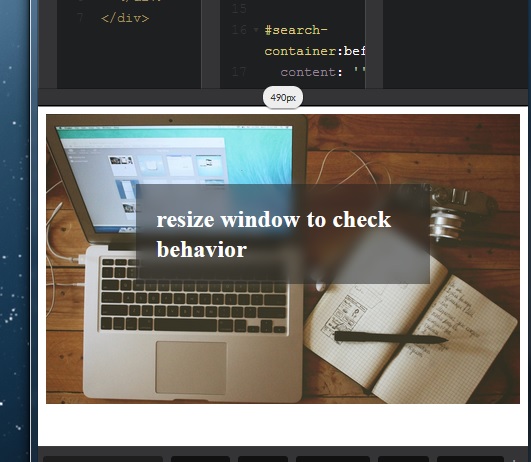
示例中有一个伪的而不是额外的div:
#bg {
  background-image: url('http://store6.up-00.com/2017-03/149079039538851.jpg');
  background-repeat: no-repeat;
  background-size: cover;
  background-attachment: fixed;
  background-position: center top;
  padding: 70px 90px 120px 90px;
}

#search-container {
  position: relative;
}

#search-container:before {/* add same bg-image with same backgrounds values to match main container */
  content: '';
  position: absolute;
  top: 0px;
  right: 0px;
  bottom: 0px;
  left: 0px;
  z-index: 0;
  background-image: url('http://store6.up-00.com/2017-03/149079039538851.jpg');
  background-repeat: no-repeat;
  background-size: cover;
  background-position: center top;
  background-attachment: fixed;/* make it match #bg position and size */
  -webkit-filter: blur(5px);
  filter: blur(5px);
}

#search {
  position: relative;
  z-index: 1;
  padding: 20px;
  background: rgba(34, 34, 34, 0.5);
  display:flex;
}

#search h2 {
  color: #ffffff;
  margin:auto;
}<div id="bg">
<div id="search-container">
<div id="search">
<h2>Hello World</h2>
</div>
</div>
</div>
页面原文内容由Stack Overflow提供。腾讯云小微IT领域专用引擎提供翻译支持
原文链接:
https://stackoverflow.com/questions/43093646
复制相关文章
相似问题
腾讯云开发者

Copyright © 2013 - 2026 Tencent Cloud. All Rights Reserved. 腾讯云 版权所有
深圳市腾讯计算机系统有限公司 ICP备案/许可证号:粤B2-20090059  粤公网安备44030502008569号
腾讯云计算(北京)有限责任公司 京ICP证150476号 | 京ICP备11018762号