
Visual 6 ListView的自动化支持
我需要通过自动化接口(用C++/C#编写代码)获取控件的值/文本。我尝试使用UI自动化API,这是检查捕获的一些结果:
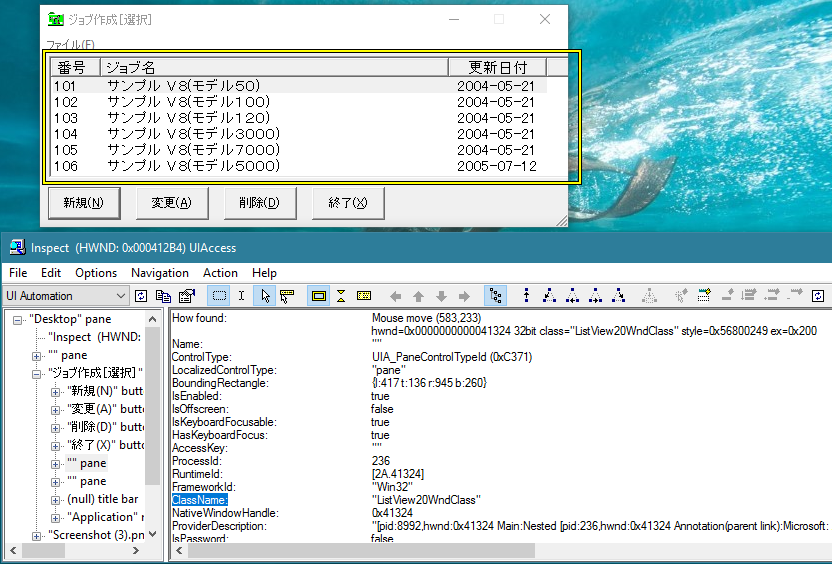
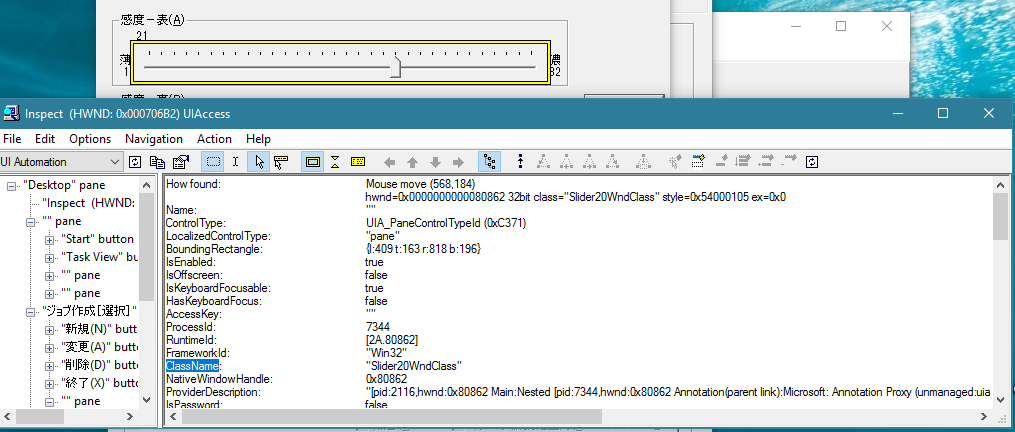
UI自动化将这些控件识别为pane,我无法获得列表、视图、文本项或获取/设置滑块值。
与MSAA这样的其他工具进行了尝试,自动化间谍给出了相同的结果。
经过研究,我发现控件的类名为ListView20WndClass,Slider20WndClass,.属于Visual 6控件。
那么,是否有任何API也可以支持这些类型的控件呢?
备注1:有一个名为雷诺雷的工具可以支持这些控件(遗憾的是,它是Euro3490商业许可证),我不知道使用了哪个底层API:
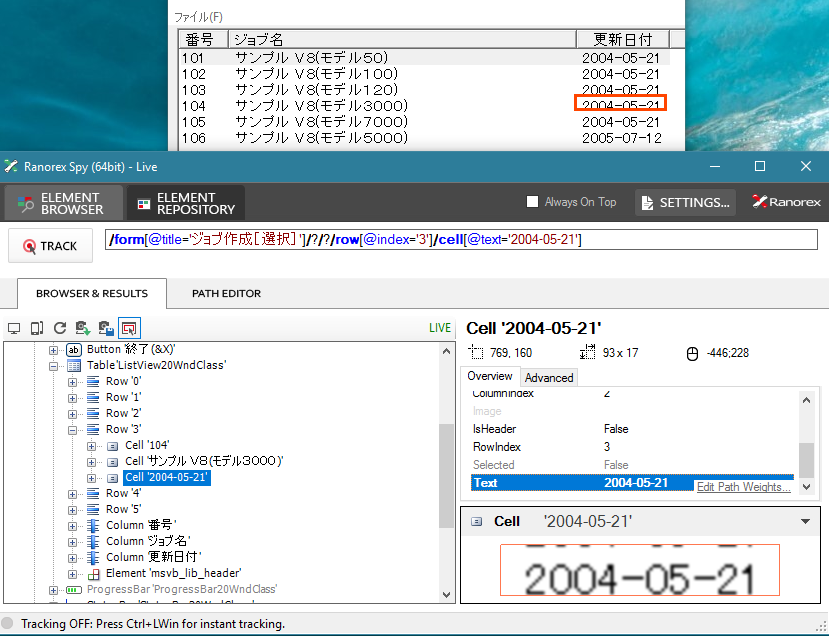
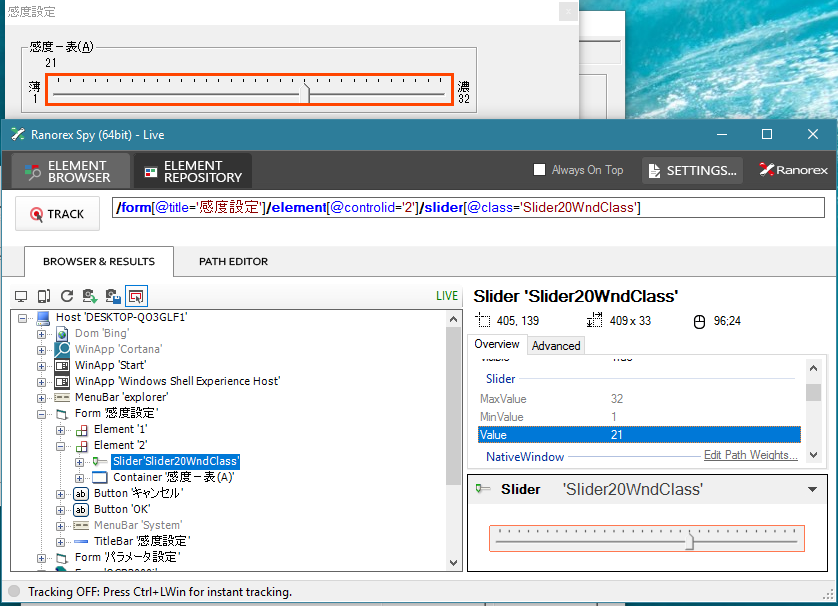
备注2在被测试的应用程序中使用了其他一些控件类型,即UI自动化仍然可以获得值:
- ThunderRT6FormDC:识别为窗口
- ThunderRT6CommandButton:识别为按钮
- ThunderRT6CheckBox:识别为复选框
- 等等。
- 遗憾的是,它们嵌入了ListView20WndClass和Slider20WndClass,但两者都识别为窗格。
更新1我创建了一个获取文本的简单程序,但仍然无法工作(编译为字符集):
#include <iostream>
using namespace std;

#include <UIAutomation.h>
#include <atlstr.h>
#include <Commctrl.h>

CString getListViewItemText(HWND hwnd, int nItem, int nSubItem) {
    LVITEM item;
    memset(&item, 0, sizeof(LVITEM));
    item.iSubItem = nSubItem;
    CString string;
    int Length = 64; //initial reasonable string length
    int ReturnCode;

    do {
        Length *= 2; //resize the string buffer
        item.cchTextMax = Length;
        item.pszText = string.GetBufferSetLength(Length);

        ReturnCode = (int)::SendMessage(hwnd, LVM_GETITEMTEXT,
            (WPARAM)nItem, (LPARAM)&item);
        printf("len = %d \n", ReturnCode);

    } while (ReturnCode == Length - 1); //if could not get all chars, try again

    string.ReleaseBuffer();
    return string;
}

void UI_Spy() {

    // Init COM
    CoInitialize(NULL);

    // Init UIAutomation instance
    IUIAutomation *pAuto;
    CoCreateInstance(CLSID_CUIAutomation, NULL,
        CLSCTX_INPROC_SERVER, IID_IUIAutomation, reinterpret_cast<void**>(&pAuto));

    if (pAuto) {

        IUIAutomationElement *pElm;
        POINT p;

        for (int i = 0; i < 10; i++) {
            for (int j = 5; j > 0; j--) {
                Sleep(1000);
                printf("%d ", j);
            }
            GetCursorPos(&p);
            if (pAuto->ElementFromPoint(p, &pElm) == S_OK) {
                wprintf(L"\nPOSITION x = %d, y = %d\n", p.x, p.y);

                BSTR str;
                pElm->get_CurrentName(&str);
                wprintf(L"-Name = %s\n", str);
                SysFreeString(str);

                pElm->get_CurrentLocalizedControlType(&str);
                wprintf(L"-Type = %s\n", str);
                SysFreeString(str);

                CONTROLTYPEID typeId;
                pElm->get_CurrentControlType(&typeId);

                switch (typeId) {

                    // Process checkbox
                case UIA_CheckBoxControlTypeId:
                    IUIAutomationTogglePattern  *toggle;
                    pElm->GetCurrentPattern(UIA_TogglePatternId, (IUnknown**)&toggle);
                    ToggleState state;
                    toggle->get_CurrentToggleState(&state);
                    printf("-Checkbox = %s\n", state == ToggleState::ToggleState_On ? "TRUE"
                        : (state == ToggleState::ToggleState_Off ? "FALSE" : "INTER"));
                    break;

                    // Process VB6 listview
                case UIA_PaneControlTypeId:
                    pElm->get_CurrentClassName(&str);
                    if (str != nullptr && wcscmp(str, L"ListView20WndClass") == 0) {
                        HWND hwnd;
                        pElm->get_CurrentNativeWindowHandle((UIA_HWND*)&hwnd);
                        printf("-VB6 Listview: %p\n", hwnd);

                        CString txt = getListViewItemText(hwnd, 0, 0);
                        //txt = "Test";
                        printf("-[0,0] = %S\n", (const wchar_t*)txt);
                    }
                    SysFreeString(str);
                    break;

                    // Process normal listview
                case UIA_ListControlTypeId:
                    HWND hwnd;
                    pElm->get_CurrentNativeWindowHandle((UIA_HWND*)&hwnd);
                    printf("-Normal Listview: %p\n", hwnd);

                    CString txt = getListViewItemText(hwnd, 0, 0);
                    //txt = "Test";
                    printf("-[0,0] = %S\n", (const wchar_t*)txt);
                    break;
                }

                wprintf(L"\n");
                pElm->Release();
            }
            printf("\n");
        }

        // Release UIAutomation instance
        pAuto->Release();
    }

    // Release COM
    CoUninitialize();
}

int main()
{
    UI_Spy();

    cin.get();
    return 0;
}
当它数到5.4..3.2.1时,只需鼠标在屏幕上的某个元素上进行检查。
但是当我鼠标移动到列表视图上时:
- VB6列表视图(ListView20WndClass):它返回一个空字符串(我的示例是
101) - MFC/Winform视图(SysListView32):鼠标下的应用程序停止工作(控制台应用程序仍在运行)
回答 2
Stack Overflow用户
发布于 2017-03-29 15:30:12
ListView.ListItem对象没有hwnd。
您应该使用ListView类名搜索,然后使用SendMessage()发送消息LVM_GETITEM,并使用LVITEM结构获取有关条目的信息:
LVM_GETITEM消息(Windows)
https://msdn.microsoft.com/en-us/library/windows/desktop/bb774953(v=vs.85).aspx
LVITEM结构(Windows)
https://msdn.microsoft.com/en-us/library/windows/desktop/bb774760(v=vs.85).aspx
本参考页可帮助您:
列表-视图控件引用( https://msdn.microsoft.com/en-us/library/windows/desktop/ff485973(v=vs.85).aspx )
但是,编辑的问题与VB6语言编程无关。所以,我认为这是一个错误的论坛,你应该问问论坛上与你的语言有关的使用。
https://stackoverflow.com/questions/43083781
复制相似问题
腾讯云开发者

Copyright © 2013 - 2026 Tencent Cloud. All Rights Reserved. 腾讯云 版权所有
深圳市腾讯计算机系统有限公司 ICP备案/许可证号:粤B2-20090059  粤公网安备44030502008569号
腾讯云计算(北京)有限责任公司 京ICP证150476号 | 京ICP备11018762号