
Laravel Homestead误差
Laravel Homestead误差
提问于 2017-03-28 19:54:11
当我想要设置Laravel并添加流浪者到Homestead
Error occurred:
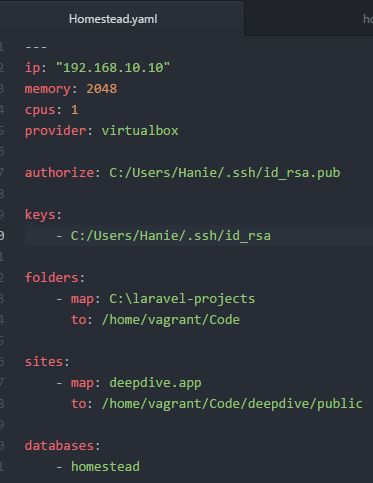
Homestead/scripts/homestead.rb:118:in`read': No such file or directory @ rb_sysopen - C:/Users/Hanie/.ssh/id_rsa (Errno::ENOENT)
from C:/Windows/Homestead/scripts/homestead.rb:118:in`block (2 levels) in configure'
from C:/HashiCorp/Vagrant/embedded/gems/gems/vagrant-1.9.2/plugins/kernel_v2/config/vm_provisioner.rb:72:in `call'
from C:/HashiCorp/Vagrant/embedded/gems/gems/vagrant-1.9.2/plugins/kernel_v2/config/vm_provisioner.rb:72:in `add_config'
from C:/HashiCorp/Vagrant/embedded/gems/gems/vagrant-1.9.2/plugins/kernel_v2/config/vm.rb:336:in `provision'
from C:/Windows/Homestead/scripts/homestead.rb:115:in `block in configure'
from C:/Windows/Homestead/scripts/homestead.rb:114:in `each'
from C:/Windows/Homestead/scripts/homestead.rb:114:in `configure'
from C:/Windows/Homestead/Vagrantfile:35:in `block in <top (required)>'
from C:/HashiCorp/Vagrant/embedded/gems/gems/vagrant-1.9.2/lib/vagrant/config/v2/loader.rb:37:in `call'
from C:/HashiCorp/Vagrant/embedded/gems/gems/vagrant-1.9.2/lib/vagrant/config/v2/loader.rb:37:in `load'                            from C:/HashiCorp/Vagrant/embedded/gems/gems/vagrant-1.9.2/lib/vagrant/config/loader.rb:113:in `block (2 levels) in load'
 from C:/HashiCorp/Vagrant/embedded/gems/gems/vagrant-1.9.2/lib/vagrant/config/loader.rb:107:in `each'                             from C:/HashiCorp/Vagrant/embedded/gems/gems/vagrant-1.9.2/lib/vagrant/config/loader.rb:107:in `block in load'
from C:/HashiCorp/Vagrant/embedded/gems/gems/vagrant-1.9.2/lib/vagrant/config/loader.rb:104:in `each'
from C:/HashiCorp/Vagrant/embedded/gems/gems/vagrant-1.9.2/lib/vagrant/config/loader.rb:104:in `load'
 from C:/HashiCorp/Vagrant/embedded/gems/gems/vagrant-1.9.2/lib/vagrant/vagrantfile.rb:28:in `initialize'
from C:/HashiCorp/Vagrant/embedded/gems/gems/vagrant-1.9.2/lib/vagrant/environment.rb:746:in `new'
from C:/HashiCorp/Vagrant/embedded/gems/gems/vagrant-1.9.2/lib/vagrant/environment.rb:746:in `vagrantfile'
 from C:/HashiCorp/Vagrant/embedded/gems/gems/vagrant-1.9.2/lib/vagrant/environment.rb:492:in `host'
 from C:/HashiCorp/Vagrant/embedded/gems/gems/vagrant-1.9.2/lib/vagrant/environment.rb:214:in `block in action_runner'
from C:/HashiCorp/Vagrant/embedded/gems/gems/vagrant-1.9.2/lib/vagrant/action/runner.rb:33:in `call'
from C:/HashiCorp/Vagrant/embedded/gems/gems/vagrant-1.9.2/lib/vagrant/action/runner.rb:33:in `run'
 from C:/HashiCorp/Vagrant/embedded/gems/gems/vagrant-1.9.2/lib/vagrant/environment.rb:479:in `hook'
from C:/HashiCorp/Vagrant/embedded/gems/gems/vagrant-1.9.2/lib/vagrant/environment.rb:728:in `unload'
 from C:/HashiCorp/Vagrant/embedded/gems/gems/vagrant-1.9.2/bin/vagrant:130:in `ensure in <main>'
from C:/HashiCorp/Vagrant/embedded/gems/gems/vagrant-1.9.2/bin/vagrant:130:in `<main>'
我的Homestead.yaml在这里:怎么了?
回答 1
Stack Overflow用户
回答已采纳
发布于 2017-04-04 13:32:00
1.安装git。2.打开主目录。3鼠标右键'Git bash这里‘4 bash keygen
来自:sysopen
页面原文内容由Stack Overflow提供。腾讯云小微IT领域专用引擎提供翻译支持
原文链接:
https://stackoverflow.com/questions/43078705
复制相关文章
相似问题
腾讯云开发者

Copyright © 2013 - 2026 Tencent Cloud. All Rights Reserved. 腾讯云 版权所有
深圳市腾讯计算机系统有限公司 ICP备案/许可证号:粤B2-20090059  粤公网安备44030502008569号
腾讯云计算(北京)有限责任公司 京ICP证150476号 | 京ICP备11018762号