
自定义边框在底部
自定义边框在底部
提问于 2017-03-24 15:57:39
我想做一个在底部有一个定制边框的div。div应该是这样的:
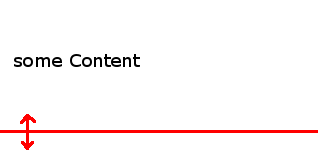
因此,在左下角应该有一个箭头,而右边的部分(仅仅是行)应该根据宽度动态地展开。
我拿了来自w3schools的示例并试图修改它。
CSS:
#borderimg1 {
  border-bottom: 10px solid transparent;
  padding: 15px;
  -webkit-border-image: url(arrow.png) 30 round;
  /* Safari 3.1-5 */
  -o-border-image: url(arrow.png) 30 round;
  /* Opera 11-12.1 */
  border-image: url(arrow.png) 30 round;
}

#borderimg2 {
  border-bottom: 10px solid transparent;
  padding: 15px;
  -webkit-border-image: url(arrow.png) 30 stretch;
  /* Safari 3.1-5 */
  -o-border-image: url(arrow.png) 30 stretch;
  /* Opera 11-12.1 */
  border-image: url(arrow.png) 30 stretch;
}
HTML:
 The border-image property specifies an image to be used as the border around an element:</p>
    <p id="borderimg1">Here, the middle sections of the image are repeated to create the border.</p>
    <p id="borderimg2">Here, the middle sections of the image are stretched to create the border.</p>
但它并没有显示出任何边界。
注意: arrow.png是我的机器上的本地图像。
回答 1
Stack Overflow用户
发布于 2017-03-24 16:05:58
这个怎么样:
// le div
<div class='hello'>Hi there</div>

// le css
.hello {
  display: inline-block;
  height: 50px;
  border-bottom: 1px solid red;
  overflow: display;
  box-sizing: content-box;
  margin-bottom: 20px;
  position: relative;
}

.hello::after {
  content: '';
  height: 20px;
  position: absolute;
  bottom: -10px;
  left: 0px;
  right: 0px;
  background: url(http://www.charbase.com/images/glyph/11021);
  background-repeat: no-repeat;
  background-size: 20px;
  background-position: 10px 0px;
}
http://codepen.io/duhaime/pen/yMExKP
页面原文内容由Stack Overflow提供。腾讯云小微IT领域专用引擎提供翻译支持
原文链接:
https://stackoverflow.com/questions/43004045
复制相关文章
相似问题
腾讯云开发者

Copyright © 2013 - 2026 Tencent Cloud. All Rights Reserved. 腾讯云 版权所有
深圳市腾讯计算机系统有限公司 ICP备案/许可证号:粤B2-20090059  粤公网安备44030502008569号
腾讯云计算(北京)有限责任公司 京ICP证150476号 | 京ICP备11018762号