
d3如何在post请求中正确传递请求体?
d3如何在post请求中正确传递请求体?
提问于 2017-03-22 23:47:18
我有这个d3脚本,它根据post请求到动态API返回的JSON结果生成一个表。
d3.request("https://erudite-master-api-awsmaui.lab.expts.net/erudite/search")
.header("Content-Type", "application/json")
.post("intent=data-quality", function (error,data){

                      function tabulate(data, columns) {
                            var table = d3.select('#response').append('table')
                            var thead = table.append('thead')
                            var tbody = table.append('tbody');

                            // append the header row
                            thead.append('tr')
                              .selectAll('th')
                              .data(columns).enter()
                              .append('th')
                                .text(function (column) { return column; });

                            // create a row for each object in the data
                            var rows = tbody.selectAll('tr')
                              .data(data)
                              .enter()
                              .append('tr');

                    console.log(data)
                      // create a cell in each row for each column
                      var cells = rows.selectAll('td')
                              .data(function (row) {
                                return columns.map(function (column) {
                                  return {column: column, value: row[column]};
                                });
                              })
                              .enter()
                              .append('td')
                                .text(function (d) { return d.value; });
                      return table;
                    }
                        // render the table
                        tabulate(data, d3.keys(data[0]));

                    });
当向API执行此post请求时,预期它将如何工作传递的输入参数:
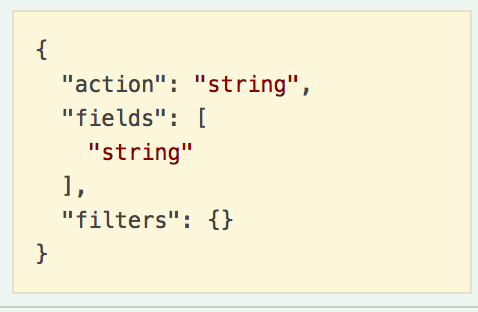
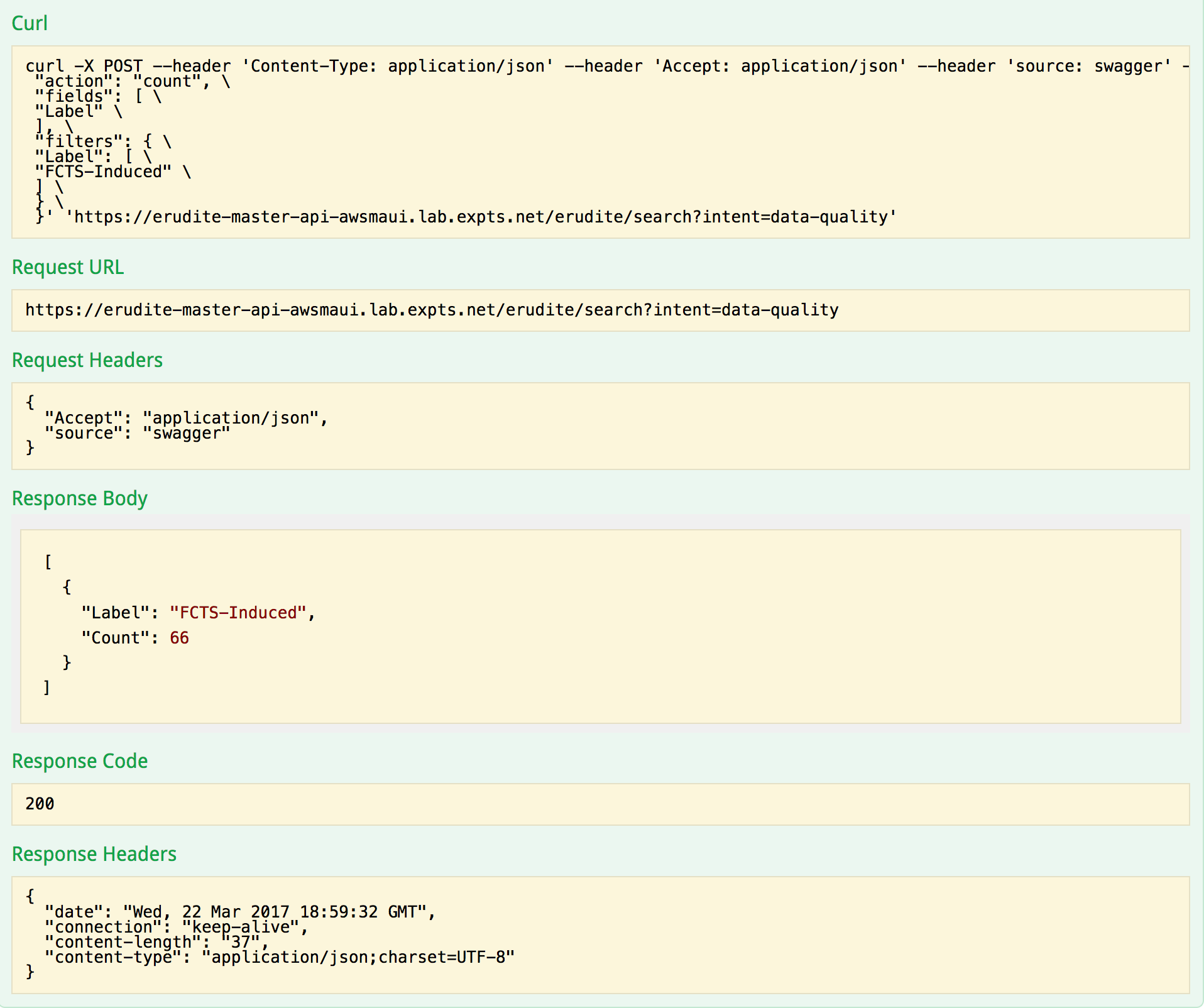
但是,在运行此脚本时,将返回一个400错误代码。我想我知道我错过了什么,这可能是通过请求的身体?但也不能百分之百确定。任何帮助都是非常感谢的。
回答 2
Stack Overflow用户
回答已采纳
发布于 2017-03-23 01:42:56
看看你的curl,我猜是:
var data = {
  "action": "string",
  "fields": [
    "string"
  ],
  "filters": {}
};

d3.request("https://erudite-master-api-awsmaui.lab.expts.net/erudite/search?intent=data-quality")
  .header("Content-Type", "application/json")
  .post(JSON.stringify(data), function (error,data) {

...Stack Overflow用户
发布于 2017-03-23 00:14:31
试一试
d3.request("https://erudite-master-api-awsmaui.lab.expts.net/erudite/search")
  .header("Content-Type", "application/x-www-form-urlencoded")
  .mimeType("application/json")
  .post("intent=data-quality", function (error,data){...});
如果您期望得到JSON响应,则只需使用d3.json。
页面原文内容由Stack Overflow提供。腾讯云小微IT领域专用引擎提供翻译支持
原文链接:
https://stackoverflow.com/questions/42964726
复制相关文章
相似问题
腾讯云开发者

Copyright © 2013 - 2026 Tencent Cloud. All Rights Reserved. 腾讯云 版权所有
深圳市腾讯计算机系统有限公司 ICP备案/许可证号:粤B2-20090059  粤公网安备44030502008569号
腾讯云计算(北京)有限责任公司 京ICP证150476号 | 京ICP备11018762号