
使用libyuv库缩放YUV图像时的问题
我正在开发一个基于Camera API 2的摄像头应用程序,我发现了使用利比夫的几个问题。我想转换从YUV_420_888中检索到的ImageReader图像,但是我在可再处理的曲面上缩放时遇到了一些问题。
本质上:图像的色调是绿色的,而不是相应的色调(我正在导出.yuv文件并使用http://rawpixels.net/检查它们)。
您可以在这里看到一个输入示例:
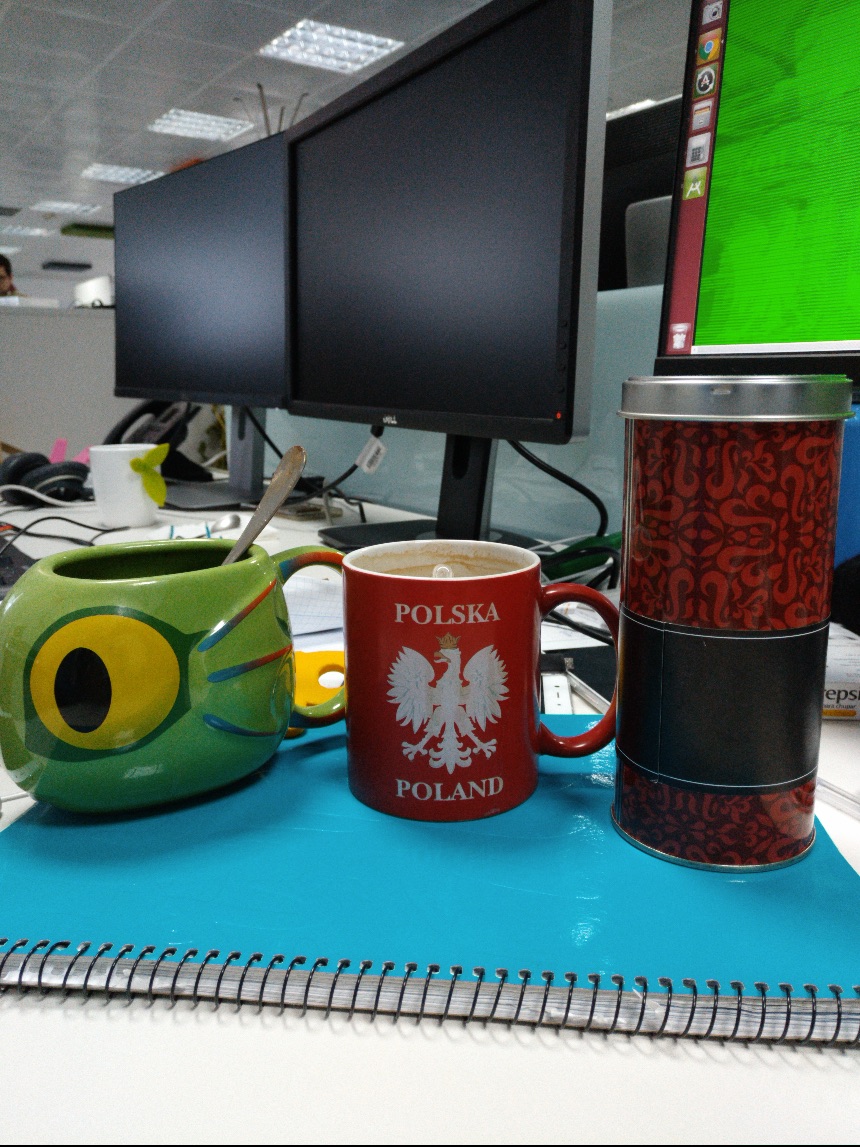
我做了缩放之后得到了什么:
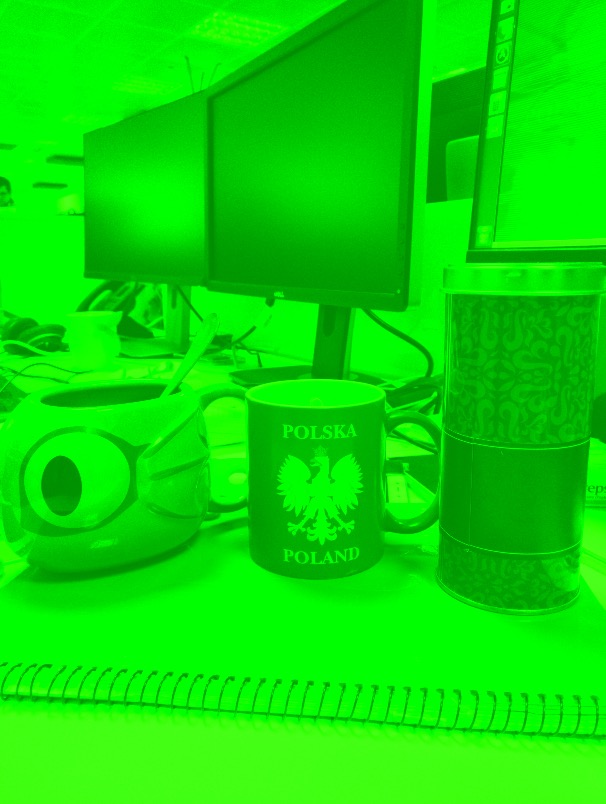
我认为我在大步上做错了什么,或者提供了无效的YUV格式(也许我必须将图像转换成另一种格式?)但是,我不知道错误在哪里,因为我不知道如何将绿色与缩放算法联系起来。
这是我使用的转换代码,您可以忽略返回NULL,因为还有与问题无关的进一步处理。
#include <jni.h>
#include <stdint.h>
#include <android/log.h>
#include <inc/libyuv/scale.h>
#include <inc/libyuv.h>
#include <stdio.h>


#define  LOG_TAG    "libyuv-jni"

#define unused(x) UNUSED_ ## x __attribute__((__unused__))
#define  LOGD(...)  __android_log_print(ANDROID_LOG_DEBUG, LOG_TAG, __VA_ARGS__)
#define  LOGE(...)  __android_log_print(ANDROID_LOG_ERROR, LOG_TAG, __VA_ARGS_)

struct YuvFrame {
    int width;
    int height;
    uint8_t *data;
    uint8_t *y;
    uint8_t *u;
    uint8_t *v;
};

static struct YuvFrame i420_input_frame;
static struct YuvFrame i420_output_frame;

extern "C" {

JNIEXPORT jbyteArray JNICALL
Java_com_android_camera3_camera_hardware_session_output_photo_yuv_YuvJniInterface_scale420YuvByteArray(
        JNIEnv *env, jclass /*clazz*/, jbyteArray yuvByteArray_, jint src_width, jint src_height,
        jint out_width, jint out_height) {

    jbyte *yuvByteArray = env->GetByteArrayElements(yuvByteArray_, NULL);

    //Get input and output length
    int input_size = env->GetArrayLength(yuvByteArray_);
    int out_size = out_height * out_width;

    //Generate input frame
    i420_input_frame.width = src_width;
    i420_input_frame.height = src_height;
    i420_input_frame.data = (uint8_t *) yuvByteArray;
    i420_input_frame.y = i420_input_frame.data;
    i420_input_frame.u = i420_input_frame.y + input_size;
    i420_input_frame.v = i420_input_frame.u + input_size / 4;

    //Generate output frame
    free(i420_output_frame.data);
    i420_output_frame.width = out_width;
    i420_output_frame.height = out_height;
    i420_output_frame.data = new unsigned char[out_size * 3 / 2];
    i420_output_frame.y = i420_output_frame.data;
    i420_output_frame.u = i420_output_frame.y + out_size;
    i420_output_frame.v = i420_output_frame.u + out_size / 4;
    libyuv::FilterMode mode = libyuv::FilterModeEnum::kFilterBilinear;

    int result = I420Scale(i420_input_frame.y, i420_input_frame.width,
                           i420_input_frame.u, i420_input_frame.width / 2,
                           i420_input_frame.v, i420_input_frame.width / 2,
                           i420_input_frame.width, i420_input_frame.height,
                           i420_output_frame.y, i420_output_frame.width,
                           i420_output_frame.u, i420_output_frame.width / 2,
                           i420_output_frame.v, i420_output_frame.width / 2,
                           i420_output_frame.width, i420_output_frame.height,
                           mode);
    LOGD("Image result %d", result);
    env->ReleaseByteArrayElements(yuvByteArray_, yuvByteArray, 0);
    return NULL;
}回答 5
Stack Overflow用户
发布于 2018-11-15 09:37:38
绿色图像是因为其中一架飞机装满了0,这意味着其中一架飞机是空的。这是因为我从YUV NV21而不是YUV I420转换而来。安卓系统中摄像头框架中的图像是I420 YUVs。
我们需要将它们转换为YUV I420,以便与利比亚人一起正常工作。之后,我们可以开始使用库提供的多个操作。如旋转、缩放等。
下面是关于缩放方法外观的片段:
JNIEXPORT jint JNICALL
Java_com_aa_project_images_yuv_myJNIcl_scaleI420(JNIEnv *env, jclass type,
                                                 jobject srcBufferY,
                                                 jobject srcBufferU,
                                                 jobject srcBufferV,
                                                 jint srcWidth, jint srcHeight,
                                                 jobject dstBufferY,
                                                 jobject dstBufferU,
                                                 jobject dstBufferV,
                                                 jint dstWidth, jint dstHeight,
                                                 jint filterMode) {

    const uint8_t *srcY = static_cast<uint8_t *>(env->GetDirectBufferAddress(srcBufferY));
    const uint8_t *srcU = static_cast<uint8_t *>(env->GetDirectBufferAddress(srcBufferU));
    const uint8_t *srcV = static_cast<uint8_t *>(env->GetDirectBufferAddress(srcBufferV));
    uint8_t *dstY = static_cast<uint8_t *>(env->GetDirectBufferAddress(dstBufferY));
    uint8_t *dstU = static_cast<uint8_t *>(env->GetDirectBufferAddress(dstBufferU));
    uint8_t *dstV = static_cast<uint8_t *>(env->GetDirectBufferAddress(dstBufferV));

    return libyuv::I420Scale(srcY, srcWidth,
                             srcU, srcWidth / 2,
                             srcV, srcWidth / 2,
                             srcWidth, srcHeight,
                             dstY, dstWidth,
                             dstU, dstWidth / 2,
                             dstV, dstWidth / 2,
                             dstWidth, dstHeight,
                             static_cast<libyuv::FilterMode>(filterMode));
}Stack Overflow用户
发布于 2017-03-29 08:52:02
您可以尝试使用y_size而不是数组的完整大小的代码。
    ...
    //Get input and output length
    int input_size = env->GetArrayLength(yuvByteArray_);
    int y_size = src_width * src_height;
    int out_size = out_height * out_width;

    //Generate input frame
    i420_input_frame.width = src_width;
    i420_input_frame.height = src_height;
    i420_input_frame.data = (uint8_t *) yuvByteArray;
    i420_input_frame.y = i420_input_frame.data;
    i420_input_frame.u = i420_input_frame.y + y_size;
    i420_input_frame.v = i420_input_frame.u + y_size / 4;

    //Generate output frame
    free(i420_output_frame.data);
    i420_output_frame.width = out_width;
    i420_output_frame.height = out_height;
    i420_output_frame.data = new unsigned char[out_size * 3 / 2];
    i420_output_frame.y = i420_output_frame.data;
    i420_output_frame.u = i420_output_frame.y + out_size;
    i420_output_frame.v = i420_output_frame.u + out_size / 4;
...可能您的代码是基于该https://github.com/begeekmyfriend/yasea/blob/master/library/src/main/libenc/jni/libenc.cc的,根据该代码,您必须使用y_size
Stack Overflow用户
发布于 2017-04-03 18:02:15
框架的输入大小有问题:
它应该是:
int input_array_size = env->GetArrayLength(yuvByteArray_);
int input_size = input_array_size * 2 / 3; //This is the frame size
例如,如果您的框架为6x4
香奈儿y尺寸: 6*4 = 24
 1 2 3 4 5 6
 _ _ _ _ _ _
|_|_|_|_|_|_| 1
|_|_|_|_|_|_| 2
|_|_|_|_|_|_| 3
|_|_|_|_|_|_| 4香奈儿u尺寸: 3*2 =6
  1   2   3
 _ _ _ _ _ _
|   |   |   |
|_ _|_ _|_ _| 1
|   |   |   |
|_ _|_ _|_ _| 2香奈儿v尺寸: 3*2 =6
  1   2   3
 _ _ _ _ _ _
|   |   |   |
|_ _|_ _|_ _| 1
|   |   |   |
|_ _|_ _|_ _| 2
数组大小= 6*4+3*2+3*2 = 36
但实际帧大小=信道y大小= 36 *2/3= 24
https://stackoverflow.com/questions/42960251
复制相似问题
腾讯云开发者

Copyright © 2013 - 2026 Tencent Cloud. All Rights Reserved. 腾讯云 版权所有
深圳市腾讯计算机系统有限公司 ICP备案/许可证号:粤B2-20090059  粤公网安备44030502008569号
腾讯云计算(北京)有限责任公司 京ICP证150476号 | 京ICP备11018762号