
gganimate创建重复的传奇和标题
gganimate创建重复的传奇和标题
提问于 2017-03-22 14:37:36
我制作了一个动画片.gif使用gganimate.问题是输出有重复的图例和标题,我不知道是什么原因造成的。
图例应该在底部,标题应该在情节的左下角。对我做错了什么有什么想法吗?
可复制的例子:
library(gapminder)
library(ggplot2)
library(gganimate)
library(viridis)

t <- ggplot(gapminder, aes(gdpPercap, lifeExp, size = pop, color = continent, frame = year)) +
        geom_point() +
        scale_color_viridis(name="Continent", discrete=TRUE) +
        scale_x_log10() +
        theme_void() +
        theme( legend.position = "bottom", legend.box = "vertical", legend.title.align = 0) +
        labs(title = "Year: ") +
        labs(caption = " Caption test") +
        theme(plot.title = element_text(hjust = 0.5, vjust = 0.05)) +
        theme(plot.caption = element_text(hjust = 0, color="gray40", size=10))


gganimate(t, "output_test.gif")
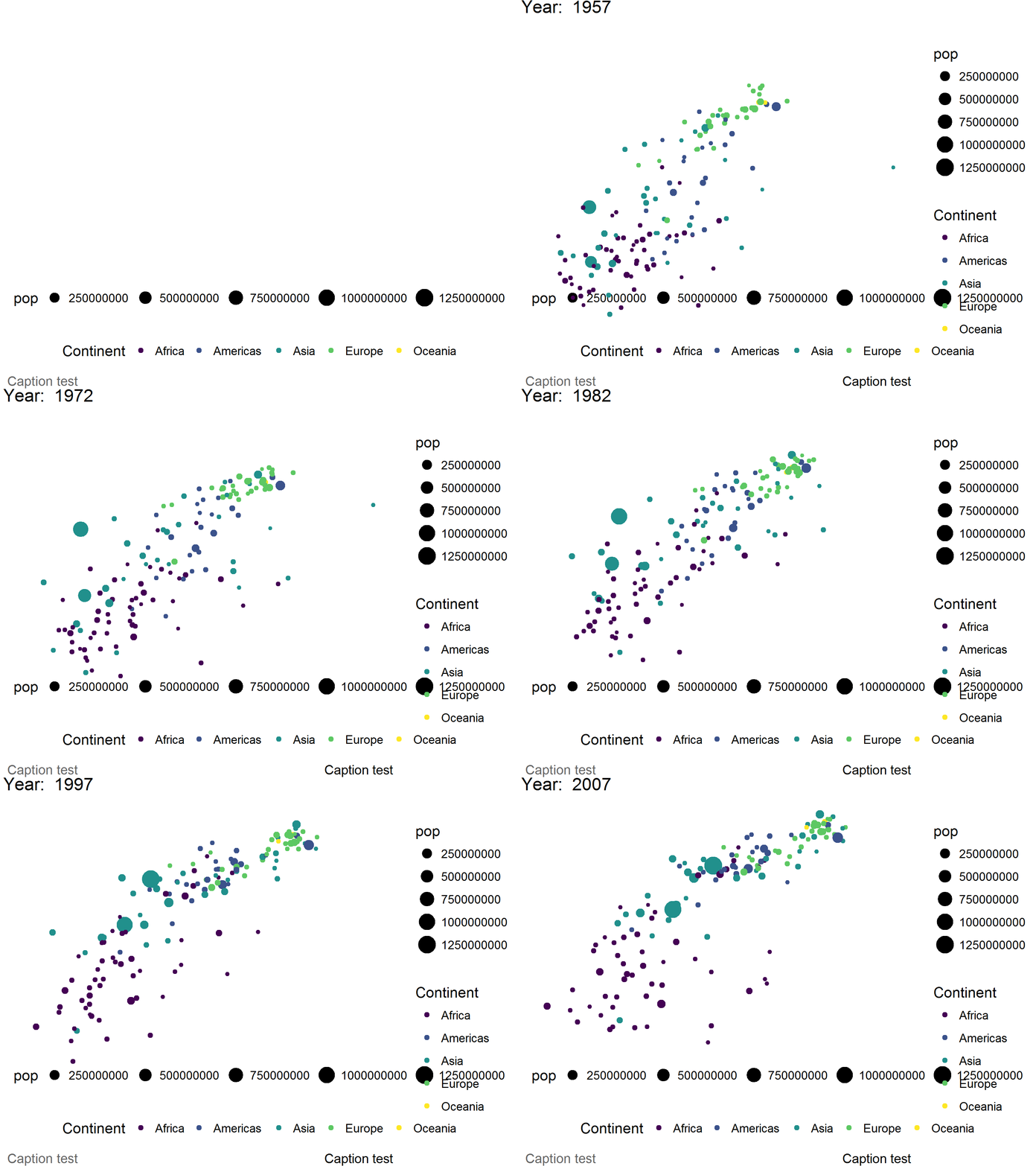
更新24-03-2017:“gganimate”的作者David在推特上向我证实,这种奇怪的行为是由一个应该很快修复的错误引起的。
同时,@hrbrmstr的解决方案似乎是一个不错的解决方案。另一种选择是使用旧版本的gganimate,可以这样安装:
  library(devtools)
install_github("dgrtwo/gganimate", ref = "26ec501")回答 2
Stack Overflow用户
回答已采纳
发布于 2017-03-22 15:30:51
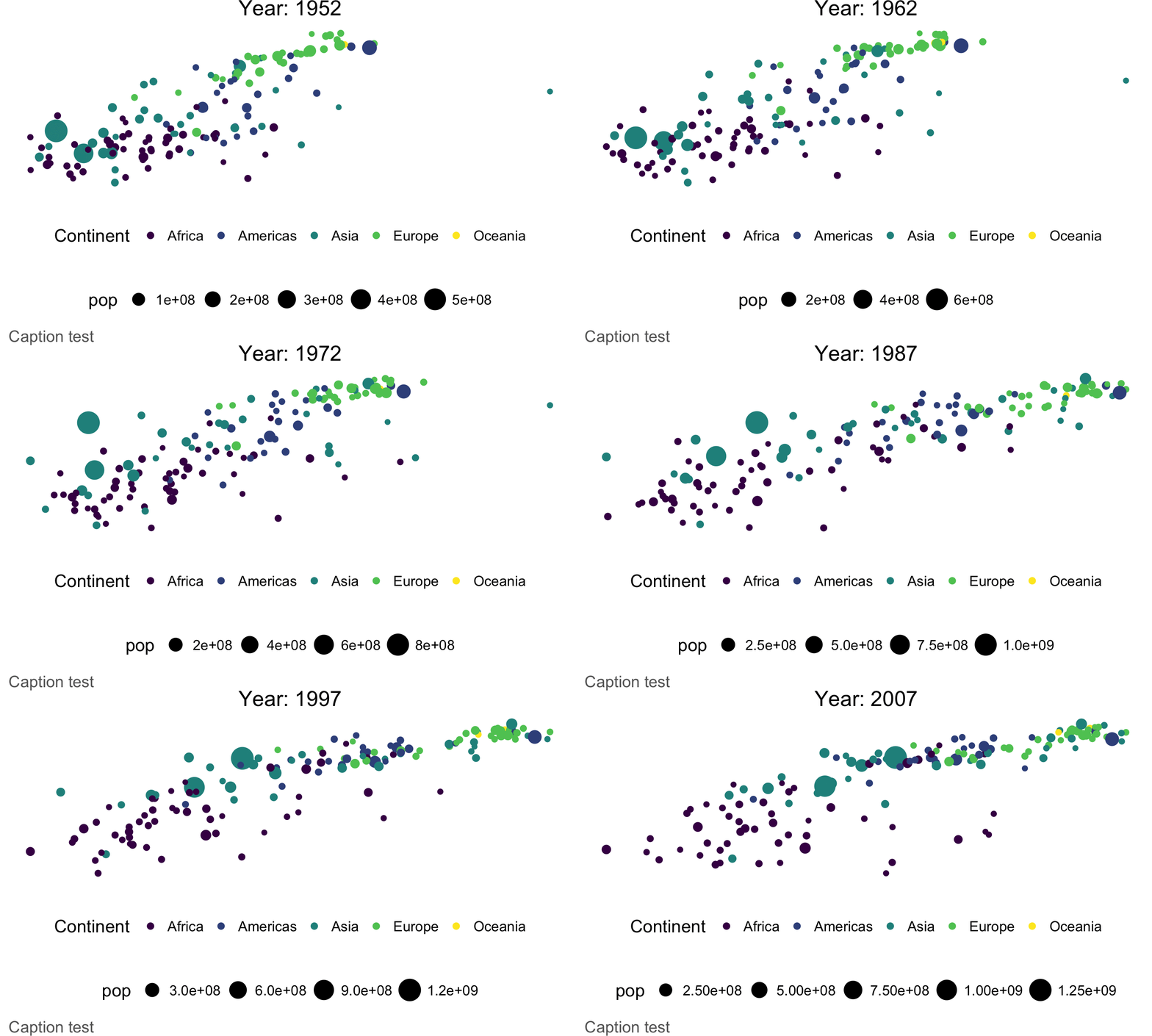
这里有一种在gganimate之外执行此操作的方法。
清理文件是留给读者的一个练习:-)
library(gapminder)
library(viridis)
library(magick)
library(tidyverse)

td <- tempdir()

years <- sort(unique(gapminder$year))

pb <- progress_estimated(length(years))

map_chr(years, ~{

  pb$tick()$print()

  filter(gapminder, year == .x) %>%
    ggplot(aes(gdpPercap, lifeExp, size = pop, color = continent)) +
    geom_point() +
    scale_color_viridis(name="Continent", discrete=TRUE) +
    scale_x_log10() +
    labs(title = sprintf("Year: %s", .x)) +
    labs(caption = " Caption test") +
    guides(colour = guide_legend(order = 2), shape = guide_legend(order = 1)) +
    theme_void() +
    theme(legend.position = "bottom", legend.box = "vertical", legend.title.align = 0) +
    theme(plot.title = element_text(hjust = 0.5, vjust = 0.05)) +
    theme(plot.caption = element_text(hjust = 0, color="gray40", size=10)) -> gg

  fil <- file.path(td, sprintf("%04d.png", as.integer(.x)))

  ggsave(fil, width=5, height=3, gg)

  fil

}) %>%
  map(image_read) %>%
  image_join() %>%
  image_animate(fps=2, loop=1) %>%
  image_write("animated.gif")
Stack Overflow用户
发布于 2017-03-22 15:04:43
gganimate_save有一些问题。在文件中,详细说明如下:
如果保存到GIF,则使用利用冗余背景(缩放、静态层等)的自定义方法。
除了显示两组轴的gif外,除了水平轴外,第一个图像是空白的。
如果你打电话来
gganimate(t, "output_test.mp4")那么,最终的电影就像预期的那样。
然后,您可以在mp4上调用imagemagick,在bash中将其转换为gif (或适应来自R的系统调用):
> convert output_test.mp4 output_test.gif来自R:
system('convert output_test.mp4 output_test.gif')页面原文内容由Stack Overflow提供。腾讯云小微IT领域专用引擎提供翻译支持
原文链接:
https://stackoverflow.com/questions/42954762
复制相关文章
相似问题
腾讯云开发者

Copyright © 2013 - 2026 Tencent Cloud. All Rights Reserved. 腾讯云 版权所有
深圳市腾讯计算机系统有限公司 ICP备案/许可证号:粤B2-20090059  粤公网安备44030502008569号
腾讯云计算(北京)有限责任公司 京ICP证150476号 | 京ICP备11018762号