
如何去除中间的空行
如何去除中间的空行
提问于 2017-03-22 13:26:46
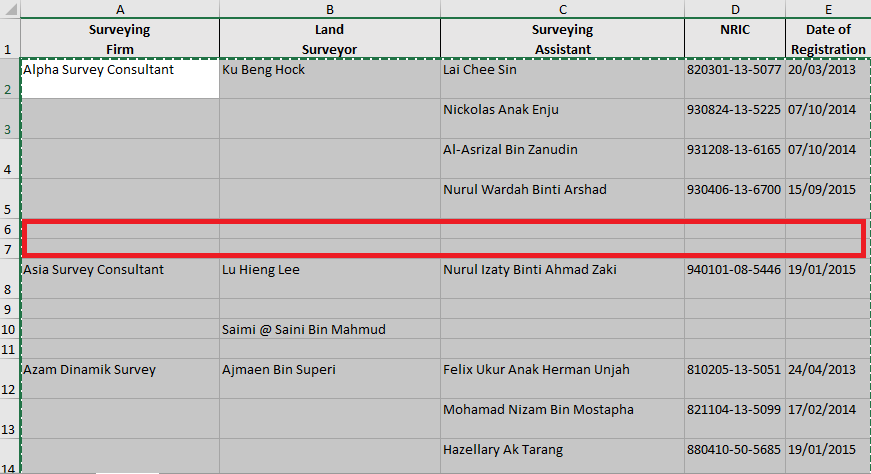
如何消除两家公司之间的空行。
 {.....some code for calling excel template and write

    Dim lsvw As NotesView, lsdoc As NotesDocument, lsdc As NotesDocumentCollection
    Dim savw As NotesView, sadoc As NotesDocument, sadc As NotesDocumentCollection
    Dim firmvw As NotesView, firmdoc As NotesDocument
    Dim firmve As NotesViewEntry
    Dim firmvc As NotesViewEntryCollection
    Dim tmpve As NotesViewEntry '   temporary use

    Dim firmArr         '   array that contain Company ID
    Dim firmid          '   firm id to store all firm


    Set firmvw = db.Getview("Company Information by Co_ID")
    Set lsvw = db.Getview("(LS sort by Co_ID)")
    Set savw = db.Getview("SA sort by LS Num")


    Set firmvc = firmvw.Allentries      '   get all entries
    If firmvc.Count = 0 Then            '   if all view entry collection is empty
        Print "No Company information!"
        Exit Sub
    End If

    Set firmve = firmvc.Getfirstentry()

    firmArr = ""
    firmid = ""
    Do While Not firmVe Is Nothing
        Set firmdoc =firmve.Document
        firmid = firmid + firmdoc.Co_ID(0) + ";"    '   put all co Id store inside firmID
        Set tmpve = firmvc.Getnextentry(firmVe)
        Set firmVe = tmpve
    Loop

    firmArr = FullTrim(ArrayUnique(Split(firmid, ";"))) '   split all firm with ";" so become array

    '   ForAll refvar In container
    '       [statement]
    '   End ForAll

    row = 2
    ForAll firm In firmArr
        Dim codoc As NotesDocument
        Set codoc = firmvw.Getdocumentbykey(firm,True)
        If Not codoc Is Nothing Then
            xlsht.Cells(row, 1) = Codoc.Co_Name(0)
        End If
        Set lsdc = lsvw.GetAllDocumentsByKey(firm,True)
        Set lsdoc = lsdc.GetFirstDocument

        Do While Not lsdoc Is Nothing

            xlsht.Cells(row, 2) = lsdoc.Name(0)

            Set sadc = savw.GetAllDocumentsByKey(lsdoc.Reg_Num_LS(0),True)
            Set sadoc = sadc.GetFirstDocument

            Do While Not sadoc Is Nothing

                xlsht.Cells(row, 3) = sadoc.Name(0)
                xlsht.Cells(row, 4) = sadoc.NRIC(0)
                xlsht.Cells(row, 5) = sadoc.Date_Apprv_Cr(0)
                row = row +1
                Set sadoc = sadc.GetNextDocument(sadoc)

            Loop

            row = row +1
            Set lsdoc = lsdc.GetNextDocument(lsdoc)
        Loop

        row = row + 1   '   write every row during pass one company
    End ForAll


Call xlWbk.Save
Call xlWbk.Close
Set xlWbk = Nothing
Call xl.Quit
Set xl = Nothing

Set rtitem = New NotesRichTextItem(doc, "Attachment")
Call rtitem.Embedobject(EMBED_ATTACHMENT, "", template)
If template <> "" And Dir$(template, 0) <> "" Then Kill template


Call doc.Save(True, False)
代码正在执行:
- 首先,将所有牢固的存储添加到数组中。
- 在这个循环之后,遍历所有数组。
- 每次使用公司寻找文件,去搜索土地测量师,然后把它写到excel中。
- 在此之后,使用土地测量师寻找一个测量助理跟踪他,也写在excel中。
问题:每过一次循环,公司都会添加一条新行,但在这两者之间似乎会出现双行线,任何知道我的代码哪一部分是错的都行。谢谢!
回答 1
Stack Overflow用户
回答已采纳
发布于 2017-03-22 21:32:10
在三个嵌套循环中有三行不同的代码,分别是row = row + 1。如果您跟踪您的第一个案例的逻辑,您将遇到三个测量助理(sadoc)中的一个,一个为土地测量师(lsdoc),然后一个为公司。这是执行row = row + 1的五倍,但是您只生成了三行数据,因为lsdoc信息和公司信息与第一个sadoc信息位于同一行。
如果每个lsdoc总是至少有一个sadoc,而每个公司总是只有一个土地测量师,那么答案很简单:只需去掉两条额外的row = row + 1线即可。不幸的是,我发现一个公司有一个以上的lsdoc,而在同样的情况下,对于第二个lsdoc来说,没有sadoc,所以不会那么简单。
您必须跟踪并只在需要时执行row = row + 1。也就是说,改变这个
row = row +1
Set sadoc = sadc.GetNextDocument(sadoc)
到这个
Set sadoc = sadc.GetNextDocument(sadoc)
If not sadoc is Nothing then
   row = row +1
End If
也为lsdoc做同样的事。
页面原文内容由Stack Overflow提供。腾讯云小微IT领域专用引擎提供翻译支持
原文链接:
https://stackoverflow.com/questions/42953025
复制相关文章
相似问题
腾讯云开发者

Copyright © 2013 - 2026 Tencent Cloud. All Rights Reserved. 腾讯云 版权所有
深圳市腾讯计算机系统有限公司 ICP备案/许可证号:粤B2-20090059  粤公网安备44030502008569号
腾讯云计算(北京)有限责任公司 京ICP证150476号 | 京ICP备11018762号