
TDialogService.MessageDialog的颜色
TDialogService.MessageDialog的颜色
提问于 2017-03-21 13:35:00
你能解释一下如何使用TDialogService.MessageDialog窗口的颜色吗?
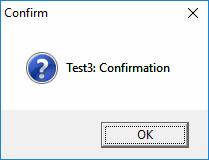
更新:使用此命令创建的:
  TDialogService.MessageDialog('Test3: Confirmation', MsgDlgType.mtConfirmation,
    [TMsgDlgBtn.mbOK], TMsgDlgBtn.mbOK, 0,
    procedure(const AResult: TModalResult)
    begin
    end);
我需要颜色的底部面板(按钮父)和背景色的消息。我需要这个颜色使我自己的对话框看起来像FMX默认对话框。
目前,我有自己的高度可定制的对话框,如下所示:
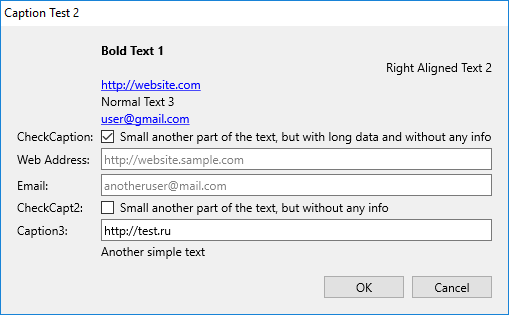
我还可以在哪里获得TDialogService.MessageDialog窗口中使用的图标?
回答 1
Stack Overflow用户
回答已采纳
发布于 2017-03-22 11:55:22
感谢大卫·赫弗南和Triber的回答
procedure GetThemeBackgroud(AImage: TImage; ATheme: HTHEME; APartID: Integer);
var
  stream: TMemoryStream;
  bitmap: Vcl.Graphics.TBitmap;
begin
  bitmap := Vcl.Graphics.TBitmap.Create;
  try
    bitmap.Width := Round(AImage.Width);
    bitmap.Height := Round(AImage.Height);
    DrawThemeBackground(ATheme, bitmap.Canvas.Handle, APartID, 0,
                        Rect(0, 0, bitmap.Width, bitmap.Height), nil);
    stream := TMemoryStream.Create;
    try
      bitmap.SaveToStream(stream);
      AImage.Bitmap.LoadFromStream(stream);
    finally
      stream.Free;
    end;
  finally
    bitmap.Free;
  end;
end;

procedure GetThemeBackgroud;
var
  theme: HTHEME;
begin
  theme := OpenThemeData(0, 'TASKDIALOG');
  if theme <> 0 then
  try
    // Client color
    GetThemeBackgroud(imgClient, theme, TDLG_PRIMARYPANEL);
    // Bottom color
    GetThemeBackgroud(imgBottom, theme, TDLG_SECONDARYPANEL);
  finally
    CloseThemeData(theme);
  end;
end;
在这里,我们应该添加2个TImages: client和按钮父母:
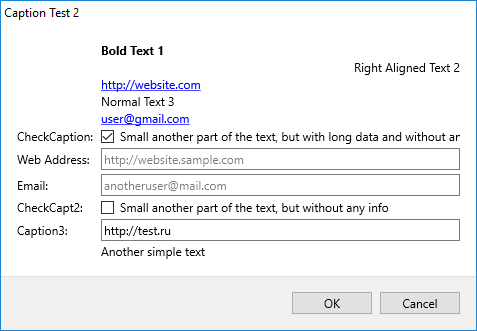
现在我应该研究一下系统图标的加载。
页面原文内容由Stack Overflow提供。腾讯云小微IT领域专用引擎提供翻译支持
原文链接:
https://stackoverflow.com/questions/42928717
复制相关文章
相似问题
腾讯云开发者

Copyright © 2013 - 2026 Tencent Cloud. All Rights Reserved. 腾讯云 版权所有
深圳市腾讯计算机系统有限公司 ICP备案/许可证号:粤B2-20090059  粤公网安备44030502008569号
腾讯云计算(北京)有限责任公司 京ICP证150476号 | 京ICP备11018762号