
在车把模板上声明数据表
在车把模板上声明数据表
提问于 2017-03-21 10:59:29
我最近已经开始在我的项目中使用handlerbar.js,它看起来还不错,但是我很难用模板创建动态数据网格。
我跟著杰森
gridrow: [
    { col1: 'a', col2: 'b', col3: 'c' },
    { col1: 'd', col2: 'e', col3: 'f' },
    { col1: 'g', col2: 'h', col3: 'i' }
]
当我创建模板时
<tbody>
<table id="dt_scroll">
{{#each gridrow}}
    <tr>
        <td>{{col1}}</td>
        <td>{{col2}}</td>
        <td>{{col3}}</td>
    </tr>
{{/each}}
</table>
</tbody>
当我为表dt_scroll声明数据表时,显示错误
$invoice_preview.html(theCompiledHtml);
$invoice_form.html('');
$window.resize();
$dt_scroll = $('#dt_scroll');
console.log($dt_scroll.length);
if ($dt_scroll.length) {
    $('#dt_scroll').DataTable({
        "scrollY": "200px",
        "scrollCollapse": false,
        "paging": false
    });
}
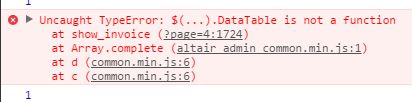
回答 1
Stack Overflow用户
回答已采纳
发布于 2017-03-21 11:21:47
我认为问题在于浏览器试图解析<table/>。当你尝试的时候,它会失败的。{{#each gridrow}}不允许作为表的第一个子表。
要解决这个问题,只需将模板放在脚本标记中即可。我还修正了你的HTML,因为它对DataTable插件无效
<div id="invoice_preview"></div>

<script type="x-template" id="dt_scroll">
  <table>
    <thead>
      <tr>
        <th>1.</th>
        <th>2.</th>
        <th>3.</th>
      </tr>
    </thead>
    <tbody>
      {{#each gridrow}}
      <tr>
        <td>{{col1}}</td>
        <td>{{col2}}</td>
        <td>{{col3}}</td>
      </tr>
      {{/each}}
    </tbody>
  </table>
</script>
现在,JavaScript代码必须类似于这样的代码。
var context = {title: "My New Post", gridrow: [
    { col1: 'a', col2: 'b', col3: 'c' },
    { col1: 'd', col2: 'e', col3: 'f' },
    { col1: 'g', col2: 'h', col3: 'i' }
]}

// compile the template
var html = Handlebars.compile($('#dt_scroll').html())(context)

// setting the compiled html
var $invoice_preview = $('#invoice_preview')
$invoice_preview.html(html)

// start the plugin
$invoice_preview.find(">:first-child").DataTable({
  "scrollY": "200px",
  "scrollCollapse": false,
  "paging": false
})页面原文内容由Stack Overflow提供。腾讯云小微IT领域专用引擎提供翻译支持
原文链接:
https://stackoverflow.com/questions/42925171
复制相关文章
相似问题
腾讯云开发者

Copyright © 2013 - 2026 Tencent Cloud. All Rights Reserved. 腾讯云 版权所有
深圳市腾讯计算机系统有限公司 ICP备案/许可证号:粤B2-20090059  粤公网安备44030502008569号
腾讯云计算(北京)有限责任公司 京ICP证150476号 | 京ICP备11018762号