
不是从DataGridView打印数据,而是在PrintPreview中显示
不是从DataGridView打印数据,而是在PrintPreview中显示
提问于 2017-03-20 11:09:46
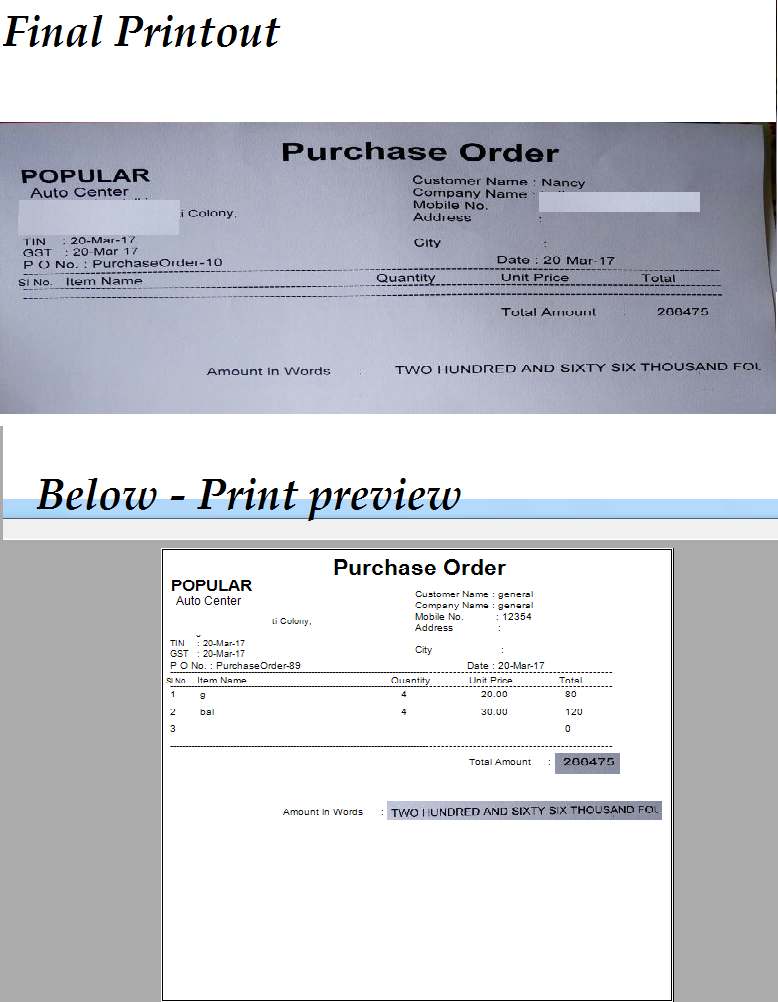
在下面的打印预览代码中,它显示了来自DataGridView的所有数据,而不是打印所有数据,只是打印页面的结构。
我附上了打印预览和打印输出的图片。
private void btnPrintPreview_Click(object sender, EventArgs e)
{
    printPreviewDialog1.ShowDialog();
    i = 0;
}

private void printDocument1_PrintPage(object sender, System.Drawing.Printing.PrintPageEventArgs e)
{
    e.Graphics.DrawString("Purchase Order ", new Font("Arial", 28, FontStyle.Bold), Brushes.Black, new Point(280, 10));
    e.Graphics.DrawString("POPULAR ", new Font("Arial", 20, FontStyle.Bold), Brushes.Black, new Point(10, 50));
    e.Graphics.DrawString("Center", new Font("Arial", 14, FontStyle.Regular), Brushes.Black, new Point(20, 80));
    e.Graphics.DrawString("Behind ,", new Font("Arial", 11, FontStyle.Regular), Brushes.Black, new Point(10, 100));
    e.Graphics.DrawString(" Colony,", new Font("Arial", 11, FontStyle.Regular), Brushes.Black, new Point(10, 120));
    e.Graphics.DrawString("Sh - 501.", new Font("Arial", 11, FontStyle.Regular), Brushes.Black, new Point(10, 140));
    e.Graphics.DrawString("TIN    : " + DateTime.Now.ToShortDateString(), new Font("Arial", 11, FontStyle.Regular), Brushes.Black, new Point(10, 160));
    e.Graphics.DrawString("GST   : " + DateTime.Now.ToShortDateString(), new Font("Arial", 11, FontStyle.Regular), Brushes.Black, new Point(10, 178));

    e.Graphics.DrawString("P O No. : " + lblPONumber.Text.Trim(), new Font("Arial", 12, FontStyle.Regular), Brushes.Black, new Point(10, 197));
    e.Graphics.DrawString("Date : " + date.Text, new Font("Arial", 12, FontStyle.Regular), Brushes.Black, new Point(506, 197));

    e.Graphics.DrawString("Customer Name : " + txtSupplierName.Text.Trim(), new Font("Arial", 12, FontStyle.Regular), Brushes.Black, new Point(420, 70));
    e.Graphics.DrawString("Company Name : " + txtSupplierCompanyName.Text.Trim(), new Font("Arial", 12, FontStyle.Regular), Brushes.Black, new Point(420, 90));
    e.Graphics.DrawString("Mobile No.           : " + txtMobile.Text.Trim(), new Font("Arial", 12, FontStyle.Regular), Brushes.Black, new Point(420, 110));
    e.Graphics.DrawString("Address               : ", new Font("Arial", 12, FontStyle.Regular), Brushes.Black, new Point(420, 130));
    e.Graphics.DrawString("                              ", new Font("Arial", 12, FontStyle.Regular), Brushes.Black, new Point(420, 150));
    e.Graphics.DrawString("City                       : ", new Font("Arial", 12, FontStyle.Regular), Brushes.Black, new Point(420, 170));


    e.Graphics.DrawString("------------------------------------------------------------------------------------------------------------------------------------", new Font("Arial", 12, FontStyle.Regular), Brushes.Black, new Point(10, 210));

    e.Graphics.DrawString("Sl No.", new Font("Arial", 10, FontStyle.Regular), Brushes.Black, new Point(05, 227));
    e.Graphics.DrawString("Item Name", new Font("Arial", 12, FontStyle.Regular), Brushes.Black, new Point(55, 225));
    e.Graphics.DrawString("Quantity", new Font("Arial", 12, FontStyle.Regular), Brushes.Black, new Point(380, 225));
    e.Graphics.DrawString("Unit Price", new Font("Arial", 12, FontStyle.Regular), Brushes.Black, new Point(510, 225));
    e.Graphics.DrawString("Total", new Font("Arial", 12, FontStyle.Regular), Brushes.Black, new Point(660, 225));

    e.Graphics.DrawString("------------------------------------------------------------------------------------------------------------------------------------", new Font("Arial", 12, FontStyle.Regular), Brushes.Black, new Point(10, 235));

    int ypos = 250;

    while (i < dataGridView1.Rows.Count)
    {

        if (ypos > e.MarginBounds.Height)
        {
            ypos = 250;
            e.HasMorePages = true;
            return;
        }
            numberofitemsprinted++;
            SlNumber++;

                e.Graphics.DrawString(SlNumber.ToString(), new Font("Arial", 12, FontStyle.Regular), Brushes.Black, new Point(10, ypos));

                e.Graphics.DrawString(dataGridView1.Rows[i].Cells[0].FormattedValue.ToString(), new Font("Arial", 12, FontStyle.Regular), Brushes.Black, new Point(60, ypos));

                e.Graphics.DrawString(dataGridView1.Rows[i].Cells[3].FormattedValue.ToString(), new Font("Arial", 12, FontStyle.Regular), Brushes.Black, new Point(397, ypos));

                e.Graphics.DrawString(dataGridView1.Rows[i].Cells[2].FormattedValue.ToString(), new Font("Arial", 12, FontStyle.Regular), Brushes.Black, new Point(530, ypos));

                e.Graphics.DrawString(dataGridView1.Rows[i].Cells[4].FormattedValue.ToString(), new Font("Arial", 12, FontStyle.Regular), Brushes.Black, new Point(670, ypos));

                i++;
                ypos = ypos + 30;

    }


        e.Graphics.DrawString("------------------------------------------------------------------------------------------------------------------------------------", new Font("Arial", 12, FontStyle.Regular), Brushes.Black, new Point(10, ypos));

        e.Graphics.DrawString("Total Amount      :       " + txtTotalSum.Text.Trim(), new Font("Arial", 12, FontStyle.Regular), Brushes.Black, new Point(510, ypos + 30));


        e.Graphics.DrawString("Amount in Words      :       " + txtTotalSumWords.Text.Trim(), new Font("Arial", 12, FontStyle.Regular), Brushes.Black, new Point(200, ypos + 120));


        numberofitemsperpage = 0;
        numberofitemsprinted = 0;
        SlNumber = 0;


    }

private void btnPrint_Click(object sender, EventArgs e)
{
    printDocument1.Print();
}回答 1
Stack Overflow用户
回答已采纳
发布于 2017-03-20 13:33:43
您需要在打印之前重置变量i。
看起来,PrintPage在预览时被称为(),然后在没有重置i的情况下,为实际打印再次调用。
这应有助于:
private void btnPrint_Click(object sender, EventArgs e)
{
    i = 0;
    printDocument1.Print();
}我还强烈建议建议将i的名称改为更明确的名称,如currentPrintRow。
页面原文内容由Stack Overflow提供。腾讯云小微IT领域专用引擎提供翻译支持
原文链接:
https://stackoverflow.com/questions/42902070
复制相关文章
相似问题
腾讯云开发者

Copyright © 2013 - 2026 Tencent Cloud. All Rights Reserved. 腾讯云 版权所有
深圳市腾讯计算机系统有限公司 ICP备案/许可证号:粤B2-20090059  粤公网安备44030502008569号
腾讯云计算(北京)有限责任公司 京ICP证150476号 | 京ICP备11018762号