
目标-C-有任何方法让UIView属性作为数组吗?
目标-C-有任何方法让UIView属性作为数组吗?
提问于 2017-03-13 13:45:26
我需要访问UIView数组项(所有UIView都有自己的独立活动)。但是,当赋值为@property (assign, nonatomic) UIView *ui_view[MAXIMUM_UIVIEW];时,它会导致构建失败。
还有其他更好的方法让它像我尝试的那样运作吗?
错误:
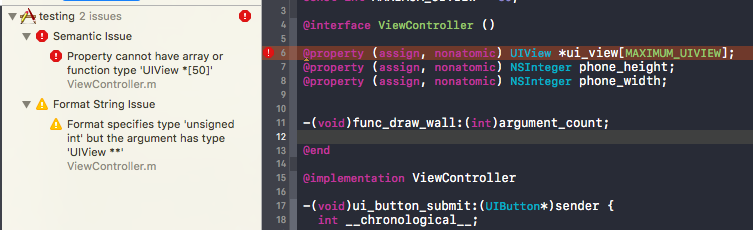
代码:
#import "ViewController.h"
const int MAXIMUM_UIVIEW = 50;

@interface ViewController ()

@property (assign, nonatomic) UIView *ui_view[MAXIMUM_UIVIEW];
@property (assign, nonatomic) NSInteger phone_height;
@property (assign, nonatomic) NSInteger phone_width;


-(void)func_draw_wall:(int)argument_count;

@end

@implementation ViewController

-(void)ui_button_submit:(UIButton*)sender {
  int __chronological__;

  //UIView *ui_view[MAXIMUM_UIVIEW];
  //int phone_height  =  self.view.frame.size.height;
  //int phone_width  =  self.view.frame.size.width;
  int phone_height  =  self.view.frame.size.height;
  int phone_width  =  self.view.frame.size.width;
  self.phone_height = phone_height;
  self.phone_width = phone_width;


  for (__chronological__ = 0 ; __chronological__ <= 50 ; __chronological__++ ) {
    [self func_draw_wall:__chronological__];
  }
}

-(void)func_draw_wall:(int)__chronological__ {

  self.ui_view[__chronological__] =
                        [[UIView alloc] initWithFrame:CGRectMake(0, 0, 50,50)];

  [self.view addSubview:self.ui_view[__chronological__]];
  NSLog(@"Mem Address of localView[%d] = %x\n", __chronological__, self.ui_view);
}

-(void)ui_button {
  self.view.backgroundColor = [UIColor blackColor];
  UIButton *but = [[UIButton alloc] init];
  [but setTitle:@"--- Add ---" forState:UIControlStateNormal];
  [but setTitleColor:[UIColor redColor] forState:UIControlStateNormal];
  [but addTarget:self action:@selector(ui_button_submit:)
        forControlEvents:UIControlEventTouchUpInside];

  int startHeight = 167;
  int frameHeight = self.view.frame.size.height - startHeight;
  [but setFrame:CGRectMake(0, startHeight, 320, frameHeight)];

  [but setTranslatesAutoresizingMaskIntoConstraints:false];
  [but setImage:[UIImage imageNamed:@"Image"] forState:UIControlStateNormal];
  [self.view addSubview:but];


  NSDictionary *viewsDict = @{@"button" : but};
  [self.view addConstraints:[NSLayoutConstraint
                           constraintsWithVisualFormat:@"V:[button]-0-|"
                           options:0 metrics:nil views:viewsDict]];

  NSLayoutConstraint *constraint = [NSLayoutConstraint constraintWithItem:but
      attribute:NSLayoutAttributeCenterX relatedBy:NSLayoutRelationEqual
      toItem:self.view attribute:NSLayoutAttributeCenterX multiplier:1.0
      constant:0];
  constraint.active = true;
  [self.view addConstraint:constraint];
  [self.view layoutIfNeeded];

}

- (void)viewDidLoad {
  [super viewDidLoad];
  [self ui_button];
}


@end回答 1
Stack Overflow用户
回答已采纳
发布于 2017-03-13 13:49:18
使类型为NSArray *,而不是UIView *[]
您应该能够使用泛型类型参数,所以NSArray<UIView *> *
页面原文内容由Stack Overflow提供。腾讯云小微IT领域专用引擎提供翻译支持
原文链接:
https://stackoverflow.com/questions/42765198
复制相关文章
相似问题
腾讯云开发者

Copyright © 2013 - 2026 Tencent Cloud. All Rights Reserved. 腾讯云 版权所有
深圳市腾讯计算机系统有限公司 ICP备案/许可证号:粤B2-20090059  粤公网安备44030502008569号
腾讯云计算(北京)有限责任公司 京ICP证150476号 | 京ICP备11018762号