
快速3旋转的图像在ImageView中没有正确显示
快速3旋转的图像在ImageView中没有正确显示
提问于 2017-03-11 00:04:53
我正在使用Swift 3,我正在iPhone 7上进行开发。
基于对如何旋转图像的大量搜索,我使用了以下代码:
func sFunc_imageFixOrientation(img:UIImage) -> UIImage {


    // No-op if the orientation is already correct
    if (img.imageOrientation == UIImageOrientation.up) {
        return img;
    }
    // We need to calculate the proper transformation to make the image upright.
    // We do it in 2 steps: Rotate if Left/Right/Down, and then flip if Mirrored.
    var transform:CGAffineTransform = CGAffineTransform.identity

    if (img.imageOrientation == UIImageOrientation.left
        || img.imageOrientation == UIImageOrientation.leftMirrored) {
        transform = transform.translatedBy(x: img.size.width, y: 0)
        transform = transform.rotated(by: CGFloat(M_PI_2))
    }

    if (img.imageOrientation == UIImageOrientation.right
        || img.imageOrientation == UIImageOrientation.rightMirrored) {
        transform = transform.translatedBy(x: 0, y: img.size.height);
        transform = transform.rotated(by: CGFloat(-M_PI_2));
    }

    // Now we draw the underlying CGImage into a new context, applying the transform
    // calculated above.
    let ctx:CGContext = CGContext(data: nil, width: Int(img.size.width), height: Int(img.size.height),
                                  bitsPerComponent: img.cgImage!.bitsPerComponent, bytesPerRow: 0,
                                  space: img.cgImage!.colorSpace!,
                                  bitmapInfo: img.cgImage!.bitmapInfo.rawValue)!

    ctx.concatenate(transform)


    if (img.imageOrientation == UIImageOrientation.left
        || img.imageOrientation == UIImageOrientation.leftMirrored
        || img.imageOrientation == UIImageOrientation.right
        || img.imageOrientation == UIImageOrientation.rightMirrored
        ) {

        ctx.draw(img.cgImage!, in: CGRect(x:0,y:0,width:img.size.height,height:img.size.width))

    } else {
        ctx.draw(img.cgImage!, in: CGRect(x:0,y:0,width:img.size.width,height:img.size.height))
    }


    // And now we just create a new UIImage from the drawing context
    let cgimg:CGImage = ctx.makeImage()!
    let imgEnd:UIImage = UIImage(cgImage: cgimg)

    return imgEnd
}
在我的应用程序中,我使用肖像模式为下面的一张纸拍照。
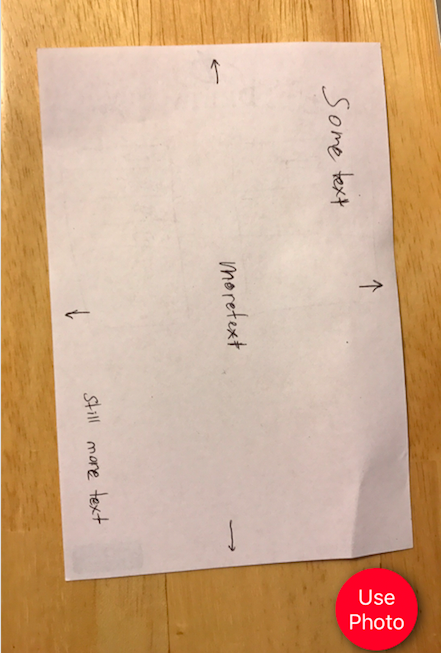
我希望这张图片在我的UIImageView中以景观方向出现,所以我使用了上面的函数:
let rotatedImage = sFunc_imageFixOrientation(img : stillPicture.image!)
tempImageShow.contentMode = UIViewContentMode.scaleAspectFit
tempImageShow.image = rotatedImage
结果是:
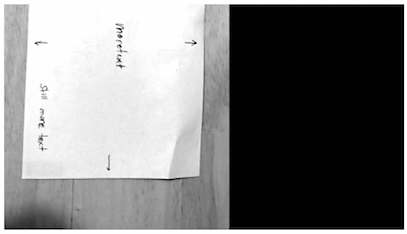
正如你所看到的,图像根本没有旋转。它在右边用一个黑色的长方形填充,然后压紧,以填充空间。如何使实际图像旋转,以及上面的代码有什么问题?
回答 1
Stack Overflow用户
回答已采纳
发布于 2017-03-11 01:23:00
我真的不想涵盖每一种情况,但对于你的图像,为了把它旋转成风景,这样文字就可以正确地向上写,我写了下面的代码:
let im = UIImage(named:"picture")!
let r = UIGraphicsImageRenderer(size:
    CGSize(width: im.size.height, height: im.size.width))
let outim = r.image { _ in
    let con = UIGraphicsGetCurrentContext()!
    con.translateBy(x: 0, y: im.size.width)
    con.rotate(by: -.pi/2)
    im.draw(at: .zero)
 }
 let iv = UIImageView(image:outim)
 self.view.addSubview(iv)
结果:
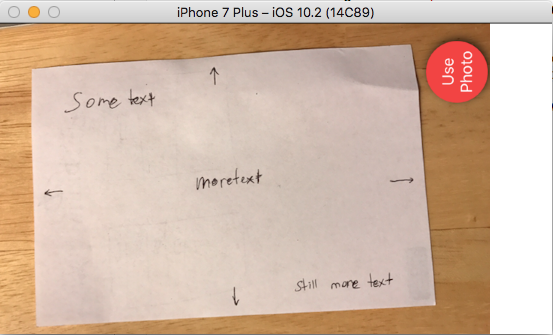
这应该能让你对这个程序有一个大致的了解。
页面原文内容由Stack Overflow提供。腾讯云小微IT领域专用引擎提供翻译支持
原文链接:
https://stackoverflow.com/questions/42729736
复制相关文章
相似问题
腾讯云开发者

Copyright © 2013 - 2026 Tencent Cloud. All Rights Reserved. 腾讯云 版权所有
深圳市腾讯计算机系统有限公司 ICP备案/许可证号:粤B2-20090059  粤公网安备44030502008569号
腾讯云计算(北京)有限责任公司 京ICP证150476号 | 京ICP备11018762号