
Laravel5.4^-如何自定义通知电子邮件布局?
我正在尝试自定义HTML电子邮件布局,在通过电子邮件发送通知时使用。
我已经发布了邮件和通知视图。
php artisan vendor:publish --tag=laravel-mail
php artisan vendor:publish --tag=laravel-notifications
如果我修改/resources/views/vendor/notifications/email.blade.php文件,我只能更改发送的电子邮件的正文内容。我期待修改页脚,页眉,以及电子邮件布局的每一个其他部分。
我还试图修改/resources/vendor/mail/html/内部的视图,但是每当发送通知时,它甚至不会使用这些视图,而是使用默认的laravel框架视图。
我知道我可以在Notification返回的MailMessage上设置一个视图,但是我希望保留标准的line()、greeting()等函数。
有人知道我怎样才能让我的通知使用/resources/vendor/mail/html中的视图发送电子邮件吗?
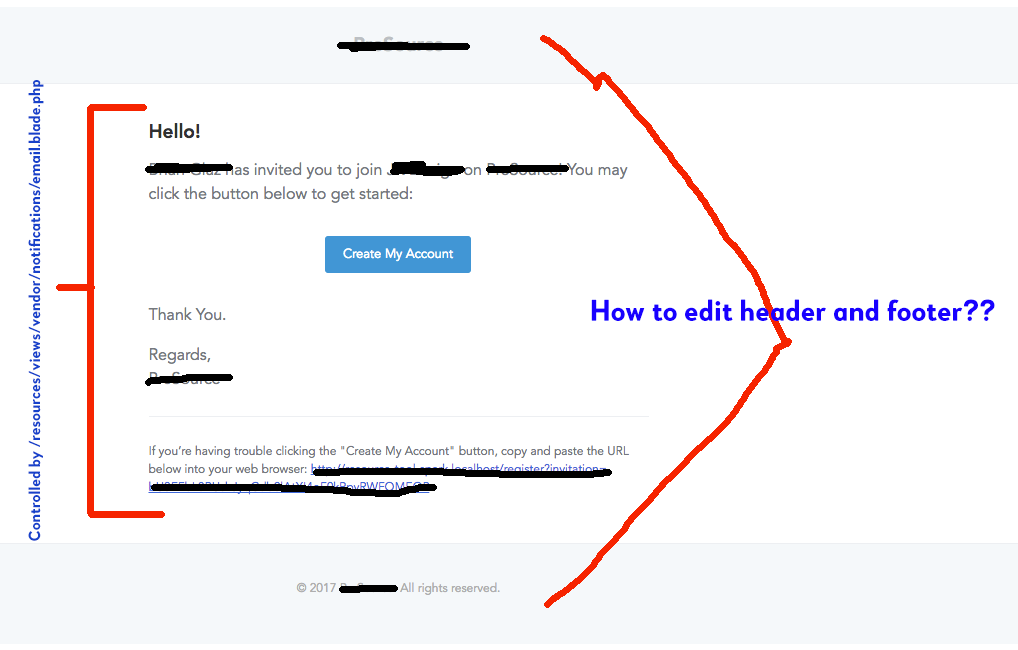
下面是我的/resources/views/vendor/notifications/email.blade.php文件,但是它没有任何地方可以自定义页眉/页脚/整体布局。
@component('mail::message')
{{-- Greeting --}}
@if (! empty($greeting))
# {{ $greeting }}
@else
@if ($level == 'error')
# Whoops!
@else
# Hello!
@endif
@endif

{{-- Intro Lines --}}
@foreach ($introLines as $line)
{{ $line }}

@endforeach

{{-- Action Button --}}
@if (isset($actionText))
<?php
    switch ($level) {
        case 'success':
            $color = 'green';
            break;
        case 'error':
            $color = 'red';
            break;
        default:
            $color = 'blue';
    }
?>
@component('mail::button', ['url' => $actionUrl, 'color' => $color])
{{ $actionText }}
@endcomponent
@endif

{{-- Outro Lines --}}
@foreach ($outroLines as $line)
{{ $line }}

@endforeach

<!-- Salutation -->
@if (! empty($salutation))
{{ $salutation }}
@else
Regards,<br>{{ config('app.name') }}
@endif

<!-- Subcopy -->
@if (isset($actionText))
@component('mail::subcopy')
If you’re having trouble clicking the "{{ $actionText }}" button, copy and paste the URL below
into your web browser: [{{ $actionUrl }}]({{ $actionUrl }})
@endcomponent
@endif
@endcomponent回答 8
Stack Overflow用户
发布于 2017-03-10 18:19:46
运行此命令
php artisan vendor:publish --tag=laravel-notifications
php artisan vendor:publish --tag=laravel-mail
laravel 5.7+的更新
php artisan vendor:publish然后你会得到:
  [<number>] Tag: laravel-mail
  [<number>] Tag: laravel-notifications
然后在前面输入这个数字来发布文件以进行编辑。
然后在
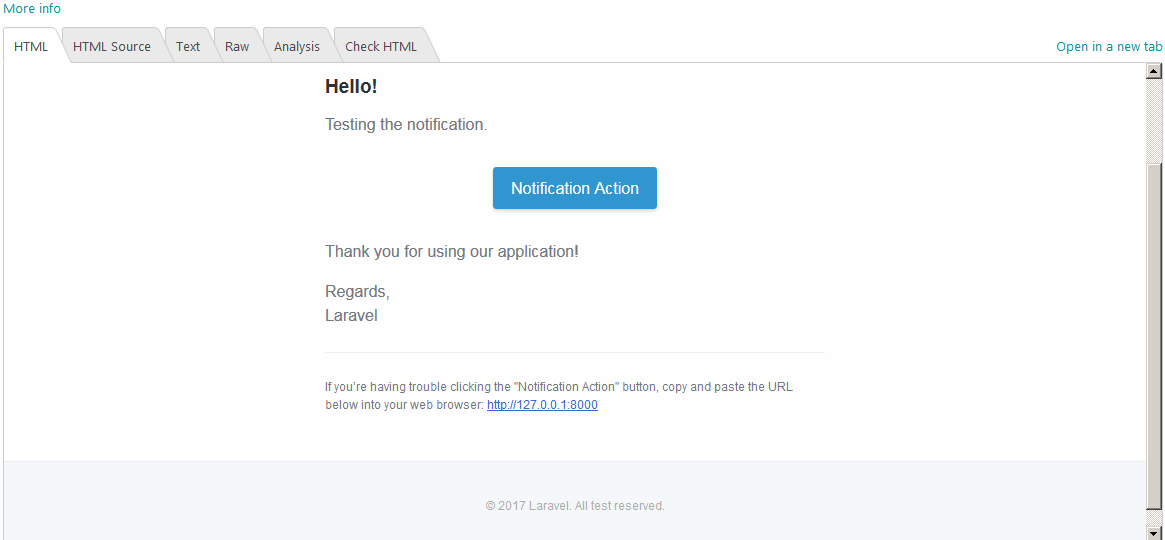
/resources/views/vendor/mail/html/您可以编辑所有组件并自定义所需的任何内容。例如,我编辑了“所有保留的权利”一句。要在此文件中的图像底部“所有保留的测试”:
/resources/views/vendor/mail/html/message.blade.php这就是我得到的:
Stack Overflow用户
发布于 2017-05-30 14:21:34
确保在config/mail.php中有正确的配置:
'markdown' => [
    'theme' => 'default',
    'paths' => [
        resource_path('views/vendor/mail'),
    ]
],Stack Overflow用户
发布于 2017-08-25 21:35:36
我写了一篇关于如何创建通知和修改模板的文章,包括页眉和页脚。
它包括关于Laravel组件如何工作以及如何将您的数据传递到新的电子邮件模板的说明。
最重要的部分是在电子邮件模板中放置以下代码:
@component('mail::layout')
    {{-- Header --}}
    @slot('header')
        @component('mail::header', ['url' => config('app.url')])
            Header Title
        @endcomponent
    @endslot
{{-- Body --}}
    This is our main message {{ $user }}
{{-- Subcopy --}}
    @isset($subcopy)
        @slot('subcopy')
            @component('mail::subcopy')
                {{ $subcopy }}
            @endcomponent
        @endslot
    @endisset
{{-- Footer --}}
    @slot('footer')
        @component('mail::footer')
            © {{ date('Y') }} {{ config('app.name') }}. Super FOOTER!
        @endcomponent
    @endslot
@endcomponent
如果您想了解组件如何工作以及如何正确传递数据,您可以查看中介文章。
https://stackoverflow.com/questions/42724118
复制相似问题
腾讯云开发者

Copyright © 2013 - 2026 Tencent Cloud. All Rights Reserved. 腾讯云 版权所有
深圳市腾讯计算机系统有限公司 ICP备案/许可证号:粤B2-20090059  粤公网安备44030502008569号
腾讯云计算(北京)有限责任公司 京ICP证150476号 | 京ICP备11018762号