
当用户拖动/移到屏幕上时,画布清晰
我面临着一个问题,我真的不知道从哪里开始解决,所以我希望这个问题不要太宽泛。
我正在制作并应用程序,在屏幕上我将有一个带有一些信息的矩形(假设它是一个<ion-grid>),我需要用另一个矩形覆盖这个矩形,所以,当que用户在屏幕上滑动它的手指时,它会显示它背后的内容。
想到的第一个解决方案是使用画布,我看到了一些例子,在点击时从画布矩形中移除一个圆圈。情况是,我对画布一无所知,也没有代码可以分享,我会尝试一些东西,然后编辑我的问题。
第二个解决方案是一种(丑陋的)解决办法,使之类似于:
<ion-grid>
  <ion-row>
    <ion-col width-5 (pan)='somethingToHideTheCol()'></ion-col> //width-5 or less
  </ion-row>
</ion-grid>因此,当<ion-col>被平移时,它调用一个隐藏它或将背景更改为透明的函数。
第二个解决方案不会模仿用户的手指形状,它会更难看,但可能会奏效。使用画布的第一个解决方案会更好,但我不知道从哪里开始,所以:
- 我该怎么做?
- 用Ionic 2可以使用画布吗?
- 如何通过javascript抓取用户正在滑动/拖动手指的屏幕?
- 有比这两种方法更好的解决办法吗?就像一个绘图库之类的。
任何想法,代码,链接,教程都是一种帮助。谢谢:)
编辑
这就是我想要创建的效果:
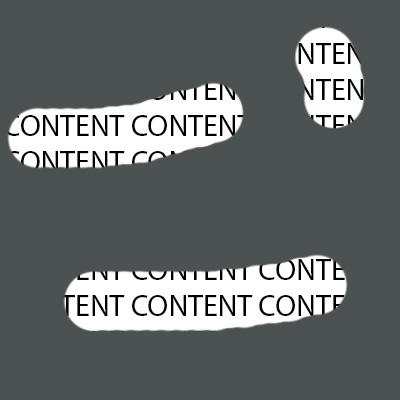
因此,当用户在屏幕上触摸并拖动手指时,它将删除部分画布。
回答 2
Stack Overflow用户
发布于 2017-03-13 12:40:40
画布确实是要做的事情:)您所要做的就是在元素上放置一个画布,填充画布的背景,然后使用CompositeOperations删除部分背景:
var CanvasHide = function(settings) {
  this.mouseDown = false;
	this.el = document.querySelectorAll("*[data-canvas-hide]");
	this.init = function() {
  	var self = this;
  	for (var i=0, l=this.el.length; i<l; i++) {
    	self.addCanvas(this.el[i]);
    }
  }

  this.addCanvas = function(el) {
    var self = this;
  	var canvas = document.createElement("canvas");
    canvas.width = el.offsetWidth;
    canvas.height = el.offsetHeight;
    el.appendChild(canvas);
    ctx = canvas.getContext("2d");
    ctx.fillStyle = "#666";
    ctx.fillRect(0,0,canvas.width, canvas.height);
    canvas.onmousedown=function(){self.mouseDown=true;};
    canvas.onmouseup=function(){self.mouseDown=false;};
    canvas.onmousemove = function(e) {
      if (self.mouseDown) {
        var x = e.pageX;
        var y = e.pageY;
        ctx.fillStyle = "#fff";
			  ctx.globalCompositeOperation = 'destination-out'
			  ctx.beginPath();
        ctx.arc(x - settings.radius/2, y - settings.radius/2, settings.radius, 0, 2 * Math.PI, false);
        ctx.fill();
      }
    }
  }

  this.init();
}

var canvasHide = new CanvasHide({radius:20});*[data-canvas-hide] {
position: relative;
}
canvas {
position: absolute;
top: 0;
left: 0;
}<div class="container" data-canvas-hide>
<h1>
Title
</h1>
<p>Lorem ipsum dolor sit amet, consectetur adipisicing elit. In commodi odio, incidunt saepe aperiam nam rerum at ex consequatur tempora quae temporibus. Odio, facere repudiandae suscipit doloribus autem unde tempore qui earum illum, minima consequatur officia repellat labore, doloremque eveniet amet eligendi quam aspernatur quisquam inventore pariatur temporibus. Ducimus adipisci numquam quaerat. Atque doloremque nostrum blanditiis dicta repellendus, provident, dolorum modi praesentium perferendis animi ab. Eaque totam itaque quo provident ea sint explicabo dicta adipisci doloremque ipsam, voluptate. Quisquam maxime ipsa fugit magnam tempora, exercitationem minus. Amet doloremque vero consequuntur perferendis voluptate perspiciatis eaque, assumenda inventore, quibusdam molestias obcaecati quis.</p>
</div>
编辑:要使它在触摸设备上工作,您需要将mouseevents更改为touchevents。
Stack Overflow用户
发布于 2017-03-13 16:57:33
画布几乎总是做任何形式的图形作品的最佳方式。
接缝我写得不够快,无法得到答案。这里有另一个版本的画布,而不是浪费代码。
我使用requestAnimationFrame更新画布,因为鼠标可以以非常高的速度启动。从IO事件进行呈现从来都不是一个好主意,对于鼠标事件来说更是如此。
此外,还包括简单的触摸界面,以及一些处理画布绘制方式的方法,以产生不同的FX,而不仅仅是擦除。最终,这将是最好在WebGL和一个着色器,模拟划痕显示表面,方向传感器等额外的漫射镜面阴影FX,以提供一个非常高质量的感觉界面。
var divBounds = textDiv.getBoundingClientRect();
// create two so we can add some FX
var canvasA = document.createElement("canvas");  // this one is for display
var canvasB = document.createElement("canvas");
canvasB.width = canvasA.width = divBounds.width;
canvasB.height = canvasA.height = divBounds.height;
canvasA.style.position = "absolute";
canvasA.style.top = divBounds.top + "px"
canvasA.style.left = divBounds.left + "px"
var ctxA = canvasA.getContext("2d");
var ctxB = canvasB.getContext("2d");
document.body.appendChild(canvasA);


//--------------------------------------------------------------------
// Mouse and touch interface
//---------------------------------------------------------------------
const input = (function(){
    var deviceIO;
    // use navigator.maxTouchPoints to discover if device has touch caps.
    if(navigator.maxTouchPoints > 0){
        deviceIO = function(element){
            const canvasPixelScale = 1; // not used
            var top = 0;  // offset to element
            var left = 0;
            var touch = {
                x : 0,  // primary touch point
                y : 0,
                points : [], // all touch points
                count : 0,  // count of active touches.
                isTouched : false, // true if touched
                events : "touchstart,touchmove,touchend,touchcancel".split(","),
            }
            // aliases for the lazy programmer
            var t = touch;
            var TP = touch.points;


            // functions to track touch points
            // Rather than create new touch points all the time this code uses a pre allocated array of touch points
            // to track individual touch points.
            function newTouch(){ // returns a new (empty) touch
                for(var j = 0; j < touch.pCount; j ++){if(TP[j].id === -1){return TP[j]}}
            }
            function getTouch(id){ // returns a touch by its id
                for(var j = 0; j < touch.pCount; j ++) {if (TP[j].id === id) {return TP[j]}}
            }
            // sets the coordinates of a touch point
            function setTouch(touchPoint, touchItem, ending){
                if(!ending){
                    touchPoint.dx = touchItem.pageX / canvasPixelScale - touchPoint.x;
                    touchPoint.dy = touchItem.pageY / canvasPixelScale - touchPoint.y;
                }
                touchPoint.x = (touchItem.pageX / canvasPixelScale) - left;
                touchPoint.y = (touchItem.pageY / canvasPixelScale) - top;
            }
            // handle all touch events
            function touchEvent(event){
                event.preventDefault();
                var tp;
                var e = event;
                var cT = event.changedTouches;
                // ensure page offset is correct by updating it each event
                var bounds = element.getBoundingClientRect()
                left = bounds.left + scrollX;
                top = bounds.top + scrollY;

                if(event.type === "touchstart"){
                    for(var i = 0; i < cT.length; i ++){
                        var tp = newTouch();
                        setTouch(tp,cT[i]);
                        tp.dx = 0;
                        tp.dy = 0;
                        tp.id = cT[i].identifier;
                    }
                }else if(event.type === "touchmove"){
                    for(var i = 0; i < cT.length; i ++){
                        setTouch(getTouch(cT[i].identifier),cT[i]);
                    }
                }else if(event.type === "touchend"){
                    for(var i = 0; i < cT.length; i ++){
                        setTouch(tp = getTouch(cT[i].identifier),cT[i],true);
                        tp.id = -1;
                    }
                }else if(event.type === "touchcancel"){
                    for(var i = 0; i < cT.length; i ++){
                        var tp = getTouch(cT[i].identifier);
                        tp.id = -1;
                    }
                }
                //check for any active touch events. If none turn off touch flag
                touch.isTouched = false;
                touch.count = 0;
                for(var j = 0; j < touch.pCount; j ++) {
                    if (TP[j].id !== -1) {
                        if(touch.count === 0){  // use the first touch point as main input coord
                            touch.x = TP[j].x;
                            touch.y = TP[j].y;
                        }
                        touch.isTouched = true;
                        touch.count += 1;
                    }
                }
                return false;
            }
            touch.pCount = navigator.maxTouchPoints;
            for(var i = 0; i < touch.pCount; i ++){// create a set of touch points that persist
                touch.points[i] = { x : 0,y : 0,dx : 0,dy : 0,down : false,id : -1,}
            }
            touch.events.forEach(n => { element.addEventListener(n, touchEvent); } );
            return touch;
        }
    }else{  // use the mouse instead
        deviceIO = function(element){
            function preventDefault(e) { e.preventDefault(); }
            var i;
            var mouse = {
                x : 0, y : 0, buttonRaw : 0,
                over : false,  // mouse is over the element
                bm : [1, 2, 4, 6, 5, 3], // masks for setting and clearing button raw bits;
                mouseEvents : "mousemove,mousedown,mouseup,mouseout,mouseover".split(",")
            };
            function mouseMove(e) {
                var t = e.type;
                var m = mouse;
                var bounds = element.getBoundingClientRect()
                m.x = e.pageX - bounds.left - scrollX;
                m.y = e.pageY - bounds.top - scrollY;
                if (t === "mousedown") { m.buttonRaw |= m.bm[e.which-1];
                } else if (t === "mouseup") { m.buttonRaw &= m.bm[e.which + 2];
                } else if (t === "mouseout") { m.buttonRaw = 0; m.over = false;
                } else if (t === "mouseover") { m.over = true; }
                e.preventDefault();
            }
            mouse.mouseEvents.forEach(n => { element.addEventListener(n, mouseMove); } );

            return mouse;
        }
    }
    return deviceIO;
}());

const io = input(canvasA); // start user input

//------------------------------------------------------------------
// Scratchy
//------------------------------------------------------------------
const message = "Touch!"; // message on canvas
const font = "68px arial black"; // text for message
const fontCol = "#777"; // colour off message
// the display settings for app
const drawWidth = 40; // radius of touch area
const edgeStyle = "#777"; // colour of overlay
const edgeWidth = 4; // make look nice
const overlayStyle = "#999"; // colour of overlay
const displayAccentMain = "rgba(80,160,255,1)"; // make look nice
const displayAccent = "rgba(60,60,60,1)";
const touchPointFalloffA = 1.1; // shift center of s curve. Less than one and like touch press harder more than one and make touch more like feather scratching glass
const touchPointFalloffB = 2; // strength off s curve
var lastX;
var lastY; // save the position of last touch mouse
const touchStyle = createTouchStyle(touchPointFalloffA, touchPointFalloffB); // creates a gradient used to draw the touch point
start(); // start the app;
function createTouchStyle(a,b){
    const touchGradient = ctxA.createRadialGradient(0,0,0,0,0,drawWidth);
    const curveS = (x,p) => {
       x = x < 0 ? 0 : x > 1 ? 1 : x;
       var xx = Math.pow(x,p);
       return xx / (xx + Math.pow(1-x,p));
    };
    const curveB = (x,p) => {
       x = x < 0 ? 0 : x > 1 ? 1 : x;
       return Math.pow(x,p);
    };
    for(var i = 0; i <= 1; i += 0.025){
        touchGradient.addColorStop(i,"rgba(0,0,0,"+curveS(curveB(1-i,a),b)+")");
    }
    return touchGradient;
}

// Draw the starting canvas
function start() {
    ctxB.font = font;
    ctxB.textAlign = "center";
    ctxB.textBaseline = "middle";
    ctxB.fillStyle = edgeStyle;
    ctxB.fillRect(0, 0, canvasA.width, canvasA.height);
    ctxB.fillStyle = overlayStyle;
    ctxB.fillRect(edgeWidth, edgeWidth, canvasA.width - edgeWidth * 2, canvasA.height - edgeWidth * 2);
    ctxB.fillStyle = fontCol;
    ctxB.fillText(message,canvasB.width / 2, canvasB. height / 2);
    ctxA.drawImage(canvasB, 0, 0); // put canvas on display
    textDiv.className = "showText"; // set color of text so that it can be read
    update();
}


// update the canvas when there is touch or mouse changes
function update() {
    // only on touch or mouse button down
    if (io.isTouched || io.buttonRaw === 1) {
        if(lastX === undefined){ // if start of touch set last to current
            lastX = io.x;
            lastY = io.y;
        }
        // set gradient and copmosite mode
        ctxB.fillStyle = touchStyle;
        ctxB.globalCompositeOperation = "destination-out";

        // If large movement then smear the couch over the distance
        // Find the distance from last contact point / mouse down
        var dx = io.x - lastX;
        var dy = io.y - lastY;
        var dist = Math.sqrt(dx*dx+dy*dy);
        if(dist > 1.5){  // only smear out contact if dist over 1.5 pixels
            lastX += (dx /= dist);  // normalise vector between contacts
            lastY += (dy /= dist);  // also step past last pos as that has been drawn
            dist += 1;
            ctxB.globalAlpha = Math.max(0.05,1 / dist); // reduce FX depending on dist
            while(dist > 0){ // move from last to current
                ctxB.beginPath();
                ctxB.setTransform(1,0,0,1,lastX,lastY);
                ctxB.arc(0, 0, drawWidth, 0, Math.PI * 2);
                ctxB.fill();
                lastX += dx;
                lastY += dy;
                dist -= 1;
            }
        }else{
            // just a single touch point
            ctxB.globalAlpha = 1.0;
            ctxB.setTransform(1,0,0,1,io.x,io.y);
            ctxB.beginPath();
            ctxB.arc(0, 0, drawWidth, 0, Math.PI * 2);
            ctxB.fill();
        }
        // save this pos for the next frame
        lastX = io.x;
        lastY = io.y;

        // draw to display canvas using shadows to add FX

        ctxA.clearRect(0,0,canvasA.width,canvasA.height);
        // Add to display canvas with very slight highlight
        ctxA.shadowOffsetX = ctxA.shadowOffsetY = 1;
        ctxA.shadowColor = displayAccentMain;
        ctxA.drawImage(canvasB, 0, 0);

        ctxA.shadowOffsetX = ctxA.shadowOffsetY = -1;
        ctxA.shadowColor = displayAccent;
        ctxA.drawImage(canvasB, 0, 0);

    }else{
        lastX = undefined; // no contact no last contact!
    }
    requestAnimationFrame(update);
}div {
font-family : arial black;
font-size : 16px;
}
#textDiv {
width: 500px;
height: 400px;
padding: 4px;
border: 4px #fff solid;
box-shadow: 5px 5px 5px rgba(0,0,0,0.5);
}
.hideText {
background: #999;
color: #999;
}
.showText { /* because the canvas is added after the div is displayed */
/* the above style hides the text and this make is visible */
/* when canvas is ready */
background: #000;
color: #fff;
}<div>
<h2>Test touch</h2>
<div id="textDiv" class="hideText">
<h3>From MDN TouchEvent</h3>
<p>The TouchEvent interface represents an event sent when the state of contacts with a touch-sensitive surface changes. This surface can be a touch screen or trackpad, for example. The event can describe one or more points of contact with the screen and includes support for detecting movement, addition and removal of contact points, and so forth.</p>
<p>Touches are represented by the Touch object; each touch is described by a position, size and shape, amount of pressure, and target element. Lists of touches are represented by TouchList objects</p>
</div>
</div>
https://stackoverflow.com/questions/42721227
复制相似问题
腾讯云开发者

Copyright © 2013 - 2026 Tencent Cloud. All Rights Reserved. 腾讯云 版权所有
深圳市腾讯计算机系统有限公司 ICP备案/许可证号:粤B2-20090059  粤公网安备44030502008569号
腾讯云计算(北京)有限责任公司 京ICP证150476号 | 京ICP备11018762号