
无法使用git向github添加文件夹
我尝试使用"git *“、"git提交-m”和“github”将一个新文件夹添加到github中。
这是我的GitHub回购的屏幕截图,在这里我添加了"angular2-webpack-starter",但它甚至不是一个文件夹。
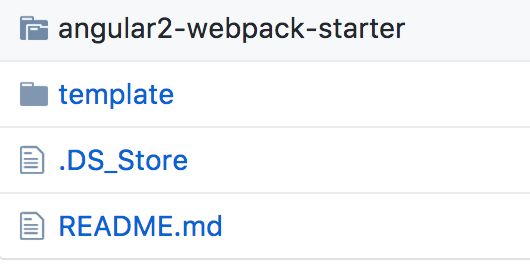
我试图再次执行上面的命令,结果显示
On branch master
Your branch is up-to-date with 'origin/master'.
nothing to commit, working tree clean那个文件(angular2-webpack-starter)图标是什么意思?
如何将该文件夹添加到我的GitHub存储库中?
回答 1
Stack Overflow用户
发布于 2017-03-10 00:01:38
这个图标的意思是:嵌套的git存储库。
意义:在执行git add *时,添加了嵌套的git angular2-webpack-starter的顶部文件夹,将其记录为gitlink ( 在父回购中的特殊条目,表示嵌套回购树的SHA1 )。
如果您确实希望包含angular2-webpack-starter的内容,则需要删除angular2-webpack/. you `子文件夹中的内容,然后删除gitlink,然后将文件夹添加回:
git rm --cached angular2-webpack-starter  # no trailing slash
git add .
git commit -m "record deletion of angular2-webpack-starter gitlink"

rm -Rf angular2-webpack-starter/.git
git add .
git commit -m "record deletion of angular2-webpack-starter"

git push但是,一个更干净的解决方案是将同样的angular2-webpack-starter添加到子模中,这将使其成为一个灰色文件夹(同样如此),但这一次的.gitmodules录音来自于angular2-webpack-starter来自何处。
https://stackoverflow.com/questions/42705741
复制相似问题
腾讯云开发者

Copyright © 2013 - 2026 Tencent Cloud. All Rights Reserved. 腾讯云 版权所有
深圳市腾讯计算机系统有限公司 ICP备案/许可证号:粤B2-20090059  粤公网安备44030502008569号
腾讯云计算(北京)有限责任公司 京ICP证150476号 | 京ICP备11018762号