
是什么导致Chrome中的Vue.js组件的动画/转换中断?
const NotificationBar = {
  name: 'notification-bar',

  template: `
    <div
      :class="{
        'notification-bar': true,
        'notification-bar--error': isError,
        'notification-bar--warning': isWarning,
        'notification-bar--info': isInfo,
        'notification-bar--visible': isVisible,
      }"

      @click="dismiss"
      @transitionend="transitionEnd($event)">
      {{ message }}
    </div>
  `,

  props: {
    message: {
      type: String,
      required: true,
    },

    type: {
      type: String,
      required: true,

      validator(value) {
        const valid = ['error', 'warning', 'info'];
        return valid.includes(value);
      },
    },

    dismissable: {
      type: Boolean,
      default: false,
    },

    timeout: {
      type: Number,
      default: 0,
    },
  },

  data() {
    return {
      isVisible: false,
    };
  },

  computed: {
    isError() {
      return this.type === 'error';
    },

    isWarning() {
      return this.type === 'warning';
    },

    isInfo() {
      return this.type === 'info';
    },
  },

  methods: {
    clear() {
      const event = 'cleared';
      let done;

      if (this.isVisible) {
        this.$once('transitionend', () => {
          done = true;
          this.$emit(event, done);
        });
        this.isVisible = false;
      } else {
        done = false;
        this.$emit(event, done);
      }
    },

    dismiss() {
      const event = 'dismissed';
      let done;

      if (this.dismissable) {
        done = true;
        this.$emit(event, done);
        this.clear();
      } else {
        done = false;
        this.$emit(event, done);
      }
    },

    show() {
      if (!this.isVisible) {
        this.isVisible = true;
        this.$emit('show', this.clear);

        if (this.timeout) {
          setTimeout(() => {
            this.$emit('timeout');
            this.clear();
          }, this.timeout);
        }
      }
    },

    transitionEnd(event) {
      this.$emit('transitionend', event);
    },
  },

  mounted() {
    window.requestAnimationFrame(this.show);
  },
};

const NotificationCenter = {
  name: 'notification-center',

  components: {
    NotificationBar,
  },

  template: `
    <div>
      <notification-bar
        v-for="notification in active"

        :message="notification.message"
        :type="notification.type"
        :dismissable="notification.dismissable"
        :timeout="notification.timeout"

        @cleared="clear">
      </notification-bar>
    </div>
  `,

  props: {
    queue: {
      type: Array,
      required: true,
    },
  },

  data() {
    return {
      active: [],
    };
  },

  computed: {
    hasActiveNotification() {
      return this.active.length > 0;
    },

    hasQueuedNotification() {
      return this.queue.length > 0;
    },
  },

  watch: {
    queue() {
      if (this.hasQueuedNotification && !this.hasActiveNotification) {
        this.setNextActive();
      }
    },
  },

  methods: {
    setNextActive() {
      this.setActive(this.queue.shift());
    },

    setActive(notification) {
      this.active.push(notification);
    },

    removeActive() {
      this.active.pop();
    },

    clear() {
      this.active.pop();

      if (this.hasQueuedNotification) {
        this.$nextTick(this.setNextActive);
      }
    },
  },
};

window.vm = new Vue({
  components: {
    NotificationCenter,
  },

  el: '#app',

  template: `
    <div>
      <notification-center
        :queue="notifications">
      </notification-center>

      <label>
        <strong>Type</strong> <br>
        Error <input v-model="type" type="radio" name="type" value="error"> <br>
        Warning <input v-model="type" type="radio" name="type" value="warning"> <br>
        Info <input v-model="type" type="radio" name="type" value="info"> <br>
      </label>

      <label>
        <strong>Message</strong>
        <input v-model="message" type="text">
      </label>

      <label>
        <strong>Dismissable</strong>
        <input v-model="dismissable" type="checkbox">
      </label>

      <label>
        <strong>Timeout</strong>
        <input v-model="timeout" type="number" step="100" min="0">
      </label>

      <button @click="generateNotification">Generate notification</button>
    </div>
  `,

  data: {
    notifications: [],

    type: null,
    message: null,
    dismissable: null,
    timeout: null,
  },

  methods: {
    generateNotification() {
      const {
        type,
        message,
        dismissable,
        timeout,
      } = this;

      this.notifications.push({
        type,
        message,
        dismissable,
        timeout,
      });

      this.type = this.message = this.dismissable = this.timeout = null;
    },
  },
});.notification-bar {
box-sizing: border-box;
position: absolute;
top: -3.2rem;
right: 0;
left: 0;
z-index: 9999;
width: 100%;
height: 3.2rem;
color: #fff;
font-family: 'Avenir Next', sans-serif;
font-size: 1.2em;
line-height: 3.2rem;
text-align: center;
transition: top 266ms ease;
}
.notification-bar--error {
background-color: #f02a4d;
}
.notification-bar--warning {
background-color: #ffc107;
}
.notification-bar--info {
background-color: #2196f3;
}
.notification-bar--visible {
top: 0;
}
label {
display: block;
margin: 2rem 0;
font-size: 1.4rem;
}
label:first-of-type {
margin-top: 5rem;
}<!DOCTYPE html>
<html>
<head>
<meta charset="utf-8">
<title></title>
<style>
html {
font-size: 62.5%;
}
body {
font-family: sans-serif;
}
</style>
</head>
<body>
<div id="app"></div>
<script src="https://cdnjs.cloudflare.com/ajax/libs/vue/2.0.3/vue.js"></script>
</body>
</html>
再现问题的步骤
- 运行在Chrome代码段上方。
- 生成一个通知。(将dismissable,类型设置为anything,将message设置为anything,设置生成通知)
- 观察通知栏
预期行为
通知栏顺利地进入可见视图。您可以通过在Firefox中执行上面的步骤来观察这一点。
这里是一个GIF演示了Chrome中的正确行为。单击生成通知,您可以看到条形图顺利过渡。
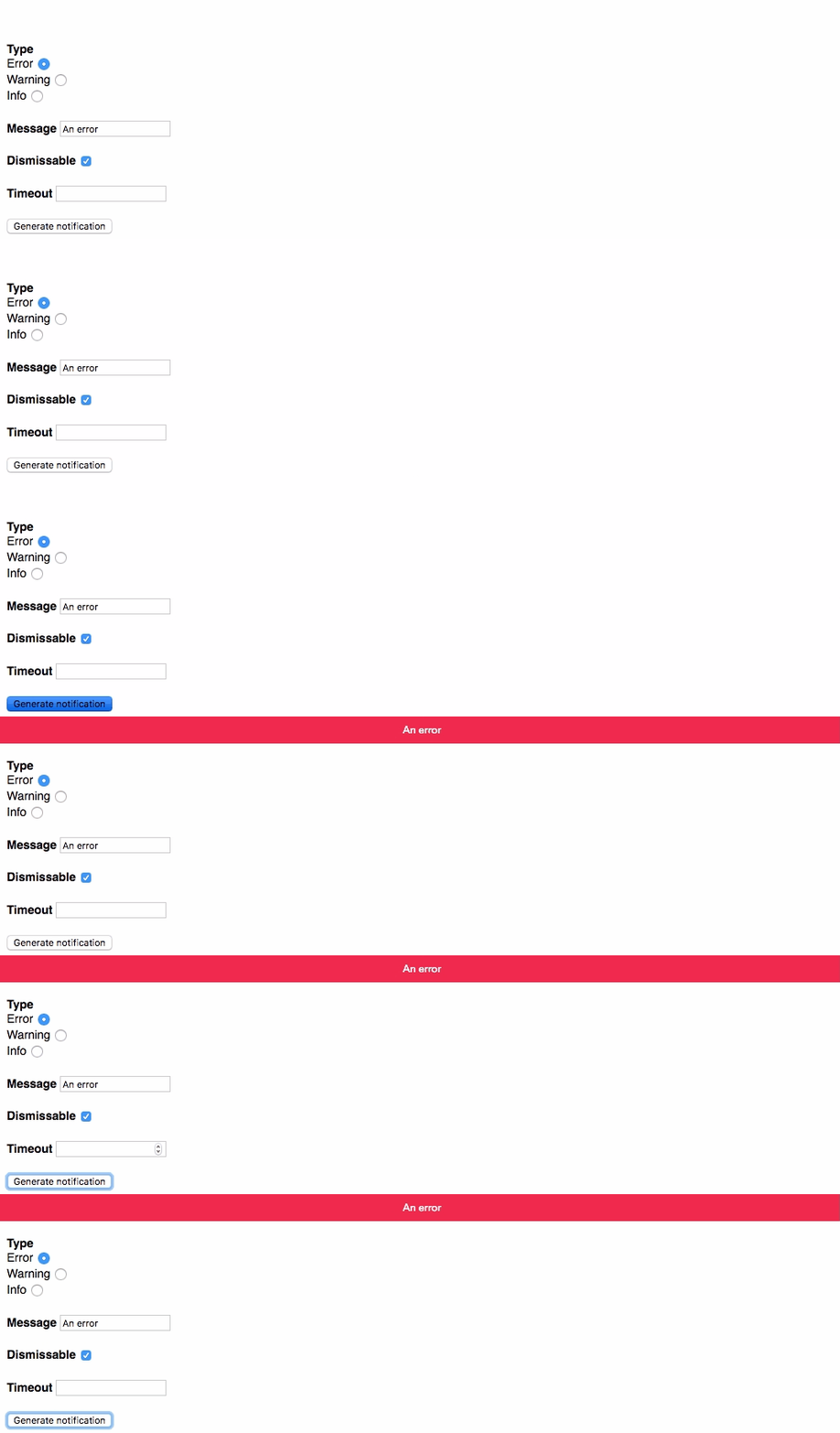
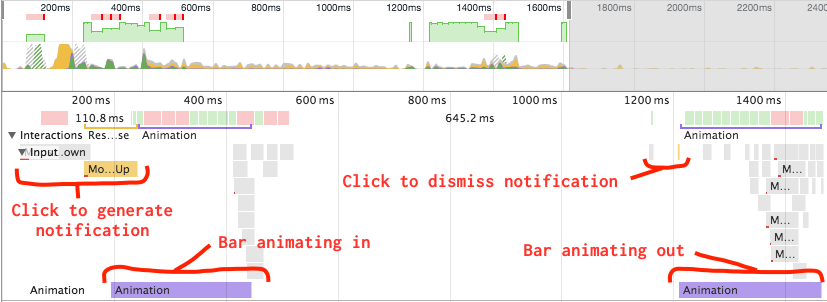
这里是Chrome行为正确的时间线的屏幕截图:
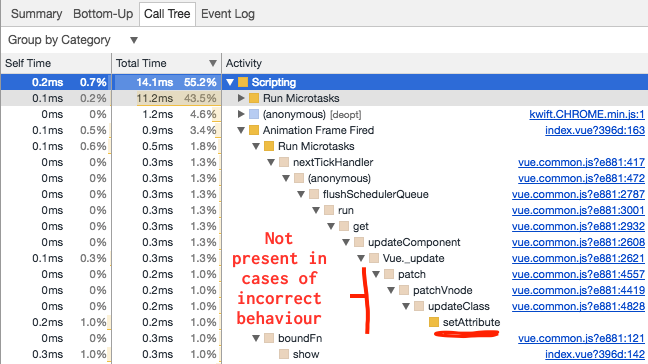
这里是Chrome行为正确时的调用树:
实际行为
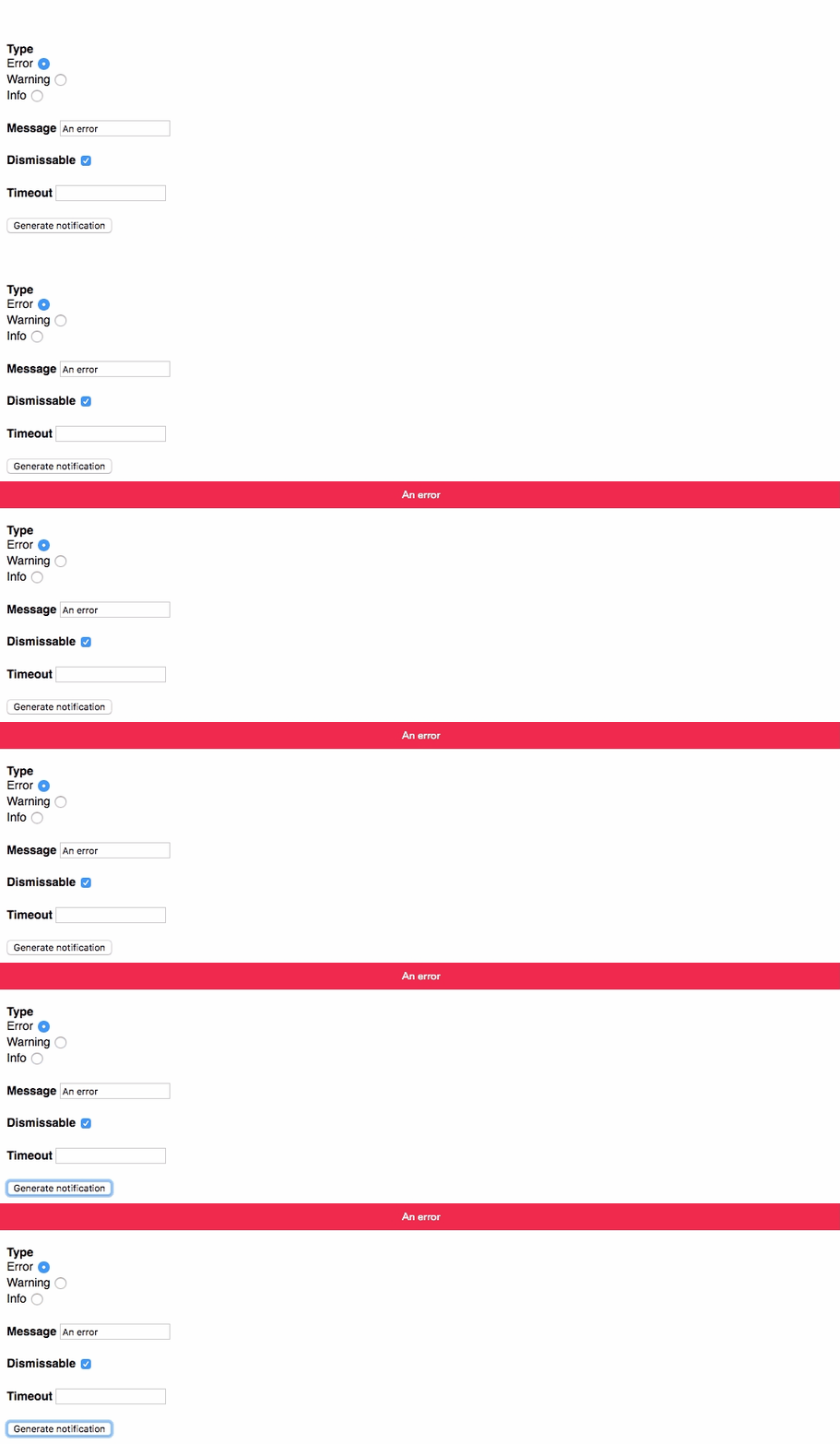
通知栏在大多数情况下并不能顺利地动画到可视视图中。在Chrome中捕获一个时间线时,在显示通知栏时没有显示运行的动画。动画总是正确运行时,酒吧是动画离开屏幕。动画总是在Firefox中正确运行。
这里是一个GIF,它演示了Chrome中的错误行为。在单击Generate notification时,可以看到条形图突然出现。
这里是Chrome行为不正确的时间线的截图:
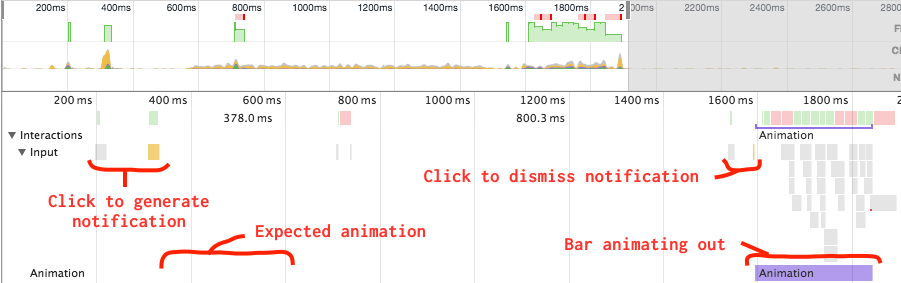
这里是Chrome行为不正确时的调用树:
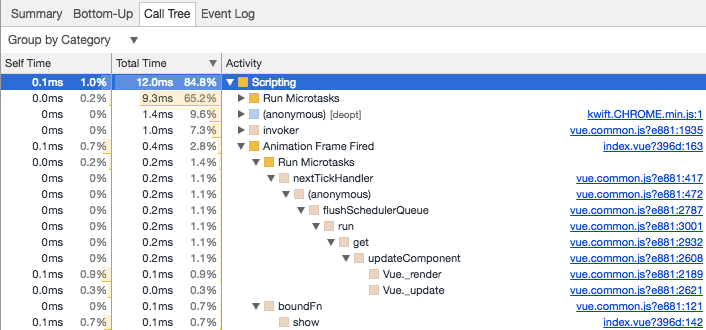
更多信息
概述了代码在做什么
NotificationCenter接受一个queue道具。这是一个对象数组,数组代表一个通知队列,一个对象表示单个通知。- 一旦
queue更改,监视程序将运行检查队列中是否有通知,以及是否存在活动通知。如果是这样,则将下一个通知设置为活动通知。 NotificationCenter的模板有一个指令循环在active中的项上,并呈现一个NotificationBar。在前一步中,设置了一个新的活动通知,从而创建一个新的通知条并将其挂载到DOM中。- 在DOM上挂载
NotificationBar之后,它的show方法将在window.requestAnimationFrame中运行。
回答 2
Stack Overflow用户
发布于 2017-03-10 12:22:18
在与Vue的贡献者LinusBorg就Vue论坛进行了一些讨论之后,我们找到了一个可能的原因:
..。这个问题很可能是Vue异步地修补DOM,因此当调用
mounted()时,组件的元素就存在,但它们并不是DOM中的主要元素。 因此,现在,取决于不同的浏览器如何处理普通任务、微任务和animationFrames的优先级,在Chrome中,元素可能还没有在DOM中,当您通过show()更改类时 在这种情况下,动画效果自然不会出现。 我建议尝试this.$nextTick()(这可以保证元素已经在DOM中),或者简单地使用Vue为您提供的工具,即<transition>组件。
最初尝试使用this.$nextTick,但在火狐和Chrome中都失败了。
最后,我能够使用<transition>组件实现整个过程。
const NotificationBar = {
  name: 'notification-bar',

  template: `
    <transition
      name="visible"
      mode="out-in"

      @after-enter="show">
      <div
        :class="{
          'notification-bar': true,
          'notification-bar--error': isError,
          'notification-bar--warning': isWarning,
          'notification-bar--info': isInfo,
          'notification-bar--visible': isVisible,
        }"

        :key="id"

        @click="dismiss">
        {{ message }}
      </div>
    </transition>
  `,

  props: {
    message: {
      type: String,
      required: true,
    },

    type: {
      type: String,
      required: true,

      validator(value) {
        const valid = ['error', 'warning', 'info'];
        return valid.includes(value);
      },
    },

    id: {
      type: [Number, String],
      required: true,
    },

    dismissable: {
      type: Boolean,
      default: false,
    },

    timeout: {
      type: Number,
      default: 0,
    },
  },

  data() {
    return {
      isVisible: false,
    };
  },

  computed: {
    isError() {
      return this.type === 'error';
    },

    isWarning() {
      return this.type === 'warning';
    },

    isInfo() {
      return this.type === 'info';
    },
  },

  methods: {
    clear() {
      const event = 'clear';
      let done;

      if (this.isVisible) {
        done = true;
        this.$emit(event, done);
        this.isVisible = false;
      } else {
        done = false;
        this.$emit(event, done);
      }
    },

    dismiss() {
      const event = 'dismissed';
      let done;

      if (this.dismissable) {
        done = true;
        this.$emit(event, done);
        this.clear();
      } else {
        done = false;
        this.$emit(event, done);
      }
    },

    show() {
      if (!this.isVisible) {
        this.isVisible = true;
        this.$emit('show', this.clear);

        if (this.timeout) {
          setTimeout(() => {
            this.$emit('timeout');
            this.clear();
          }, this.timeout);
        }
      }
    },
  },
};

const NotificationCenter = {
  name: 'notification-center',

  template: `
    <div>
      <notification-bar
        v-if="hasQueuedNotification"

        :message="activeNotification.message"
        :type="activeNotification.type"
        :dismissable="activeNotification.dismissable"
        :timeout="activeNotification.timeout"
        :id="activeNotification.id"

        @clear="clear">
      </notification-bar>
    </div>
  `,

  components: {
    NotificationBar,
  },

  props: {
    queue: {
      type: Array,
      required: true,
    },
  },

  computed: {
    hasQueuedNotification() {
      return this.queue.length > 0;
    },

    activeNotification() {
      return this.queue[0];
    },
  },

  methods: {
    clear() {
      this.queue.shift();
    },
  },
};

window.vm = new Vue({
  components: {
    NotificationCenter,
  },

  el: '#app',

  template: `
    <div>
      <notification-center
        :queue="notifications">
      </notification-center>

      <label>
        <strong>Type</strong> <br>
        Error <input v-model="type" type="radio" name="type" value="error"> <br>
        Warning <input v-model="type" type="radio" name="type" value="warning"> <br>
        Info <input v-model="type" type="radio" name="type" value="info"> <br>
      </label>

      <label>
        <strong>Message</strong>
        <input v-model="message" type="text">
      </label>

      <label>
        <strong>Dismissable</strong>
        <input v-model="dismissable" type="checkbox">
      </label>

      <label>
        <strong>Timeout</strong>
        <input v-model="timeout" type="number" step="100" min="0">
      </label>

      <button @click="generateNotification">Generate notification</button>
    </div>
  `,

  data: {
    notifications: [],

    type: null,
    message: null,
    dismissable: null,
    timeout: null,

    dismissIndex: null,
    dismissMessage: null,
  },

  methods: {
    generateNotification() {
      const {
        type,
        message,
        dismissable,
        timeout,
      } = this;

      const id = Date.now();

      this.notifications.push({
        type,
        message,
        dismissable,
        timeout,
        id,
      });

      this.type = this.message = this.dismissable = this.timeout = null;
    },
  },
});.notification-bar {
box-sizing: border-box;
position: absolute;
top: 0;
right: 0;
left: 0;
z-index: 9999;
width: 100%;
height: 3.2rem;
color: #fff;
font-family: 'Avenir Next', sans-serif;
font-size: 1.2em;
line-height: 3.2rem;
text-align: center;
}
.notification-bar--error {
background-color: #f02a4d;
}
.notification-bar--warning {
background-color: #ffc107;
}
.notification-bar--info {
background-color: #2196f3;
}
.notification-bar.visible-enter, .notification-bar.visible-leave-to {
top: -3.2rem;
}
.notification-bar.visible-enter-to, .notification-bar.visible-leave {
top: 0;
}
.notification-bar.visible-enter-active, .notification-bar.visible-leave-active {
transition: top 266ms ease;
}
/* ================================================================== */
/* */
/* ================================================================== */
html {
font-size: 62.5%;
}
body {
margin: 0;
border: 1px solid black;
font-family: sans-serif;
}
label {
display: block;
margin: 2rem 0;
font-size: 1.4rem;
}
label:first-of-type {
margin-top: 5rem;
}<!DOCTYPE html>
<html>
<head>
<meta charset="utf-8">
<meta name="viewport" content="width=device-width">
<title></title>
</head>
<body>
<div id="app"></div>
<script src="https://cdnjs.cloudflare.com/ajax/libs/vue/2.1.10/vue.js"></script>
</body>
</html>
Stack Overflow用户
发布于 2017-03-08 17:28:40
问题在于这一行:
this.type = this.message = this.dismissable = this.timeout = null;如果你把它移除,它就能正常工作。当它被执行时,道具变成空,并且您已经验证道具不应该是空的。
const NotificationBar = {
  name: 'notification-bar',

  template: `
    <div
      :class="{
        'notification-bar': true,
        'notification-bar--error': isError,
        'notification-bar--warning': isWarning,
        'notification-bar--info': isInfo,
        'notification-bar--visible': isVisible,
      }"

      @click="dismiss"
      @transitionend="transitionEnd($event)">
      {{ message }}
    </div>
  `,

  props: {
    message: {
      type: String,
      required: true,
    },

    type: {
      type: String,
      required: true,

      validator(value) {
        const valid = ['error', 'warning', 'info'];
        return valid.includes(value);
      },
    },

    dismissable: {
      type: Boolean,
      default: false,
    },

    timeout: {
      type: Number,
      default: 0,
    },
  },

  data() {
    return {
      isVisible: false,
    };
  },

  computed: {
    isError() {
      return this.type === 'error';
    },

    isWarning() {
      return this.type === 'warning';
    },

    isInfo() {
      return this.type === 'info';
    },
  },

  methods: {
    clear() {
      const event = 'cleared';
      let done;

      if (this.isVisible) {
        this.$once('transitionend', () => {
          done = true;
          this.$emit(event, done);
        });
        this.isVisible = false;
      } else {
        done = false;
        this.$emit(event, done);
      }
    },

    dismiss() {
      const event = 'dismissed';
      let done;

      if (this.dismissable) {
        done = true;
        this.$emit(event, done);
        this.clear();
      } else {
        done = false;
        this.$emit(event, done);
      }
    },

    show() {
      if (!this.isVisible) {
        this.isVisible = true;
        this.$emit('show', this.clear);

        if (this.timeout) {
          setTimeout(() => {
            this.$emit('timeout');
            this.clear();
          }, this.timeout);
        }
      }
    },

    transitionEnd(event) {
      this.$emit('transitionend', event);
    },
  },

  mounted() {
    window.requestAnimationFrame(this.show);
  },
};

const NotificationCenter = {
  name: 'notification-center',

  components: {
    NotificationBar,
  },

  template: `
    <div>
      <notification-bar
        v-for="notification in active"

        :message="notification.message"
        :type="notification.type"
        :dismissable="notification.dismissable"
        :timeout="notification.timeout"

        @cleared="clear">
      </notification-bar>
    </div>
  `,

  props: {
    queue: {
      type: Array,
      required: true,
    },
  },

  data() {
    return {
      active: [],
    };
  },

  computed: {
    hasActiveNotification() {
      return this.active.length > 0;
    },

    hasQueuedNotification() {
      return this.queue.length > 0;
    },
  },

  watch: {
    queue() {
      if (this.hasQueuedNotification && !this.hasActiveNotification) {
        this.setNextActive();
      }
    },
  },

  methods: {
    setNextActive() {
      this.setActive(this.queue.shift());
    },

    setActive(notification) {
      this.active.push(notification);
    },

    removeActive() {
      this.active.pop();
    },

    clear() {
      this.active.pop();

      if (this.hasQueuedNotification) {
        this.$nextTick(this.setNextActive);
      }
    },
  },
};

window.vm = new Vue({
  components: {
    NotificationCenter,
  },

  el: '#app',

  template: `
    <div>
      <notification-center
        :queue="notifications">
      </notification-center>

      <label>
        <strong>Type</strong> <br>
        Error <input v-model="type" type="radio" name="type" value="error"> <br>
        Warning <input v-model="type" type="radio" name="type" value="warning"> <br>
        Info <input v-model="type" type="radio" name="type" value="info"> <br>
      </label>

      <label>
        <strong>Message</strong>
        <input v-model="message" type="text">
      </label>

      <label>
        <strong>Dismissable</strong>
        <input v-model="dismissable" type="checkbox">
      </label>

      <label>
        <strong>Timeout</strong>
        <input v-model="timeout" type="number" step="100" min="0">
      </label>

      <button @click="generateNotification">Generate notification</button>
    </div>
  `,

  data: {
    notifications: [],

    type: null,
    message: null,
    dismissable: null,
    timeout: null,
  },

  methods: {
    generateNotification() {
      const {
        type,
        message,
        dismissable,
        timeout,
      } = this;

      this.notifications.push({
        type,
        message,
        dismissable,
        timeout,
      });

      //this.type = this.message = this.dismissable = this.timeout = null;
    },
  },
});.notification-bar {
box-sizing: border-box;
position: absolute;
top: -3.2rem;
right: 0;
left: 0;
z-index: 9999;
width: 100%;
height: 3.2rem;
color: #fff;
font-family: 'Avenir Next', sans-serif;
font-size: 1.2em;
line-height: 3.2rem;
text-align: center;
transition: top 266ms ease;
}
.notification-bar--error {
background-color: #f02a4d;
}
.notification-bar--warning {
background-color: #ffc107;
}
.notification-bar--info {
background-color: #2196f3;
}
.notification-bar--visible {
top: 0;
}
label {
display: block;
margin: 2rem 0;
font-size: 1.4rem;
}
label:first-of-type {
margin-top: 5rem;
}<!DOCTYPE html>
<html>
<head>
<meta charset="utf-8">
<title></title>
<style>
html {
font-size: 62.5%;
}
body {
font-family: sans-serif;
}
</style>
</head>
<body>
<div id="app"></div>
<script src="https://cdnjs.cloudflare.com/ajax/libs/vue/2.0.3/vue.js"></script>
</body>
</html>
编辑
您必须在setActive函数中添加一些验证,就像在active中推送空项一样,有些验证失败了。
  setActive(notification) {
    if(notification.message){
    this.active.push(notification);
    }
},看看这个小提琴。
https://stackoverflow.com/questions/42677694
复制相似问题
腾讯云开发者

Copyright © 2013 - 2026 Tencent Cloud. All Rights Reserved. 腾讯云 版权所有
深圳市腾讯计算机系统有限公司 ICP备案/许可证号:粤B2-20090059  粤公网安备44030502008569号
腾讯云计算(北京)有限责任公司 京ICP证150476号 | 京ICP备11018762号