
使用css动画的元素方向控制
使用css动画的元素方向控制
提问于 2017-03-03 16:27:51
我有3只带有css animation.Currently的鸟,所有三只鸟都以一条直线进入画布,但我想要实现的鸟类不像this.What那样飞行,这在图片中是很清楚的描述,我想在它们进入画布的每个阶段控制它们的飞行方向。有人能帮我实现这个目标吗?
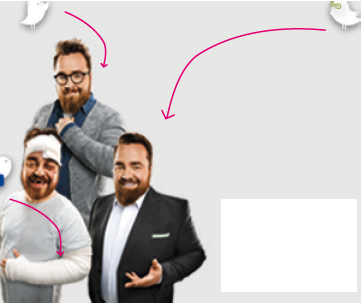

我的代码
<html>
 <head>
  <link rel="stylesheet" href="style.css">
 </head>
 <body>
  <div class="canvas">
    <img class="people" src="https://i.imgsafe.org/9967e45cc8.png" alt="">
    <img class="bird-1" src="https://i.imgsafe.org/996ac926a0.png" alt="">
    <img class="bird-2" src="https://i.imgsafe.org/996bc03236.png" alt="">
    <img class="bird-3" src="https://i.imgsafe.org/996cfb24a4.png" alt="">
 </div>
</body>
</html>
CSS
body{
margin: 0;
}

.canvas{
background-color: lightgrey;
width: 300px;
height: 250px;
position: relative;
left: 30%;
top: 20%;
overflow: hidden;
}

.logo,
.people{
 position: absolute;
}


.bird-1{
position: absolute;
width: 50px;
-webkit-animation: first 2s linear forwards;
animation: first 2s linear forwards;
top: -70px;
left: 55px;
}

.bird-2{
position: absolute;
width: 50px;
-webkit-animation: second 2s linear forwards;
animation: second 2s linear forwards;
top: 165px;
left: -50px;
}
.bird-3{
position: absolute;
width: 50px;
-webkit-animation: third 2s linear forwards;
animation: third 2s linear forwards;
top: 163px;
right: -50px;
transform: rotateY(180deg);
}

@-webkit-keyframes first{
0%{top: -70px;}
100%{top:65px;}
}

@-webkit-keyframes second{
0%{left: -50px;}
100%{left:15px;}
}

@-webkit-keyframes third{
0%{right: -50px;}
100%{right:135px;}
}
我的笔
回答 1
Stack Overflow用户
发布于 2017-03-03 18:58:28
你必须在X轴上以一定的速度(用曲线)创建一个运动,在另一个速度上创建一个Y轴的运动。您可以查看本教程,它将为您提供在CSS:http://tobiasahlin.com/blog/curved-path-animations-in-css/中所需的一切。
您也可以为每个鸟创建SVG路径,并使用此技术,但它需要JavaScript:http://icanbecreative.com/article/animate-element-along-svg-path/。
页面原文内容由Stack Overflow提供。腾讯云小微IT领域专用引擎提供翻译支持
原文链接:
https://stackoverflow.com/questions/42583918
复制相关文章
相似问题
腾讯云开发者

Copyright © 2013 - 2026 Tencent Cloud. All Rights Reserved. 腾讯云 版权所有
深圳市腾讯计算机系统有限公司 ICP备案/许可证号:粤B2-20090059  粤公网安备44030502008569号
腾讯云计算(北京)有限责任公司 京ICP证150476号 | 京ICP备11018762号