
我在Excel中记录了一个宏,但是代码抛出了一个错误?
我在Excel中记录了一个宏,但是代码抛出了一个错误?
提问于 2017-03-03 13:15:29
我在用这个代码
Sub Cleanse()
    '
    ' Cleanse Macro
    '
    Selection.SpecialCells(xlCellTypeBlanks).Select
    Selection.EntireRow.Delete
End Sub
我让Excel自动生成它:
- 压录宏
- 进入特殊状态
- 选择所有空白单元格
- 在单元格上使用删除选择
- 停止录制宏
然而,当我撤销并运行宏尝试让它做同样的事情时,它会说:
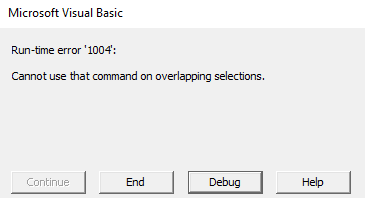
回答 2
Stack Overflow用户
回答已采纳
发布于 2017-03-03 13:51:15
你可以用这艘潜艇
Sub CleanSheet(sht As Worksheet)
    On Error Resume Next
    Intersect(sht.UsedRange, sht.UsedRange.SpecialCells(xlCellTypeBlanks).EntireRow).EntireRow.Delete
End Sub
将由您的“主”小组按以下方式调用
Sub Main()
    CleanSheet Worksheets("mySheetToBeCleanedName") '<--| change "mySheetToBeCleanedName" to actual sheet name you want to clear
End SubStack Overflow用户
发布于 2017-03-03 13:39:36
您的错误是因为您的选择(在运行子程序之前手动完成的选择)包含同一单元格两次,至少一次。编辑:这可能是由于同一行上的多个单元格为空,然后选择每个单元格的整行!有关修补程序,请参见下面的代码编辑。
您应该尽量避免使用Select,尽管宏记录器经常使用它。见此处:How to avoid using Select in Excel VBA macros
所以你的潜艇的一个更好的格式是:
Sub Cleanse()
    ' Cleanse Macro for deleting rows where cells in a range are blank
    '
    Dim myRange as Range
    ' Set the selection range to the first column in the used range.
    ' You can use this line to select any range you like.
    ' For instance if set on manual selection, you could use
    ' Set myRange = Selection. But this won't solve your actual problem.
    Set myRange = ActiveSheet.UsedRange.Columns(1)
    ' Delete all rows where a cell in myRange was blank
    myRange.SpecialCells(xlCellTypeBlanks).EntireRow.Delete
End Sub编辑:可以循环所有列如下,避免重叠范围从EntireRow。
Sub Cleanse()
    ' Cleanse Macro for deleting rows where cells in a range are blank
    '
    Dim myRange as Range
    Dim colNum as Long
    ' Cycle over all used columns
    With ActiveSheet
        For colNum = 1 To .UsedRange.Columns.Count + .UsedRange.Columns(1).Column
        ' Set the selection range to the column in used range.
            Set myRange = .UsedRange.Columns(colNum)
            ' Delete all rows where a cell in myRange was blank
            myRange.SpecialCells(xlCellTypeBlanks).EntireRow.Delete
        Next colNum
    End With
End Sub页面原文内容由Stack Overflow提供。腾讯云小微IT领域专用引擎提供翻译支持
原文链接:
https://stackoverflow.com/questions/42579889
复制相关文章
相似问题
腾讯云开发者

Copyright © 2013 - 2026 Tencent Cloud. All Rights Reserved. 腾讯云 版权所有
深圳市腾讯计算机系统有限公司 ICP备案/许可证号:粤B2-20090059  粤公网安备44030502008569号
腾讯云计算(北京)有限责任公司 京ICP证150476号 | 京ICP备11018762号