
通过TCP将统一仿真与python控制器连接起来
为了进行初步研究,我尝试将一个简单的模拟环境与基于神经网络的python控制器连接起来。模拟统一环境中的主要人物应该根据自己的经验学习行为:
- 主字符扫描环境并将其存储在数据结构中;
- 该数据结构通过TCP发送到python中正在运行的服务器;
- 在python中执行复杂的计算(基于从联合接收的数据),并产生结果(动作);
- 结果(动作)通过TCP发送回团结。该字符执行与结果相对应的操作。
- 步骤1-4重复到无穷大(除非客户机或服务器停止)。
此过程可以抽象为通过TCP发送的乒乓消息,在该消息中,联合发送一个" Ping ",Python进行一些计算,并生成一个" Pong“,该”Pong“将被发送回联合,后者将更新模拟,并再次生成一个"Ping”,并将其发送给python.
我目前在一个玩具项目中测试这个过程。我有一个脚本附加在一个统一场景的主摄像机上,看起来如下:
using UnityEngine;
using System.Collections;
using System;
using System.IO;
using System.Net.Sockets;
using Newtonsoft.Json;
using System.Threading;


public class networkSocketSO : MonoBehaviour
{
    public String host = "localhost";
    public Int32 port = 50000;

    internal Boolean socket_ready = false;
    internal String input_buffer = "";

    TcpClient tcp_socket;
    NetworkStream net_stream;

    StreamWriter socket_writer;
    StreamReader socket_reader;

    private void Start()
    {
        setupSocket();
    }


     void Update()
     {
        string received_data = readSocket();
        switch (received_data)
             {
                 case "pong":
                     Debug.Log("Python controller sent: " + (string)received_data);
                     writeSocket("ping");
                     break;
                 default:
                     Debug.Log("Nothing received");
                     break;
         }
     }

    void OnApplicationQuit()
    {
        closeSocket();
    }

    // Helper methods for:
    //...setting up the communication
    public void setupSocket()
    {
        try
        {
            tcp_socket = new TcpClient(host, port);
            net_stream = tcp_socket.GetStream();
            socket_writer = new StreamWriter(net_stream);
            socket_reader = new StreamReader(net_stream);
            socket_ready = true;
        }
        catch (Exception e)
        {
            // Something went wrong
            Debug.Log("Socket error: " + e);
        }
    }

    //... writing to a socket...
    public void writeSocket(string line)
    {
        if (!socket_ready)
            return;

        line = line + "\r\n";
        socket_writer.Write(line);
        socket_writer.Flush();
    }

    //... reading from a socket...
    public String readSocket()
    {
        if (!socket_ready)
            return "";

        if (net_stream.DataAvailable)
            return socket_reader.ReadLine();

        return "";
    }

    //... closing a socket...
    public void closeSocket()
    {
        if (!socket_ready)
            return;

        socket_writer.Close();
        socket_reader.Close();
        tcp_socket.Close();
        socket_ready = false;
    }
}
和具有以下代码的python服务器:
import socket
import json

host = 'localhost'
port = 50000
backlog = 5
size = 1024
s = socket.socket(socket.AF_INET, socket.SOCK_STREAM)
s.bind((host,port))
s.listen(backlog)

while 1:
    client, address = s.accept()
    print "Client connected."
    while 1:
        data = client.recv(size)
        if data == "ping":
            print ("Unity Sent: " + str(data))
            client.send("pong")
        else:
            client.send("Bye!")
            print ("Unity Sent Something Else: " + str(data))
            client.close()
            break
如果启动服务器,然后运行,就会发现一些奇怪的事情正在发生。也就是说,python服务器似乎不理解Unity发送的"ping“字符串。此外,我希望联合模拟中的帧在接收到python服务器的"Pong“消息之前不要更新。
我读过关于使用协同器或线程的类似问题的解决方案,但我担心它会建立另一个“时钟”,并且没有真正的ping-pong-updateframe-ping-pong-updateframe...。进程。
有什么想法吗?
提前谢谢!
请记住,真正的信息将不是“平安”和“乒乓”,而是正确的Json对象。这只是一种简化。
编辑:我首先启动python服务器,然后在编辑器中启动团结模拟。在python控制台上,我得到:
Client connected.
Unity Sent Something Else: ping
...which证明了我的说法:"python不理解通过统一(C#)发送的字符串“。
在统一控制台中,我得到:
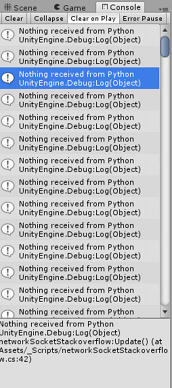
回答 2
Stack Overflow用户
发布于 2017-03-02 08:49:10
我刚刚找到了我的第一个问题的解决方案,即"python不理解来自Unity的字符串“。似乎是换行符引起了这个问题。
我刚把:
line = line + "\r\n";原代码中的行。这样,字符串中不添加额外的转义字符。添加\r\n会导致python的socket.recv()将ping与ping\r\n进行比较,并且它总是在switch语句中触发默认情况。
反过来(从python),我发送pong\n (注意转义字符),以便统一(C#) streamWriter.ReadLine()能够接收到清晰的pong。
现在,相互信息的理解起作用了。然而,它并没有解决我的第二个问题-达到乒乓更新帧过程。
Stack Overflow用户
发布于 2017-11-09 22:21:51
您应该做出响应异步。你可以使用回调。您的错误是您正在进行持续的轮询,而套接字可用的调用将始终是假的。
在Unity中尝试以下代码:
using UnityEngine;
using System.Collections;
using System;
using System.Net;
using System.Net.Sockets;

public class Client : MonoBehaviour {

private Socket _clientSocket = new Socket(AddressFamily.InterNetwork,SocketType.Stream,ProtocolType.Tcp);
private byte[] _recieveBuffer = new byte[8142];

void Start() {
    SetupServer ();
}

void Update() {

}

void OnApplicationQuit()
{
    _clientSocket.Close ();
}

private void SetupServer()
{
    try
    {
        _clientSocket.Connect(new IPEndPoint(IPAddress.Loopback,50003));
    }
    catch(SocketException ex)
    {
        Debug.Log(ex.Message);
    }

    _clientSocket.BeginReceive(_recieveBuffer,0,_recieveBuffer.Length,SocketFlags.None,new AsyncCallback(ReceiveCallback),null);

}


private void ReceiveCallback(IAsyncResult AR)
{
    //Check how much bytes are recieved and call EndRecieve to finalize handshake
    int recieved = _clientSocket.EndReceive(AR);

    if(recieved <= 0)
        return;

    //Copy the recieved data into new buffer , to avoid null bytes
    byte[] recData = new byte[recieved];
    Buffer.BlockCopy(_recieveBuffer,0,recData,0,recieved);

    //Process data here the way you want , all your bytes will be stored in recData
    Debug.Log(System.Text.Encoding.Default.GetString(_recieveBuffer));
    SendData (System.Text.Encoding.Default.GetBytes ("ping"));

    //Start receiving again
    _clientSocket.BeginReceive(_recieveBuffer,0,_recieveBuffer.Length,SocketFlags.None,new AsyncCallback(ReceiveCallback),null);
}

private void SendData(byte[] data)
{
    SocketAsyncEventArgs socketAsyncData = new SocketAsyncEventArgs();
    socketAsyncData.SetBuffer(data,0,data.Length);
    _clientSocket.SendAsync(socketAsyncData);
}
}
https://stackoverflow.com/questions/42531691
复制相似问题
腾讯云开发者

Copyright © 2013 - 2026 Tencent Cloud. All Rights Reserved. 腾讯云 版权所有
深圳市腾讯计算机系统有限公司 ICP备案/许可证号:粤B2-20090059  粤公网安备44030502008569号
腾讯云计算(北京)有限责任公司 京ICP证150476号 | 京ICP备11018762号