
OpenCV检测图像上的斑点
我需要在图像上找到(并绘制)/get最大值和最小半径点。(以下样本)
问题是如何为图像找到正确的过滤器,从而允许Canny或Threshold转换突出显示这些气泡。然后,我将使用findContours来查找矩形。
我试过:
Threshold-具有不同的层次blur->erode->erode->grayscale->canny- 用不同的“行”更改图像色调
等等。较好的检测结果是检测块(20-30%)。这个信息不允许在blob周围划直线。此外,感谢阴影,不相关的斑点被检测到,所以也防止了检测的区域。
据我所知,我需要找到有强烈对比的计数器(不像阴影中那样平滑)。有什么方法可以用openCV来实现吗?
更新
病例:图1,图2,图3,图4,图5,图6,图7,图8,图9,图10,图11,图12


再一次更新
我相信这个斑点在边缘有对比区域。因此,我试图使边缘变得更强:我创建了2 gray scale Mat: A and B,为第二个Gaussian blur应用了Gaussian blur(以降低噪声),然后我做了一些计算:遍历每个像素,找出'A‘的Xi,Yi和’B‘附近的点之间的最大差值:
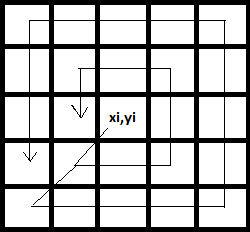
并将max差分法应用于Xi,Yi。所以我就像这样:
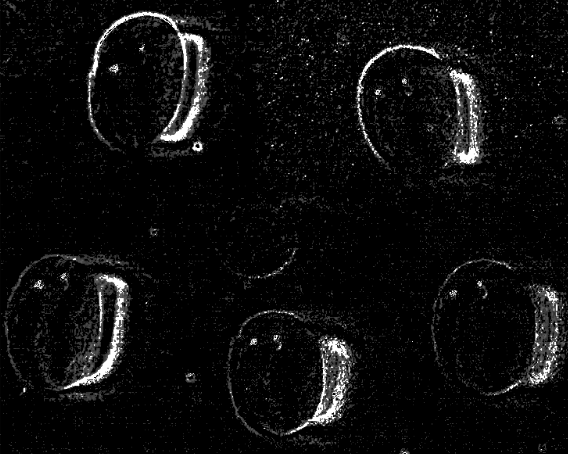
我走的路对吗?顺便说一句,我可以通过OpenCV方法达到这样的目的吗?
Update 图像去噪帮助减少noize,Sobel -突出显示轮廓,然后threshold + findContours和custome convexHull得到了一些类似的东西,但这对一些小块不好。
回答 4
Stack Overflow用户
发布于 2017-03-10 23:54:49
由于输入图像之间存在很大的差异,算法应该能够适应这种情况。由于Canny是基于高频检测的,所以我的算法将图像的锐度作为预处理自适应的参数。我不想花一周的时间来计算所有数据的函数,所以我应用了一个基于2张图像的简单线性函数,然后用第三个图像进行了测试。以下是我的研究结果:
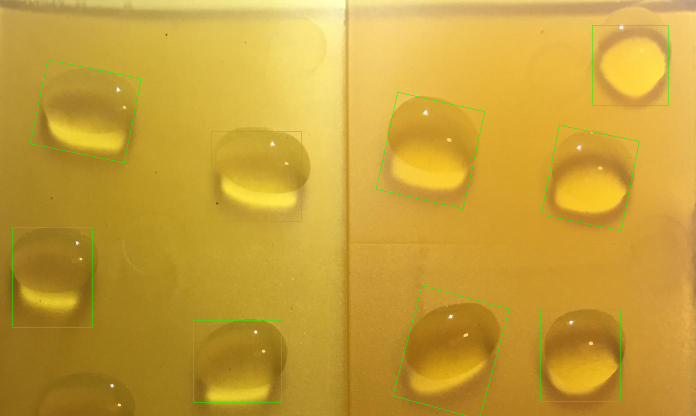
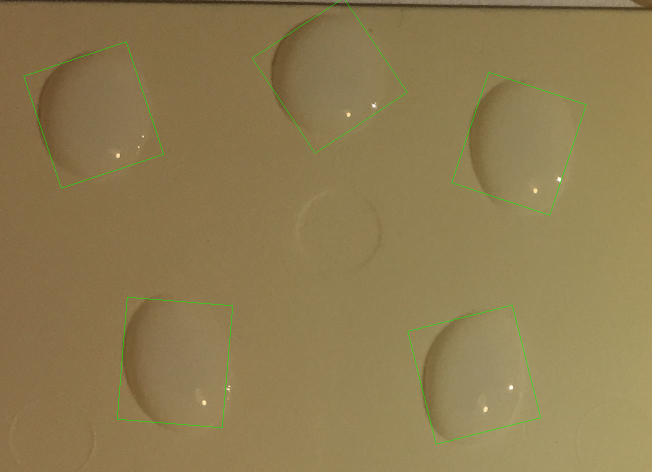
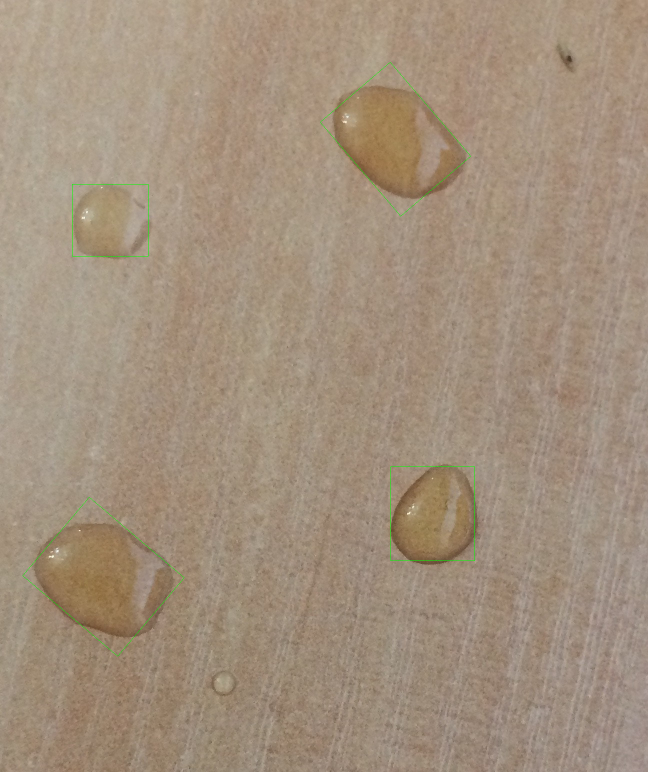
请记住,这是一个非常基本的方法,只是证明了一点。它将需要实验、测试和提炼。其想法是使用Sobel和求和所有获得的像素。这,除以图像的大小,应该给你一个基本的估计高频率。图像的响应。现在,在实验上,我找到了在两个测试用例中工作的CLAHE过滤器的clipLimit值,并找到了连接高freq的线性函数。用CLAHE滤波器对输入进行响应,取得良好的效果。
sobel = get_sobel(img)
clip_limit = (-2.556) * np.sum(sobel)/(img.shape[0] * img.shape[1]) + 26.557
这是适应性的部分。现在是轮廓图。我花了一段时间才找到一种正确的滤除噪音的方法。我选择了一个简单的技巧:两次使用等高线搜索。首先,我使用它过滤掉不必要的,噪音的轮廓。然后,我继续使用一些形态学魔法,最终得到被检测对象的正确块(代码中有更多的细节)。最后一步是根据计算的平均值对包围矩形进行过滤,因为在所有样本上,这些小块的大小都是相对相似的。
import cv2
import numpy as np


def unsharp_mask(img, blur_size = (5,5), imgWeight = 1.5, gaussianWeight = -0.5):
    gaussian = cv2.GaussianBlur(img, (5,5), 0)
    return cv2.addWeighted(img, imgWeight, gaussian, gaussianWeight, 0)


def smoother_edges(img, first_blur_size, second_blur_size = (5,5), imgWeight = 1.5, gaussianWeight = -0.5):
    img = cv2.GaussianBlur(img, first_blur_size, 0)
    return unsharp_mask(img, second_blur_size, imgWeight, gaussianWeight)


def close_image(img, size = (5,5)):
    kernel = np.ones(size, np.uint8)
    return cv2.morphologyEx(img, cv2.MORPH_CLOSE, kernel)


def open_image(img, size = (5,5)):
    kernel = np.ones(size, np.uint8)
    return cv2.morphologyEx(img, cv2.MORPH_OPEN, kernel)


def shrink_rect(rect, scale = 0.8):
    center, (width, height), angle = rect
    width = width * scale
    height = height * scale
    rect = center, (width, height), angle
    return rect


def clahe(img, clip_limit = 2.0):
    clahe = cv2.createCLAHE(clipLimit=clip_limit, tileGridSize=(5,5))
    return clahe.apply(img)


def get_sobel(img, size = -1):
    sobelx64f = cv2.Sobel(img,cv2.CV_64F,2,0,size)
    abs_sobel64f = np.absolute(sobelx64f)
    return np.uint8(abs_sobel64f)


img = cv2.imread("blobs4.jpg")
# save color copy for visualizing
imgc = img.copy()
# resize image to make the analytics easier (a form of filtering)
resize_times = 5
img = cv2.resize(img, None, img, fx = 1 / resize_times, fy = 1 / resize_times)
img = cv2.cvtColor(img, cv2.COLOR_BGR2GRAY)

# use sobel operator to evaluate high frequencies
sobel = get_sobel(img)
# experimentally calculated function - needs refining
clip_limit = (-2.556) * np.sum(sobel)/(img.shape[0] * img.shape[1]) + 26.557

# don't apply clahe if there is enough high freq to find blobs
if(clip_limit < 1.0):
    clip_limit = 0.1
# limit clahe if there's not enough details - needs more tests
if(clip_limit > 8.0):
    clip_limit = 8

# apply clahe and unsharp mask to improve high frequencies as much as possible
img = clahe(img, clip_limit)
img = unsharp_mask(img)

# filter the image to ensure edge continuity and perform Canny
# (values selected experimentally, using trackbars)
img_blurred = (cv2.GaussianBlur(img.copy(), (2*2+1,2*2+1), 0))
canny = cv2.Canny(img_blurred, 35, 95)

# find first contours
_, cnts, _ = cv2.findContours(canny.copy(), cv2.RETR_LIST, cv2.CHAIN_APPROX_SIMPLE)

# prepare black image to draw contours
canvas = np.ones(img.shape, np.uint8)
for c in cnts:
    l = cv2.arcLength(c, False)
    x,y,w,h = cv2.boundingRect(c)
    aspect_ratio = float(w)/h

    # filter "bad" contours (values selected experimentally)
    if l > 500:
        continue
    if l < 20:
        continue
    if aspect_ratio < 0.2:
        continue
    if aspect_ratio > 5:
        continue
    if l > 150 and (aspect_ratio > 10 or aspect_ratio < 0.1):
        continue
    # draw all the other contours
    cv2.drawContours(canvas, [c], -1, (255, 255, 255), 2)

# perform closing and blurring, to close the gaps
canvas = close_image(canvas, (7,7))
img_blurred = cv2.GaussianBlur(canvas, (8*2+1,8*2+1), 0)
# smooth the edges a bit to make sure canny will find continuous edges
img_blurred = smoother_edges(img_blurred, (9,9))
kernel = np.ones((3,3), np.uint8)
# erode to make sure separate blobs are not touching each other
eroded = cv2.erode(img_blurred, kernel)
# perform necessary thresholding before Canny
_, im_th = cv2.threshold(eroded, 50, 255, cv2.THRESH_BINARY)
canny = cv2.Canny(im_th, 11, 33)

# find contours again. this time mostly the right ones
_, cnts, _ = cv2.findContours(canny.copy(), cv2.RETR_EXTERNAL, cv2.CHAIN_APPROX_SIMPLE)

# calculate the mean area of the contours' bounding rectangles
sum_area = 0
rect_list = []
for i,c in enumerate(cnts):
    rect = cv2.minAreaRect(c)
    _, (width, height), _ = rect
    area = width*height
    sum_area += area
    rect_list.append(rect)
mean_area = sum_area / len(cnts)

# choose only rectangles that fulfill requirement:
# area > mean_area*0.6
for rect in rect_list:
    _, (width, height), _ = rect
    box = cv2.boxPoints(rect)
    box = np.int0(box * 5)
    area = width * height

    if(area > mean_area*0.6):
        # shrink the rectangles, since the shadows and reflections
        # make the resulting rectangle a bit bigger
        # the value was guessed - might need refinig
        rect = shrink_rect(rect, 0.8)
        box = cv2.boxPoints(rect)
        box = np.int0(box * resize_times)
        cv2.drawContours(imgc, [box], 0, (0,255,0),1)

# resize for visualizing purposes
imgc = cv2.resize(imgc, None, imgc, fx = 0.5, fy = 0.5)
cv2.imshow("imgc", imgc)
cv2.imwrite("result3.png", imgc)
cv2.waitKey(0)
总的来说,我认为这是一个非常有趣的问题,有点太大了,不能在这里回答。我提出的办法将被视为一种路标,而不是一个完整的解决办法。基本思想是:
- 自适应预处理
- 两次查找等值线:用于过滤,然后用于实际分类。
- 根据它们的平均大小对气泡进行过滤。
谢谢你的乐趣和好运!
Stack Overflow用户
发布于 2017-03-10 12:50:24
下面是我使用的代码:
import cv2
from sympy import Point, Ellipse
import numpy as np
x1='C:\\Users\\Desktop\\python\\stack_over_flow\\XsXs9.png'
image = cv2.imread(x1,0)
image1 = cv2.imread(x1,1)
x,y=image.shape
median = cv2.GaussianBlur(image,(9,9),0)
median1 = cv2.GaussianBlur(image,(21,21),0)
a=median1-median
c=255-a
ret,thresh1 = cv2.threshold(c,12,255,cv2.THRESH_BINARY)
kernel=np.ones((5,5),np.uint8)
dilation = cv2.dilate(thresh1,kernel,iterations = 1)
kernel=np.ones((5,5),np.uint8)
opening = cv2.morphologyEx(dilation, cv2.MORPH_OPEN, kernel)
cv2.imwrite('D:\\test12345.jpg',opening)
ret,contours,hierarchy =    cv2.findContours(opening,cv2.RETR_EXTERNAL,cv2.CHAIN_APPROX_SIMPLE)
c=np.size(contours[:])
Blank_window=np.zeros([x,y,3])
Blank_window=np.uint8(Blank_window)
for u in range(0,c-1):
    if (np.size(contours[u])>200):
        ellipse = cv2.fitEllipse(contours[u])
        (center,axes,orientation) =ellipse
        majoraxis_length = max(axes)
        minoraxis_length = min(axes)
        eccentricity=(np.sqrt(1-(minoraxis_length/majoraxis_length)**2))
        if (eccentricity<0.8):
             cv2.drawContours(image1, contours, u, (255,1,255), 3)
cv2.imwrite('D:\\marked.jpg',image1)
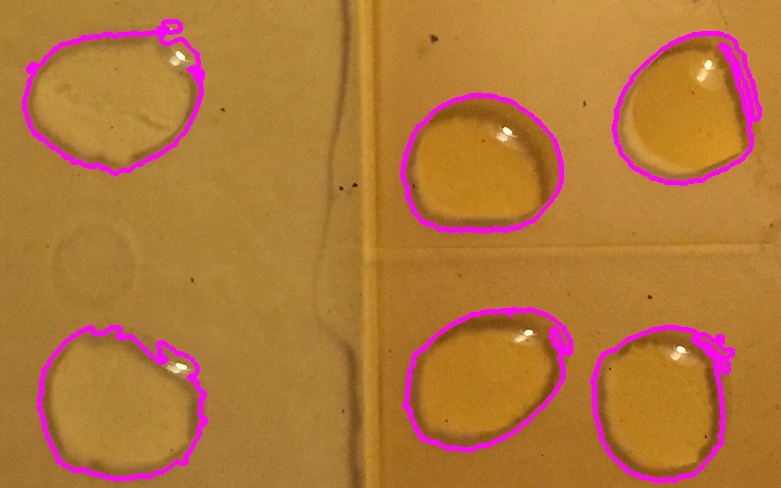
这里的问题是在附近找到一个圆形对象。这个简单的解决方案是基于寻找每一个轮廓的偏心。正在探测的这类物体是水滴。
Stack Overflow用户
发布于 2017-03-10 21:55:56
我有一个局部的解决方案。
FIRST
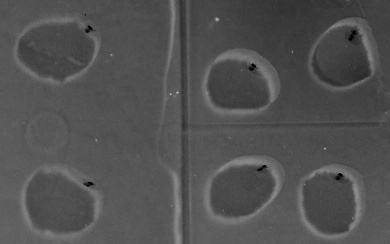
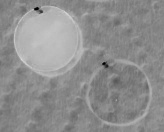
最初,我将图像转换为HSV颜色空间,并修改了值通道。在这样做的时候,我偶然发现了一些独特的东西。几乎在每一幅图像中,液滴都有微小的光反射。这一点在价值渠道中得到了明确的强调。
通过倒置,我得到了以下信息:
样本1:
样本2:
样本3:
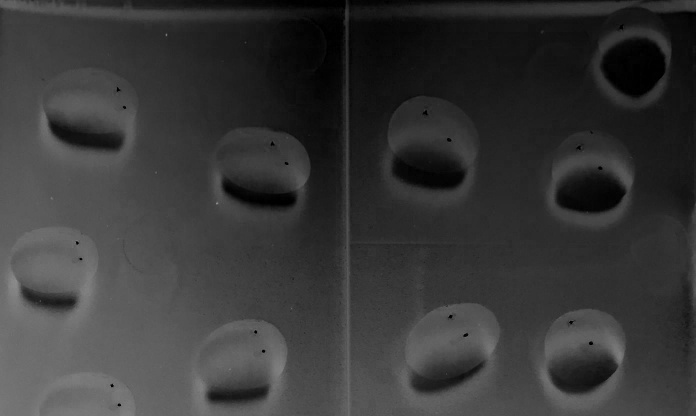
第二
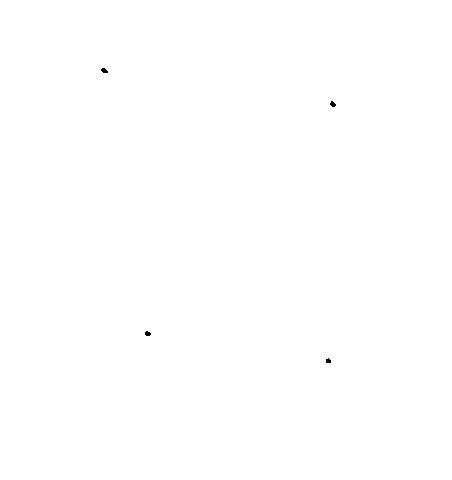
现在我们必须提取这些点的位置。为此,我对所获得的倒置值通道进行了异常检测。所谓异常,我指的是它们中的黑点。
为了做到这一点,我计算了倒置值通道的中值。我分配的像素值在70%以上和以下的中位数被视为正常像素。但超过这个范围的每一个像素值都是异常。黑点在那里非常合适。
样本1:
样本2:
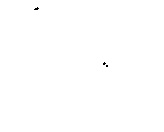
样本3:
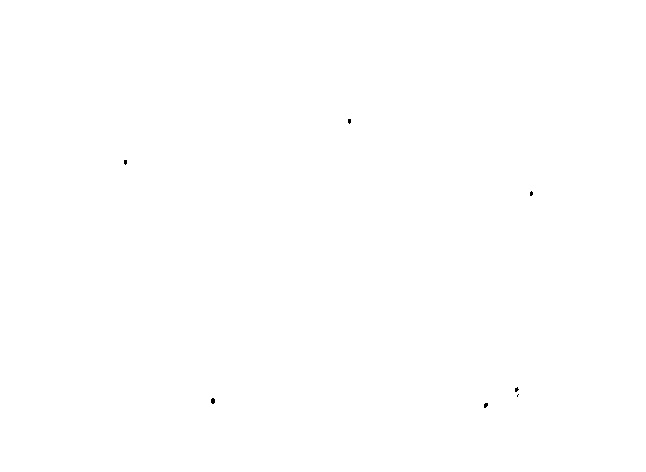
对于少数几幅图片来说,结果并不好。
你可以看到,黑点是由于光的反射,这是独特的水滴。其他圆形边缘可能存在于图像中,但反射将液滴与边缘区分开来。
第三代
现在,由于我们有这些黑点的位置,我们可以执行差分高斯(DoG) (在问题的更新中也提到),并获得相关的边缘信息。如果获得的黑点位置在发现的边缘,那就说是水滴。
免责声明:此方法不适用于所有图像。你可以把你的建议加到这上面。
https://stackoverflow.com/questions/42519707
复制相似问题
腾讯云开发者

Copyright © 2013 - 2026 Tencent Cloud. All Rights Reserved. 腾讯云 版权所有
深圳市腾讯计算机系统有限公司 ICP备案/许可证号:粤B2-20090059  粤公网安备44030502008569号
腾讯云计算(北京)有限责任公司 京ICP证150476号 | 京ICP备11018762号