
不可能使用libnfc、PN532和RPi3扫描RFID标签
我最近买了这个NFC/RFID阅读器PN532模块V3。
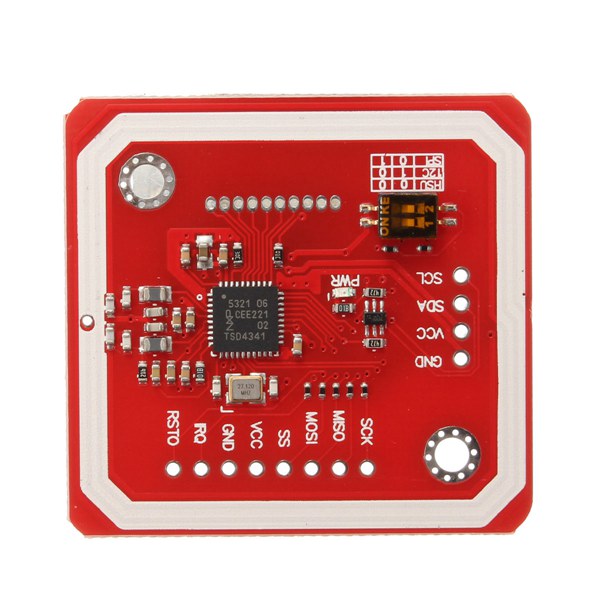
我想在我的raspberry pi 3中使用它,我已经安装并配置了库libnfc。PN532与I2C连接。我已经在我的RPi上很好地启用了它。
我的问题是我不能扫描任何东西。实际上,当我在控制台中运行函数nfc-poll时,我得到了以下内容:
nfc-poll uses libnfc 1.7.1
NFC reader: pn532_i2c:/dev/i2c-1 opened
NFC device will poll during 30000 ms (20 pollings of 300 ms for 5 modulations)
nfc_initiator_poll_target: Success
在投票过程中,我在PN532附近通过了许多不同的标签,甚至那些带着它来的标签。但从来没有发现过。然而,RPi似乎正确地与PN532通信,如第二行所示。
命令i2cdetect -y 1很好地返回:
     0  1  2  3  4  5  6  7  8  9  a  b  c  d  e  f
00:          -- -- -- -- -- -- -- -- -- -- -- -- --
10: -- -- -- -- -- -- -- -- -- -- -- -- -- -- -- --
20: -- -- -- -- 24 -- -- -- -- -- -- -- -- -- -- --
30: -- -- -- -- -- -- -- -- -- -- -- -- -- -- -- --
40: -- -- -- -- -- -- -- -- -- -- -- -- -- -- -- --
50: -- -- -- -- -- -- -- -- -- -- -- -- -- -- -- --
60: -- -- -- -- -- -- -- -- -- -- -- -- -- -- -- --
70: -- -- -- -- -- -- -- --
PN532连接如下:
- GND -> GPIO 6
- VCC -> GPIO 4
- SDA -> GPIO 3
- SCL -> GPIO 5
我已经检查了线路(我有黄色的引线,如果我删除SDA或SCL连接,我会收到一条错误消息尝试nfc-poll,它表示连接正常)。
我已经检查了PN532上两个开关的位置,以启用I2C通信。
我的libnfc配置文件(/etc/nfc/libnfc.conf)如下:
# Allow device auto-detection (default: true)
# Note: if this auto-detection is disabled, user has to set manually a device
# configuration using file or environment variable
allow_autoscan = true

# Allow intrusive auto-detection (dehttp://www.jamesrobertson.eu/pages/2014/mar/30/rfid-module.htmlfault: false)
# Warning: intrusive auto-detection can seriously disturb other devices
# This option is not recommended, user should prefer to add manually his device.
allow_intrusive_scan = false

# Set log level (default: error)
# Valid log levels are (in order of verbosity): 0 (none), 1 (error), 2 (info), 3 (debug)
# Note: if you compiled with --enable-debug option, the default log level is "debug"
log_level = 1

# Manually set default device (no default)
# To set a default device, you must set both name and connstring for your device
# Note: if autoscan is enabled, default device will be the first device available in device list.
device.name = "Itead_PN532_SPI"
device.connstring = "pn532_i2c:/dev/i2c-1"我尝试将参数allow_intrusive_scan设置为true,但它不会更改任何内容。
你知不知道?先谢谢你。
回答 1
Stack Overflow用户
发布于 2021-02-01 14:37:56
“覆盆子Pi不能提供足够的电流来驱动PN532 chip。如果你试图在你的Raspberry Pi上运行PN532,它会随机重置,可能不会响应命令。相反,你需要another power source (3.3v) to power the PN532。”
我找到了这篇文章,可能会有帮助。https://pypi.org/project/pn532pi/
https://stackoverflow.com/questions/42518731
复制相似问题
腾讯云开发者

Copyright © 2013 - 2026 Tencent Cloud. All Rights Reserved. 腾讯云 版权所有
深圳市腾讯计算机系统有限公司 ICP备案/许可证号:粤B2-20090059  粤公网安备44030502008569号
腾讯云计算(北京)有限责任公司 京ICP证150476号 | 京ICP备11018762号