
无法连接到数字海洋中的远程MySQL服务器
我正在尝试从我的工作站连接到安装在Ubuntu16.04上的远程MySQL服务器5.7。
这是我正在获得的错误(使用Navicat连接)。
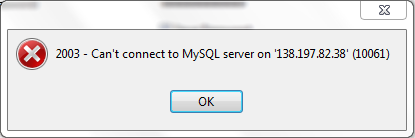
为了使它正常工作,我遵循了以下步骤。
1) GRANT ALL ON database_name.* TO user@xx.xxx.xx.xx IDENTIFIED BY 'your_password';
2) flush privileges;
3) sudo /etc/init.d/mysql restart
一些论坛建议注释行以my.cnf上的“绑定地址”开头,它位于/etc/mysql/my.cnf中。问题是我的安装上没有这样的线路。
#
# The MySQL database server configuration file.
#
# You can copy this to one of:
# - "/etc/mysql/my.cnf" to set global options,
# - "~/.my.cnf" to set user-specific options.
#
# One can use all long options that the program supports.
# Run program with --help to get a list of available options and with
# --print-defaults to see which it would actually understand and use.
#
# For explanations see
# http://dev.mysql.com/doc/mysql/en/server-system-variables.html

#
# * IMPORTANT: Additional settings that can override those from this file!
#   The files must end with '.cnf', otherwise they'll be ignored.
#
!includedir /etc/mysql/conf.d/
!includedir /etc/mysql/mysql.conf.d/
我还尝试使用以下命令在防火墙上打开端口。
sudo ufw allow 3306/tcp
sudo service ufw restart
但仍然被同样的问题困扰着。
更新:使MySQL侦听文件中添加了bind-address=0.0.0.0的所有接口。现在,MySQL甚至没有重新启动并抛出以下错误。
demo@ubuntu:~$ sudo /etc/init.d/mysql restart
[....] Restarting mysql (via systemctl): mysql.serviceJob for mysql.service failed because the control process exited with error code.
See "systemctl status mysql.service" and "journalctl -xe" for details.
 failed!
demo@ubuntu:~$回答 3
Stack Overflow用户
发布于 2017-04-17 12:58:25
使用以下方式调试-
首先,您需要了解日志的内容-- ubuntu中的默认日志存储在/var/log/mysql文件夹中,或者转到/etc/mysql/my.cnf中提到的位置。
其次,如果您想从任何位置访问mysql服务器,那么只需在开始时输入#来注释行。所以请填写绑定地址行。它现在可以从任何地方访问。
[mysqld]
# bind-address=0.0.0.0
启动mysql服务器并使用带有ip &端口的客户端系统中的telnet。检查您是否能够连接。对前-
telnet xx.xx.xx.xx 3306如果您能够连接,那么在mysql服务器中创建用户,我在主机名中使用了%,这意味着它可以从任何客户端连接前-
GRANT ALL ON database_name.* TO 'user'@'%' IDENTIFIED BY 'your_password';如果仍然显示错误,则需要发布日志。
Stack Overflow用户
发布于 2017-04-17 12:42:04
关于将bind-address=0.0.0.0添加到/etc/mysql/my.cnf,请确保实际添加了2行:
米舍尔德 绑定-地址=0.0.0.0
这将解决“更新”段落中的错误,希望整个场景能够正常工作。
Stack Overflow用户
发布于 2018-07-29 20:11:13
我也有同样的问题。并修复了我自己。
!includedir /etc/mysql/conf.d/

!includedir /etc/mysql/mysql.conf.d/
这意味着您应该检查conf.d .d和mysql.conf.d文件夹。会有conf文件。因此,您可以在真正的conf文件中更改绑定地址。
https://stackoverflow.com/questions/42478469
复制相似问题
腾讯云开发者

Copyright © 2013 - 2026 Tencent Cloud. All Rights Reserved. 腾讯云 版权所有
深圳市腾讯计算机系统有限公司 ICP备案/许可证号:粤B2-20090059  粤公网安备44030502008569号
腾讯云计算(北京)有限责任公司 京ICP证150476号 | 京ICP备11018762号