
从URL获取CSV文件并将其转换为array -Python2.7
从URL获取CSV文件并将其转换为array -Python2.7
提问于 2017-02-22 17:09:58
我正在尝试获取地震数据,并将其转化为一个数组,这样我就可以利用这些数据在地图上可视化地震。我正在写这个剧本:
import requests
import csv


def csv_to_array(a):
    b = requests.get(a)
    my_file = open(b, "rb")
    for line in my_file:
        el = [i.strip() for i in line.split(',')]
        return el
我将其导入另一个模块,并且:
import csvToArray
data = csvToArray.csv_to_array(
"http://earthquake.usgs.gov/earthquakes/feed/v1.0/summary/all_hour.csv")
i = 1
while i < len(data):
    stuff = data[i].split(',')
    print stuff[1], stuff[2]
    lat = float(stuff[1])
    lon = float(stuff[2])
    x = webMercX(lon, zoom) - cx
    y = webMercY(lat, zoom) - cy
    i += 1
上面脚本的其他函数是不必要的,但是当我运行它时,我会得到以下错误。
while i < len(data):
TypeError: object of type 'NoneType' has no len()回答 2
Stack Overflow用户
回答已采纳
发布于 2017-02-22 17:25:09
大多数建议都是代码中的注释,但也有一些一般性的建议:
- 用更好的名字
- 立即返回退出函数,如果使用
yield,则可以逐行生成
具有学习经验的新代码:
def csv_to_array(url): # use descriptive variable names
    response = requests.get(url)
    lines = response.text.splitlines() # you don't need an open...the data is already loaded
    for line in lines[1:]: # skip first line (has headers)
        el = [i.strip() for i in line.split(',')]
        yield el # don't return, that immediately ends the function

data = csv_to_array("http://earthquake.usgs.gov/earthquakes/feed/v1.0/summary/all_hour.csv")

for row in data: # don't use indexes, just iterate over the data
    # you already split on commas.
    print(row[1], row[2]) # again, better names
    lat = float(row[1])
    lon = float(row[2])
#     x = webMercX(lon, zoom) - cx
#     y = webMercY(lat, zoom) - cy
懒惰者的代码:
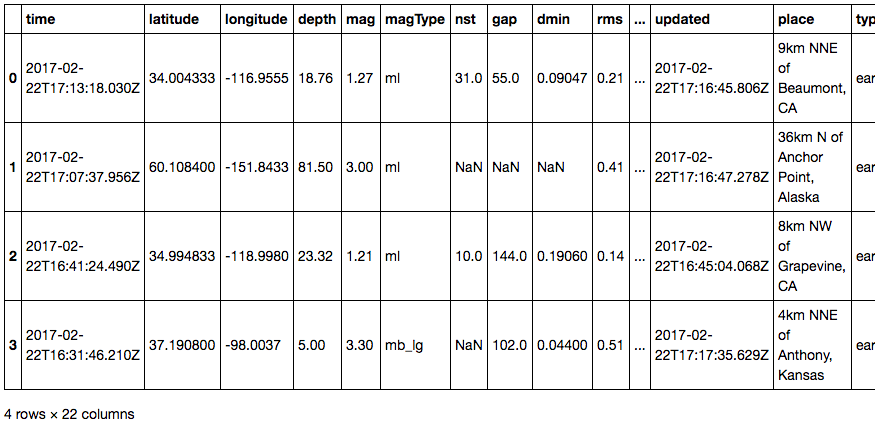
import pandas as pd
pd.read_csv('http://earthquake.usgs.gov/earthquakes/feed/v1.0/summary/all_hour.csv')
Stack Overflow用户
发布于 2017-02-22 17:23:50
可以用生成器替换第一个函数,该生成器迭代响应数据,并为文件的每一行生成数组。
def csv_to_array(a):
    response = requests.get(a)
    # you can access response's body via text attribute
    for line in response.text.split('\n'):
        yield [i.strip() for i in line.split(',')]


list(csv_to_array(some_url))页面原文内容由Stack Overflow提供。腾讯云小微IT领域专用引擎提供翻译支持
原文链接:
https://stackoverflow.com/questions/42398006
复制相关文章
相似问题
腾讯云开发者

Copyright © 2013 - 2026 Tencent Cloud. All Rights Reserved. 腾讯云 版权所有
深圳市腾讯计算机系统有限公司 ICP备案/许可证号:粤B2-20090059  粤公网安备44030502008569号
腾讯云计算(北京)有限责任公司 京ICP证150476号 | 京ICP备11018762号