
如何打印html格式,而我已经在angular2格式表成为pdf?
如何打印html格式,而我已经在angular2格式表成为pdf?
提问于 2017-02-20 09:30:25
在我试图实现的同时,我想将生成的数据导出到html表中,但是我认为样式已经消失了,如何打印整洁的表,而我的html表如下所示:
<button (click)="print()">print</button>

    <div id="print-section">
    <div class="row">
        <div class="col-md-12">
            <ba-card title="Result" baCardClass="with-scroll table-panel">
            <!-- Hasil -->
                <div class="table-responsive">
                <table class="table">
                    <tr>
                        <td>No</td>
                        <td>Kode Claim</td>
                        <td>Paid/Not Paid</td>
                        <td>Kode Service</td>
                        <td>Tanggal</td>
                        <td>Nomor Nota</td>
                        <td>Kode Produk</td>
                        <td>Kerusakan</td>
                        <td>Biaya</td>
                        <td>Transport</td>
                        <td>Valid</td>
                    </tr>
                    <tr *ngFor="let claimReports of claimReport; let i=index" >
                        <td>{{i + 1}}</td>
                        <td>{{claimReports.KODE_CLAIM}}</td>
                        <td>{{claimReports.Paid}}</td>
                        <td colspan="11">
                            <tr *ngFor="let dt of claimReports['DETAILS']; let a=index">
                                <td>{{dt.Kode_Service}}</td>
                                <td>{{dt.Tanggal_Service | date: 'dd/MM/yyyy'}}</td>
                                <td>{{dt.Nomor_Nota}}</td>
                                <td>{{dt.Kode_Produk}}</td>
                                <td>{{dt.Kerusakan}}</td>
                                <td>{{dt.Biaya}}</td>
                                <td>{{dt.Transport}}</td>
                                <td>{{dt.Valid}}</td>
                            </tr>
                        </td>
                    </tr>
                </table>
                </div>
            <!-- End Hasil -->
            </ba-card>
        </div>
    </div>
    </div>
下面是app.component.ts:
  print(): void {
    let printContents, popupWin;
    printContents = document.getElementById('print-section').innerHTML;
    popupWin = window.open('', '_blank', 'top=0,left=0,height=100%,width=auto');
    popupWin.document.open();
    popupWin.document.write(`
      <html>
        <head>
          <title>Print tab</title>
        </head>
    <body onload="window.print();window.close()">${printContents}</body>
      </html>`
    );
    popupWin.document.close();
}
下面是HTML的样子:
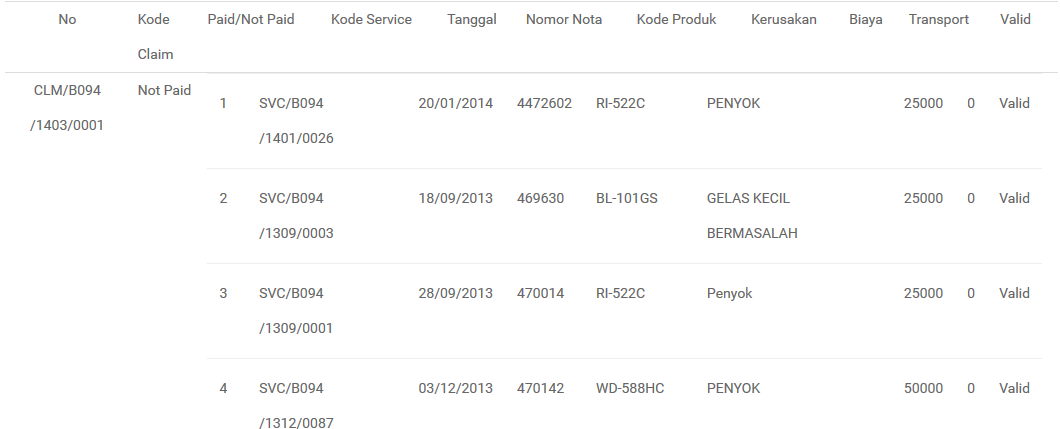
就像没有格式化一样,我怎样才能像html一样打印呢?或者至少我可以把桌子整理整齐,而且我不想在打印时显示url
UPDATE :我用引导css更新我的代码,所以在我的app.component.ts中,我的代码如下所示
  print(): void {
    let printContents, popupWin;
    printContents = document.getElementById('print-section').innerHTML;
    popupWin = window.open('', '_blank', 'top=0,left=0,height=100%,width=auto');
    popupWin.document.open();
    popupWin.document.write(`
      <html>
        <head>
          <title>Print tab</title>
           <link rel="stylesheet" href="https://maxcdn.bootstrapcdn.com/bootstrap/3.3.7/css/bootstrap.min.css">
        </head>
    <body onload="window.print();window.close()">${printContents}</body>
      </html>`
    );
    popupWin.document.close();
}
下面是打印结果:
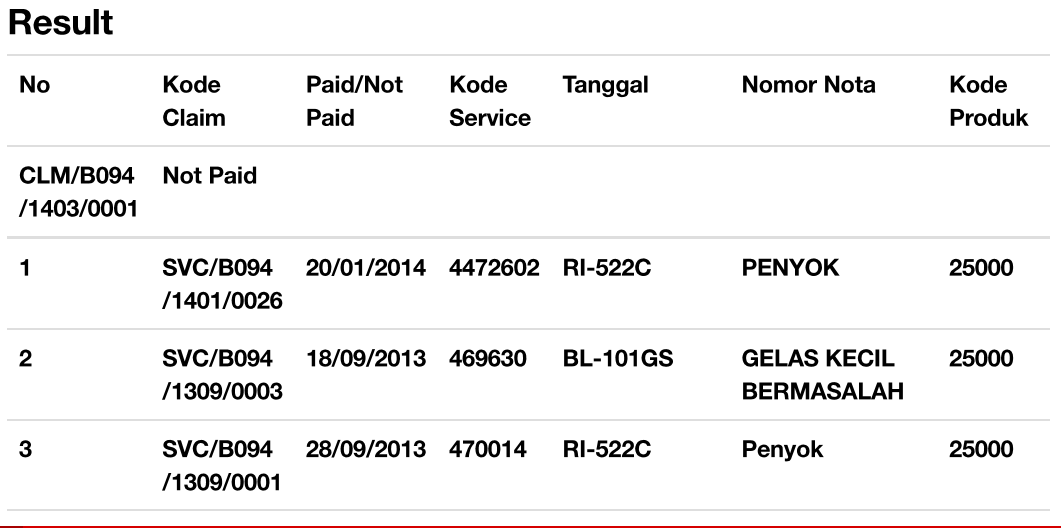
第六列被合并到第一、第二、第三和第四列,我怎样才能使它像我的桌子一样?
当我使用firebug检查css时,我看到我的colspan行是空的,下面是使用firebug时的样子:
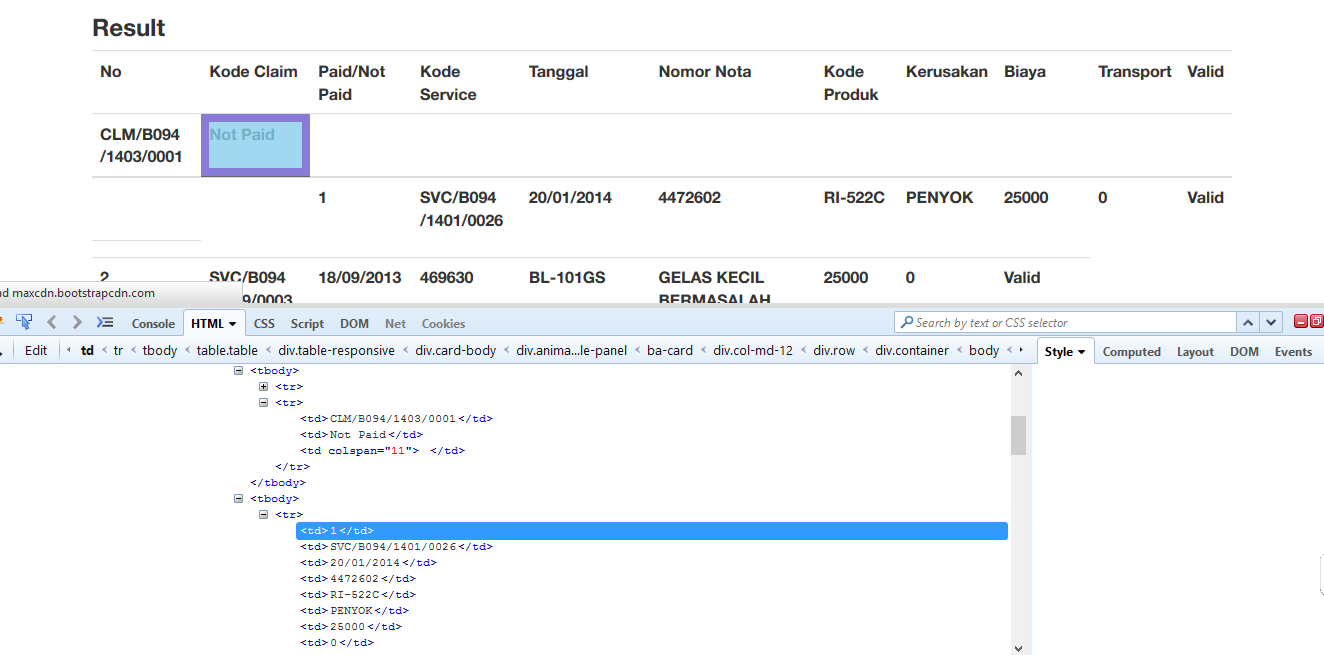
结果应该像第一行,原来的HTML就像我上面贴的一样。为什么从我的
回答 1
Stack Overflow用户
回答已采纳
发布于 2017-02-20 09:46:52
加式
您将得到一个不带样式的版本,因为在您的print()函数中不包含样式。请参见修改后的示例:
print(): void {
    let printContents, popupWin;
    printContents = document.getElementById('print-section').innerHTML;
    popupWin = window.open('', '_blank', 'top=0,left=0,height=100%,width=auto');
    popupWin.document.open();
    popupWin.document.write(`
      <html>
        <head>
          <title>Print tab</title>
          // You need to insert the stylesheet to the print function
          <link rel="stylesheet" href="correct href to your stylesheet">
        </head>
    <body onload="window.print();window.close()">${printContents}</body>
      </html>`
    );
    popupWin.document.close();
}
删除页面链接
要从页面顶部删除链接,请按照下面的说明:Disabling browser print options (headers, footers, margins) from page?
页面原文内容由Stack Overflow提供。腾讯云小微IT领域专用引擎提供翻译支持
原文链接:
https://stackoverflow.com/questions/42340822
复制相关文章
相似问题
腾讯云开发者

Copyright © 2013 - 2026 Tencent Cloud. All Rights Reserved. 腾讯云 版权所有
深圳市腾讯计算机系统有限公司 ICP备案/许可证号:粤B2-20090059  粤公网安备44030502008569号
腾讯云计算(北京)有限责任公司 京ICP证150476号 | 京ICP备11018762号