
用Swift 3多读/少读
用Swift 3多读/少读
提问于 2017-02-20 07:30:38
我想在段落的末尾加上"Read more“。当我点击“读取更多”文本时,应该展开它并在末尾显示"Less“。当点击“较少”文本时,文本将被折叠。
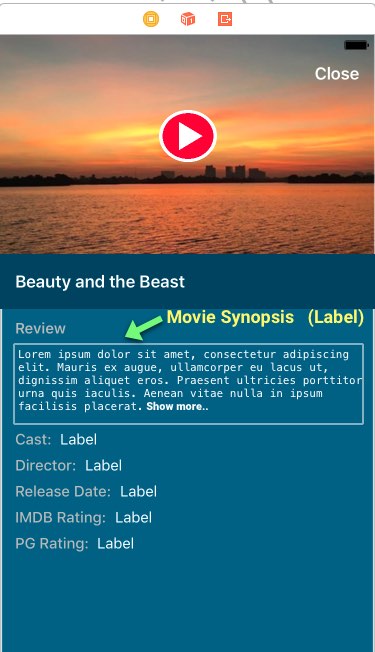
我在谷歌找到了很多样本工作。但是,我不太明白,大多数项目都是以目标C来实施的。我也在youtube上找到了。
我想知道用Swift 3实现这一点的示例代码。
我可以在不使用任何其他库的情况下实现吗?
请帮帮我。
回答 2
Stack Overflow用户
回答已采纳
发布于 2017-02-20 07:38:14
- 为
messageLabel的高度约束创建一个出口 - 将“读取更多”按钮的顶部布局设置为
messageLabel - 单击“读取更多”按钮增加高度约束常数,单击“读取较少”降低高度约束常数。 @IBOutlet弱变量btn: UIButton!@IBOutlet弱变量lblHeight: NSLayoutConstraint!var isLabelAtMaxHeight = false @IBAction func btnAction(_ btn.setTitle: Any) { isLabelAtMaxHeight { btn.setTitle("Read btn.setTitle“,for:.normal) isLabelAtMaxHeight = false lblHeight.constant = 70 } btn.setTitle("Read less",for:.normal) isLabelAtMaxHeight = true lblHeight.constant =getLabelHeight(文本: yourSummaryText,宽度: view.bounds.width,字体: yourSummaryLabel.font) }
获得文本的高度
    func getLabelHeight(text: String, width: CGFloat, font: UIFont) -> CGFloat {
        let lbl = UILabel(frame: .zero)
        lbl.frame.size.width = width
        lbl.font = font
        lbl.numberOfLines = 0
        lbl.text = text
        lbl.sizeToFit()

        return lbl.frame.size.height
}Stack Overflow用户
发布于 2019-08-06 09:48:38
我已经把绳子修剪好了。
我们可以通过.count比较字符串字符的长度,如果字符串中只有很少的字符,我们可以隐藏更多的按钮。
并删除修剪后的最后一个字,以确保没有可见的字被切断。然后加上“.”在最后
        var trimData = ""

        if eventData.eventDescription.count > 500 {
            cell.readMoreLabel.isHidden = false

            if !readMore {

                if eventData.eventDescription.count > 500 {

                    trimData = String(eventData.eventDescription.prefix(500))

                    trimData = trimData.components(separatedBy: " ").dropLast().joined(separator: " ")

                    trimData = trimData+"...."
                } else {
                    trimData = eventData.eventDescription
                }

                cell.readMoreLabel.attributedText = NSAttributedString(string: "Read More", attributes:
                    [.underlineStyle: NSUnderlineStyle.styleSingle.rawValue])


            } else {
                trimData = eventData.eventDescription
                cell.readMoreLabel.attributedText = NSAttributedString(string: "Read Less", attributes:
                    [.underlineStyle: NSUnderlineStyle.styleSingle.rawValue])
            }

        } else {
            trimData = eventData.eventDescription
             cell.readMoreLabel.isHidden = true
}页面原文内容由Stack Overflow提供。腾讯云小微IT领域专用引擎提供翻译支持
原文链接:
https://stackoverflow.com/questions/42338768
复制相关文章
相似问题
腾讯云开发者

Copyright © 2013 - 2026 Tencent Cloud. All Rights Reserved. 腾讯云 版权所有
深圳市腾讯计算机系统有限公司 ICP备案/许可证号:粤B2-20090059  粤公网安备44030502008569号
腾讯云计算(北京)有限责任公司 京ICP证150476号 | 京ICP备11018762号