
如何通过行为清除绑定到PasswordBox的WPF PasswordBox?
我编写了WPF MVVM Prism 6.2应用程序。在登录窗口(即PrismUserControl)视图中,我在视图模型中将PaswordBox绑定(通过行为)到“Password”属性。当应用程序运行时,每次调用登录窗口时,PasswordBox必须为空。(例如,用户关闭当前会话后,他或她必须只看到Shell上方的空Shell和登录窗口)。我的问题是,上述PasswordBox仅在加载应用程序后第一次显示为空。如果第二次或第三次显示PaswordBox,则它不是空的。请看下图:
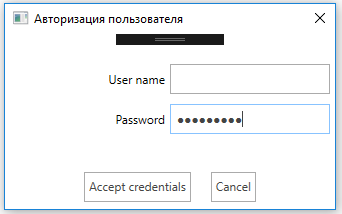
如您所见,密码不是空的,但在这种情况下它必须是空的。下面是PaswordBox所在的登录窗口标记中的XAML片段:
. . . . . . . . . . . . . .
xmlns:i="http://schemas.microsoft.com/expression/2010/interactivity"
. . . . . . . . . . . . . .
<PasswordBox Grid.Row="1" Grid.Column="1" Height="30" Margin="0 10 5 0" AutomationProperties.AutomationId="UserPasswordBox">
        <i:Interaction.Behaviors>
            <behavior:PasswordBoxBindingBehavior Password="{Binding Password}"/>
        </i:Interaction.Behaviors>
</PasswordBox>
. . . . . . . . . . . . . . . .
以下是与XAML相关的行为的类,如上所示:
public class PasswordBoxBindingBehavior : Behavior<PasswordBox>
{
    protected override void OnAttached()
    {
        AssociatedObject.PasswordChanged += OnPasswordBoxValueChanged;
    }

    public SecureString Password
    {
        get { return (SecureString)GetValue(PasswordProperty); }
        set { SetValue(PasswordProperty, value); }
    }

    public static readonly DependencyProperty PasswordProperty =
        DependencyProperty.Register("Password", typeof(SecureString), typeof(PasswordBoxBindingBehavior), new PropertyMetadata(null));

    private void OnPasswordBoxValueChanged(object sender, RoutedEventArgs e)
    {
        var binding = BindingOperations.GetBindingExpression(this, PasswordProperty);
        if (binding != null)
        {
            PropertyInfo property = binding.DataItem.GetType().GetProperty(binding.ParentBinding.Path.Path);
            if (property != null)
                property.SetValue(binding.DataItem, AssociatedObject.SecurePassword, null);
        }
    }
}
下面是视图模型中的“密码”属性。PasswordBox通过PasswordBoxBindingBehavior绑定到此属性:
public SecureString Password
{
    get { return this._password; }
    set { this.SetProperty(ref this._password, value); }
}
我需要每次在应用程序工作期间显示登录窗口时,PasswordBox都是空的。我尝试过以编程方式清除视图模型中的“Password”属性,但这没有帮助。我该怎么做呢?请帮帮忙。
回答 2
Stack Overflow用户
发布于 2017-02-19 12:06:09
您可以为行为的Password依赖项属性连接一个Password,当视图模型的Password源属性设置为null时,该属性将PasswordBox的Password属性设置为空字符串。
public class PasswordBoxBindingBehavior : Behavior<PasswordBox>
{
    protected override void OnAttached()
    {
        AssociatedObject.PasswordChanged += OnPasswordBoxValueChanged;
    }

    public SecureString Password
    {
        get { return (SecureString)GetValue(PasswordProperty); }
        set { SetValue(PasswordProperty, value); }
    }

    public static readonly DependencyProperty PasswordProperty =
        DependencyProperty.Register("Password", typeof(SecureString), typeof(PasswordBoxBindingBehavior), new PropertyMetadata(OnSourcePropertyChanged));

    private static void OnSourcePropertyChanged(DependencyObject d, DependencyPropertyChangedEventArgs e)
    {
        if(e.NewValue == null)
        {
            PasswordBoxBindingBehavior behavior = d as PasswordBoxBindingBehavior;
            behavior.AssociatedObject.PasswordChanged -= OnPasswordBoxValueChanged;
            behavior.AssociatedObject.Password = string.Empty;
            behavior.AssociatedObject.PasswordChanged += OnPasswordBoxValueChanged;
        }
    }

    private static void OnPasswordBoxValueChanged(object sender, RoutedEventArgs e)
    {
        PasswordBox passwordBox = sender as PasswordBox;
        var behavior = Interaction.GetBehaviors(passwordBox).OfType<PasswordBoxBindingBehavior>().FirstOrDefault();
        if(behavior != null)
        {
            var binding = BindingOperations.GetBindingExpression(behavior, PasswordProperty);
            if (binding != null)
            {
                PropertyInfo property = binding.DataItem.GetType().GetProperty(binding.ParentBinding.Path.Path);
                if (property != null)
                    property.SetValue(binding.DataItem, passwordBox.SecurePassword, null);
            }
        }
    }
}然后,只需在视图模型中将PasswordBox源属性设置为null,就可以清除Password。
Stack Overflow用户
发布于 2019-05-02 19:04:31
更简单的方法。这将在每次屏幕( passwordBox元素所在的网格)关闭时清除PasswordBox文本框。
<Grid  Grid.LostFocus="event_method" ...

<PasswordBox x:Name="passwordBox" ...
在后面的代码中:
public event_method()
{
    passwordBox.Clear();
}https://stackoverflow.com/questions/42315356
复制相似问题
腾讯云开发者

Copyright © 2013 - 2026 Tencent Cloud. All Rights Reserved. 腾讯云 版权所有
深圳市腾讯计算机系统有限公司 ICP备案/许可证号:粤B2-20090059  粤公网安备44030502008569号
腾讯云计算(北京)有限责任公司 京ICP证150476号 | 京ICP备11018762号