
最上面的是什么: 50%;实际上是在相对定位的元素上?
一段时间以来,我一直使用相对定位的元素将事物垂直地居中。不过,我从来不明白为什么position: relative; top: 50%;不垂直地对元素进行居中,或至少在它的容器div中以元素的顶部边缘为中心。
position: relative根据MDN:
将所有元素排列成没有定位的元素,然后调整元素的位置,而不更改布局
top关键字:
指定元素移动到其正常位置以下的数量。
以及top关键字上的一个top值:
是包含块的高度的百分比
因此,一个相对定位的元素的top: 50%值应该向下移动50%的包含块的高度,对吗?这不意味着该元素的顶部正好位于包含元素的中间吗?
考虑一下这个片段:
.container {
  overflow: hidden;
  width: 90%;
  height: 90%;
  margin: 0 auto;
  background-color: #eee;
}
.child {
  width: 40%;
  height: 40%;
  margin: 0 auto;
  background-color: #444;
  border-top: 5px solid #f00;
}
.top-50-percent {
  position: relative;
  top: 50%;
}

.contract-and-expand {
  animation-name: contract-and-expand;
  animation-duration: 5s;
  animation-iteration-count: infinite;
  animation-timing-function: ease-in-out;
}
@keyframes contract-and-expand {
  50% {
    height: 0%;
  }
}<html>
<head>
<style>
/* Just initial/basic CSS rules here to make this look better */
@import url("https://necolas.github.io/normalize.css/latest/normalize.css");
* {
box-sizing: border-box;
margin: 0;
}
html, body {
height: 100%;
}
body {
color: #aaa;
}
.center-vertically {
position: relative;
top: 50%;
transform: translateY( -50% );
}
p {
position: absolute; /* Remove paragraphs from flow so they don't interfere */
}
</style>
</head>
<body>
<div class="container center-vertically contract-and-expand">
<p>Container Wrapper</p> <!-- Paragraphs are removed from the flow -->
<div class="child top-50-percent">
</div>
</div>
</body>
</html>
从片段来看,顶部的边缘看起来是居中的。这总是正确的吗?有一个类似的小提琴:当视口的高度被拉上时,子元素的顶部边框不再以https://jsfiddle.net/9kyjt8ze/5/为中心。
回答 1
Stack Overflow用户
发布于 2017-02-18 16:56:52
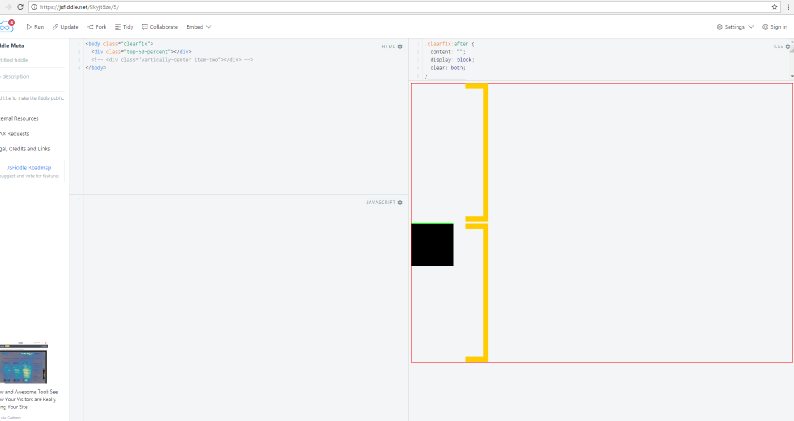
我用Inkscape和2(黄色)垂直块测量了这个值,它们的大小是一样的。这是一种视觉错觉。在那把小提琴里,顶端的边缘永远不会偏离中心位置。而且,我所有的假设似乎都是正确的:相对定位元素上的top:50%将该元素的顶部边框移动到容器高度的50%以下。其原因是,在相对定位的元素上使用top: 50%时,顶部边缘是支点。
https://stackoverflow.com/questions/42310189
复制相似问题
腾讯云开发者

Copyright © 2013 - 2026 Tencent Cloud. All Rights Reserved. 腾讯云 版权所有
深圳市腾讯计算机系统有限公司 ICP备案/许可证号:粤B2-20090059  粤公网安备44030502008569号
腾讯云计算(北京)有限责任公司 京ICP证150476号 | 京ICP备11018762号