
使用jquery滚动图像时的运动
使用jquery滚动图像时的运动
提问于 2017-02-15 20:37:05
请有人推荐一个教程/资源,或者给出一个使用jquery的基本图像运动的例子。我已经搜索了几个星期,通过谷歌,尝试各种教程和模板,我有困难找到一个例子,我认为是一个简单的动画。
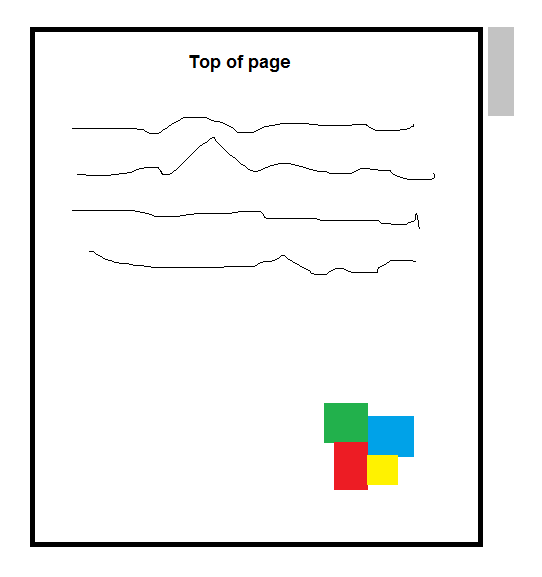
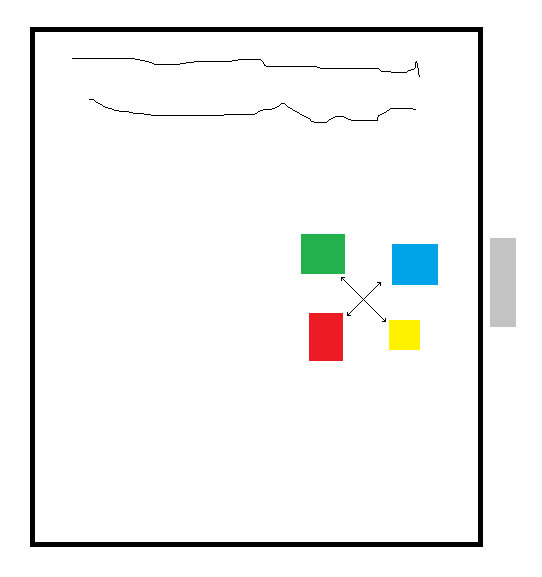
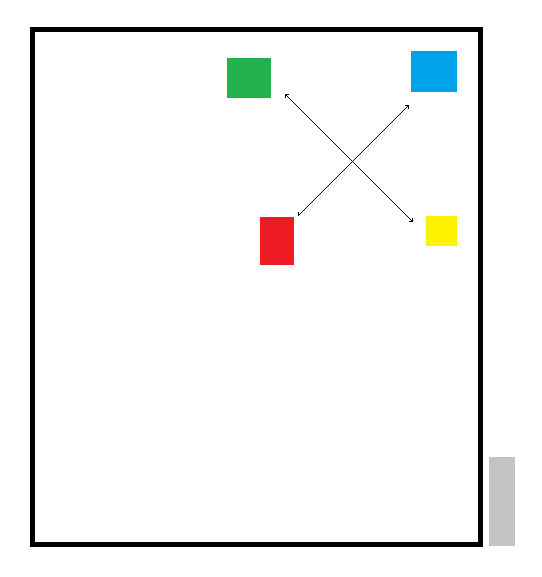
我试图找出如何创建一个效果,当你向下滚动页面,一个小图像从A点移动到B点。运动可能是对角线,水平,垂直等。我只想指定一个开始位置和结束位置,滚动开始和结束到达目的地。
我的想法是,我将采取几个不同的线框CAD图像,并做一个爆炸的组装/重组滚动效果。当你向下滚动CAD组件爆炸。当您滚动回滚时,进程将反转,程序集将重新组装。
回答 2
Stack Overflow用户
回答已采纳
发布于 2017-02-17 01:50:37
$(function() {

    var animationData = [
    {
      id: "section1",
      startX: 100,
      startY: 50,
      deltaX: +20,
      deltaY: -5,
    },
    {
      id: "section2",
      startX: 75,
      startY: 50,
      deltaX: -20,
      deltaY: -5,
    },
    {
      id: "section3",
      startX: 50,
      startY: 75,
      deltaX: -40,
      deltaY: +15,
    },
    {
      id: "section4",
      startX: 75,
      startY: 75,
      deltaX: +30,
      deltaY: +35,
    },
    ];

    // scrollTop() will be in the range of 0 to scrollMax
    var scrollMax = $("#content").height() - $("#scrollarea").height();
    var scrollArea$ = $("#scrollarea"); // cache ref for efficiency

    // position objects and show
    $("#section1").offset({ top: animationData[0].startY, left: animationData[0].startX});
    $("#section2").offset({ top: animationData[1].startY, left: animationData[1].startX});
    $("#section3").offset({ top: animationData[2].startY, left: animationData[2].startX});
    $("#section4").offset({ top: animationData[3].startY, left: animationData[3].startX});
    $(".section").show();

    scrollArea$.scroll(function(){

      var scrollPerc = scrollArea$.scrollTop() / scrollMax; // 0.0 to 1.0

      var sec1Left = animationData[0].startX + (animationData[0].deltaX * scrollPerc);
      var sec1Top = animationData[0].startY + (animationData[0].deltaY * scrollPerc);
      var sec2Left = animationData[1].startX + (animationData[1].deltaX * scrollPerc);
      var sec2Top = animationData[1].startY + (animationData[1].deltaY * scrollPerc);
      var sec3Left = animationData[2].startX + (animationData[2].deltaX * scrollPerc);
      var sec3Top = animationData[2].startY + (animationData[2].deltaY * scrollPerc);
      var sec4Left = animationData[3].startX + (animationData[3].deltaX * scrollPerc);
      var sec4Top = animationData[3].startY + (animationData[3].deltaY * scrollPerc);

      $("#section1").offset({ top: sec1Top, left: sec1Left});
      $("#section2").offset({ top: sec2Top, left: sec2Left});
      $("#section3").offset({ top: sec3Top, left: sec3Left});
      $("#section4").offset({ top: sec4Top, left: sec4Left});

    });
});.section {
position: absolute;
width: 25px;
height: 25px;
display: none;
}
#section1 {
background-color: red;
}
#section2 {
background-color: blue;
}
#section3 {
background-color: yellow;
}
#section4 {
background-color: green;
}
#content {
width: 100%;
height: 300px;
}
#scrollarea {
overflow-y: scroll;
width: 200px;
height: 200px;
}<script src="https://ajax.googleapis.com/ajax/libs/jquery/2.1.1/jquery.min.js"></script>
<div id="scrollarea">
<div id="content">
<div id="section1" class="section"></div>
<div id="section2" class="section"></div>
<div id="section3" class="section"></div>
<div id="section4" class="section"></div>
</div>
</div>
Stack Overflow用户
发布于 2017-02-15 20:45:48
有一个没有jQuery的基本w3school教程:
使用jQuery:
http://www.youon.it/parallax-scroll-in-css-jquery-tutorial-delleffetto-in-parallasse/
http://devfloat.net/jquery-parallax-scrolling-tutorials/
编辑
http://stephen.band/jparallax/
页面原文内容由Stack Overflow提供。腾讯云小微IT领域专用引擎提供翻译支持
原文链接:
https://stackoverflow.com/questions/42259544
复制相关文章
相似问题
腾讯云开发者

Copyright © 2013 - 2026 Tencent Cloud. All Rights Reserved. 腾讯云 版权所有
深圳市腾讯计算机系统有限公司 ICP备案/许可证号:粤B2-20090059  粤公网安备44030502008569号
腾讯云计算(北京)有限责任公司 京ICP证150476号 | 京ICP备11018762号