
当将adobe集成到web应用程序中时,我得到:{"error":"invalid_credentials"}
我跟踪了Web:入门示例。当函数AdobeCreativeSDK.init被调用时,它首先使用request方法选项调用https://adobeid-na1.services.adobe.com/ims/check/v4/token,然后使用request方法POST调用https://adobeid-na1.services.adobe.com/ims/check/v4/token,然后都返回状态代码200 OK。对POST请求的响应返回{"error":"invalid_credentials"},我不知道为什么以及如何解决这个问题。
任何帮助都将不胜感激。
回答 1
Stack Overflow用户
发布于 2017-02-19 02:04:18
故障排除:
你在你的控制台里看到这样的东西了吗?
XMLHttpRequest无法加载https://adobeid-na1.services.adobe.com/ims/check/v4/token。请求的资源上没有“访问-控制-允许-原产地”标题。因此,“https://your.domain.com”源是不允许访问的。
那么,您可能没有有效的SSL证书。
从文件中:
来自Adobe的开始使用
如果由于‘访问-控制-允许-起源’而导致XMLHttpRequest错误,则您的SSL设置可能会出现问题(正如本指南的“先决条件”部分所指出的,SSL是必需的)。
以下是先决条件一节中所述的内容,着重补充了
Prerequisites
- 在使用Creative之前,必须注册应用程序并获取客户端ID (API密钥)和客户端秘密值。有关详细信息,请参阅本指南的“注册应用程序”部分。
- 需要使用下列软件:
- Supported browsers: Chrome 53+, Safari 9+, Firefox 45+, Edge, IE11+
- **SSL required: Your site must support SSL on any page that integrates    the Creative SDK.**
可能的解决办法:
如果您正在从localhost在开发机器上进行测试,则需要修改hosts文件并设置映射到127.0.0.1的自己的域,然后需要在服务器上配置一个自签名证书。
您可能还想要查看如何在本地使用 (从他们的Github )那里有这个非常棒的宝石:
openssl req -new -x509 -keyout server.pem -out server.pem -days 365 -nodes有用资源:
我是怎么做到的:
1. Adobe I/O设置:
下面是在Adobe /O上如何配置我的测试应用程序:
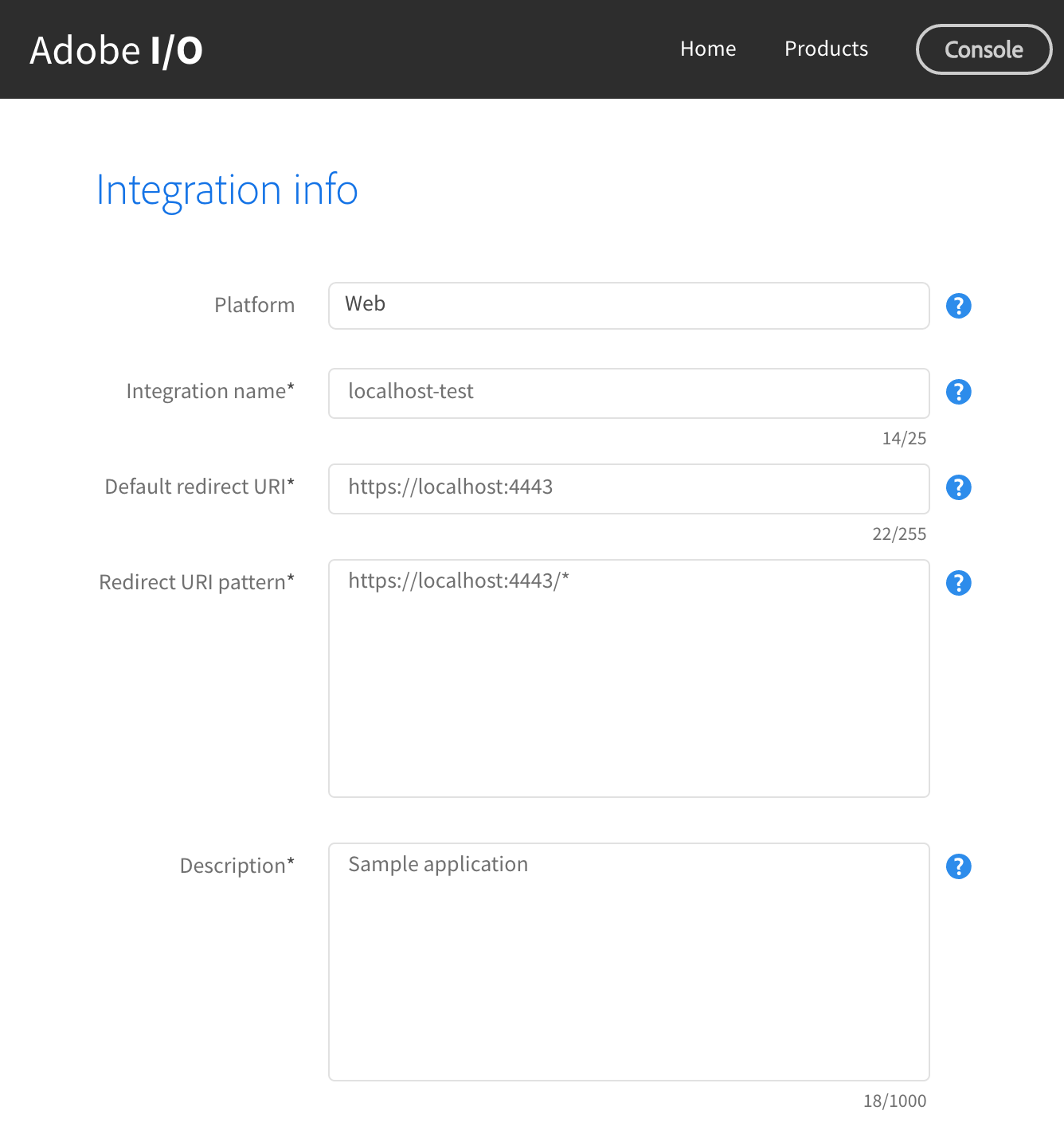
2.本地HTTP服务器(SSL)
在根目录下,若要创建自签名证书,请运行:
openssl req -new -x509 -keyout server.pem -out server.pem -days 365 -nodes然后,我设置了一个简单的python服务器,它使用上面创建的自签名证书server.pem:
# ./start.py
import BaseHTTPServer, SimpleHTTPServer
import ssl

httpd = BaseHTTPServer.HTTPServer(('localhost', 4443), SimpleHTTPServer.SimpleHTTPRequestHandler)
httpd.socket = ssl.wrap_socket (httpd.socket, certfile='server.pem', server_side=True)
httpd.serve_forever()
启动我的服务器
python ./start.py重要注意事项:,您将得到以下有效负载的200个响应:第二个调用中的{"error":"invalid_credentials"}。只要你没有收到控制台错误,你的web应用程序就准备好了。
根据文档,我添加了一个带有csdk-login的按钮来测试用户Auth。
4.充分运作的守则
文件结构:
/app
├── config.js <-- my clientId config
├── index.html
├── index.js
├── server.pem <-- my self-signed cert
└── start.py  <-- my server
HTML:
<!DOCTYPE html>
<html>
<head>
    <title>Technophobia: SDK Getting Started</title>
</head>
<body>
    <h1>Adobe Creative SDK</h1>
    <p>Look at the console</p>

    <button id="csdk-login">Log in to Creative Cloud</button>

    <script type="text/javascript" src="https://cdn-creativesdk.adobe.io/v1/csdk.js"></script>
    <script type="text/javascript" src="config.js"></script>
    <script type="text/javascript" src="index.js"></script>

</body>
</html>
JS:
/* 1) Initialize the AdobeCreativeSDK object */
AdobeCreativeSDK.init({
    /* 2) Add your Client ID (API Key) */
    clientID: CONFIG.CSDK_CLIENT_ID, //
    API: ["Asset"],
    onError: function(error) {
        /* 3) Handle any global or config errors */
        if (error.type === AdobeCreativeSDK.ErrorTypes.AUTHENTICATION) {
            console.log('You must be logged in to use the Creative SDK');
        } else if (error.type === AdobeCreativeSDK.ErrorTypes.GLOBAL_CONFIGURATION) {
            console.log('Please check your configuration');
        } else if (error.type === AdobeCreativeSDK.ErrorTypes.SERVER_ERROR) {
            console.log('Oops, something went wrong');
        }
    }
});

/* 1) Add a click handler to a button that calls a helper function */
document.getElementById("csdk-login").addEventListener('click', handleCsdkLogin, false);

/* 2) Make a helper function */
function handleCsdkLogin() {

    /* 3) Get auth status */
    AdobeCreativeSDK.getAuthStatus(function(csdkAuth) {

        /* 4) Handle auth based on status */
        if (csdkAuth.isAuthorized) {
            // The user is logged in and has authorized your site.
            console.log('Logged in!');
        } else {
            // Trigger a login
            AdobeCreativeSDK.login(handleCsdkLogin);
        }
    });
}https://stackoverflow.com/questions/42230546
复制相似问题
腾讯云开发者

Copyright © 2013 - 2026 Tencent Cloud. All Rights Reserved. 腾讯云 版权所有
深圳市腾讯计算机系统有限公司 ICP备案/许可证号:粤B2-20090059  粤公网安备44030502008569号
腾讯云计算(北京)有限责任公司 京ICP证150476号 | 京ICP备11018762号