
将LRU图像缓存与HTTPResponseCache结合用于磁盘和内存缓存
最初的目标是同时使用磁盘和内存缓存。这需要实现LRU缓存和DiskLruCache。但是,由于HTTPResponse缓存使用磁盘空间,所以我选择使用LRU缓存并执行con.setUseCaches(true);。
问题是,我并不真正理解什么是首先实现的。对于LRU和DiskLru缓存,算法如下:
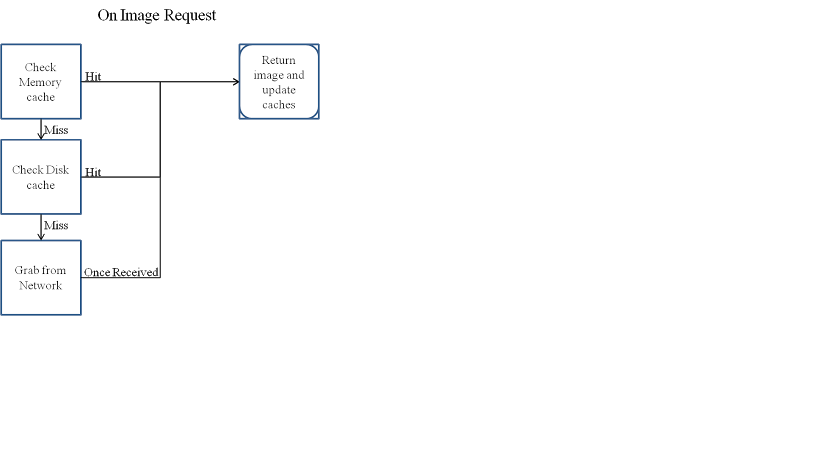
即
首先检查图像的内存缓存
如果有图像,则返回它并更新缓存。
否则检查磁盘缓存
如果磁盘缓存有映像,则返回它并更新缓存。
否则,从internet下载映像,返回图像并更新缓存。
现在使用下面的代码:
public class DownloadImageTask extends AsyncTask<String, Void, Bitmap> {
    private int inSampleSize = 0;

    private String imageUrl;

    private BaseAdapter adapter;

    private ImagesCache cache;

    private int desiredWidth, desiredHeight;

    private Bitmap image = null;

    private ImageView ivImageView;

    Context mContext;

    public DownloadImageTask(BaseAdapter adapter, int desiredWidth, int desiredHeight) {
        this.adapter = adapter;

        this.cache = ImagesCache.getInstance();

        this.desiredWidth = desiredWidth;

        this.desiredHeight = desiredHeight;
    }

    public DownloadImageTask(Context mContext, ImagesCache cache, ImageView ivImageView, int desireWidth, int desireHeight) {
        this.cache = cache;

        this.ivImageView = ivImageView;

        this.desiredHeight = desireHeight;

        this.desiredWidth = desireWidth;

        this.mContext = mContext;
    }

    @Override
    protected Bitmap doInBackground(String... params) {
        imageUrl = params[0];

        return getImage(imageUrl);
    }

    @Override
    protected void onPostExecute(Bitmap result) {
        super.onPostExecute(result);
        if (result != null) {
            cache.addImageToWarehouse(imageUrl, result);
            if (ivImageView != null) {
                ivImageView.setImageBitmap(result);
            }
            else {
            }
            if (adapter != null) {
                adapter.notifyDataSetChanged();
            }
        }
                /*
        * IMPORTANT:
        * This enables your retrieval from the cache when working offline
        */
        /***
         * Force buffered operations to the filesystem. This ensures that responses
         * written to the cache will be available the next time the cache is opened,
         * even if this process is killed.
         */
        HttpResponseCache cache = HttpResponseCache.getInstalled();
        if(cache != null) {
            //the number of HTTP requests issued since this cache was created.
            Log.e("total num HTTP requests", String.valueOf(cache.getHitCount()));
            //the number of those requests that required network use.
            Log.e("num req network", String.valueOf(cache.getNetworkCount()));
            //the number of those requests whose responses were served by the cache.
            Log.e("num use cache", String.valueOf(cache.getHitCount()));
            //   If cache is present, flush it to the filesystem.
            //   Will be used when activity starts again.
            cache.flush();
            /***
             * Uninstalls the cache and releases any active resources. Stored contents
             * will remain on the filesystem.
             */
            //UNCOMMENTING THIS PRODUCES A java.lang.IllegalStateException: cache is closedtry {
              //  cache.close();
            //}
            //catch(IOException e){
              //  e.printStackTrace();
            //}
        }
    }

    private Bitmap getImage(String imageUrl) {
        if (cache.getImageFromWarehouse(imageUrl) == null) {
            BitmapFactory.Options options = new BitmapFactory.Options();
            options.inJustDecodeBounds = true;
            options.inSampleSize = inSampleSize;
            //installing the cache at application startup.
            try {
                HttpResponseCache cache = HttpResponseCache.getInstalled();
                if (cache == null) {
                    File httpCacheDir = new File(mContext.getCacheDir(), "http");
                    long HTTP_CACHE_SIZE_IN_BYTES = 1024 * 1024 * 1024; // 1GB
                    HttpResponseCache.install(httpCacheDir, HTTP_CACHE_SIZE_IN_BYTES);
                    //Log.e("Max DiskLRUCache Size", String.valueOf(DiskLruCache.getMaxSize());
                }
            }
            catch (IOException e) {
                e.printStackTrace();
            }
            try {
                int readTimeout = 300000;
                int connectTimeout = 300000;
                URL url = new URL(imageUrl);
                HttpURLConnection connection = (HttpURLConnection) url.openConnection();
                connection.setUseCaches(true);
                connection.addRequestProperty("Cache-Control", "max-stale=" + maxStale);
                connection.setConnectTimeout(connectTimeout);
                connection.setReadTimeout(readTimeout);
                InputStream stream = connection.getInputStream();
                image = BitmapFactory.decodeStream(stream, null, options);
                int imageWidth = options.outWidth;
                int imageHeight = options.outHeight;
                if (imageWidth > desiredWidth || imageHeight > desiredHeight) {
                    System.out.println("imageWidth:" + imageWidth + ", imageHeight:" + imageHeight);
                    inSampleSize = inSampleSize + 2;
                    getImage(imageUrl);
                }
                else {
                    options.inJustDecodeBounds = false;
                    connection = (HttpURLConnection) url.openConnection();
                    connection.setUseCaches(true);
                    connection.addRequestProperty("Cache-Control", "only-if-cached");
                    connection.setConnectTimeout(connectTimeout);
                    connection.setReadTimeout(readTimeout);
                    stream = connection.getInputStream();
                    image = BitmapFactory.decodeStream(stream, null, options);
                    return image;
                }
            }
            catch (Exception e) {
                Log.e("getImage", e.toString());
            }
        }
        return image;
    }
}
似乎在doInBackground()中,我保存到HttpResponseCache,而在onPostExecute()中,我将相同的图像保存到LRUCache。我想做的是:
如果没有缓存映像,如果HttpResponseCache已满,则将其保存到HttpResponseCache,然后保存到LRUCache。如果两者都已满,则使用默认的删除机制删除旧的未使用的图像。问题是同时保存到缓存中,而不是两者都保存。
编辑重短语问题
**
由于两者都在缓存相同的映像,两次并将缓存保存到同一个文件系统,也许问题应该是使用哪一个映像,因为两者都使用似乎没有意义.
**
回答 1
Stack Overflow用户
发布于 2017-02-15 06:43:20
如果有人想重复使用上面的任何代码,我将只使用http响应缓存,而不使用LRU缓存,因为特别是当您正在缓存webservice响应(例如JSON、xml )时。为什么?
由于上面的LRU缓存实现,我曾经丢失了200 to的设备存储空间。
HTTPResponseCache的优势:
- 缓存HTTP和HTTPS对文件系统的响应,以便它们可以被重用,从而节省时间和带宽
- HttpUrlConnection做的:自动处理缓存机制,
- 借助HttpResponseCache加快应用程序的响应时间
- 它从API级1=>就可以使用了,它经得起时间的考验,并且是健壮的。
另一方面:
虽然LRUCache与DiskLRUCache相比有其优势:
- 您必须实现这个类(和其他帮助类),这意味着如果android开发人员上的代码发生变化,在应用程序中断后,您必须不断地下载和编辑您的本地版本。
- 删除映像后,您可能仍然会发现您的磁盘空间将被用作设备中的某个位置(如我的例子)。
这就是结论..。
https://stackoverflow.com/questions/42227456
复制相似问题
腾讯云开发者

Copyright © 2013 - 2026 Tencent Cloud. All Rights Reserved. 腾讯云 版权所有
深圳市腾讯计算机系统有限公司 ICP备案/许可证号:粤B2-20090059  粤公网安备44030502008569号
腾讯云计算(北京)有限责任公司 京ICP证150476号 | 京ICP备11018762号