
在回收视图StaggeredGridLayout中使用幻灯片获取不同大小的图像
在回收视图StaggeredGridLayout中使用幻灯片获取不同大小的图像
提问于 2017-02-14 13:06:57
我需要从网络下载图像,我使用Glide进行此操作。
下载图像后,它们出现在“回收器”Veiw中。部分图像看起来很好,像这样填充了所有的单元格。
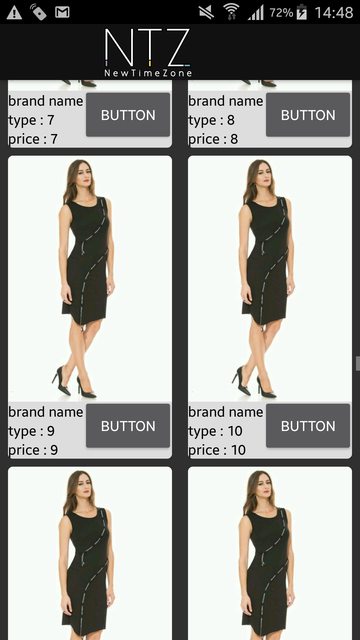
但是有些图像会表现出奇怪的行为,如下所示
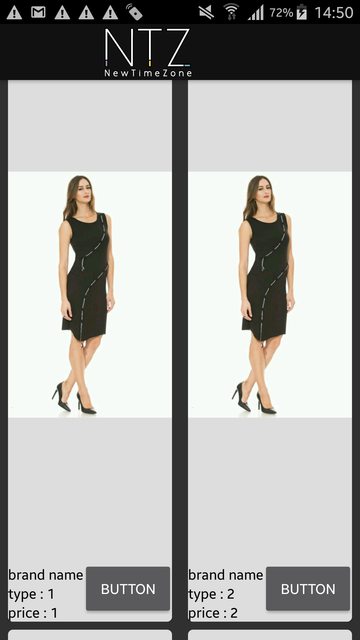
据我所知,由于Glade导致的这种结果是异步的,在适配器Glade中创建单元格之前没有图像,适配器为单元格创建默认大小.只是过了一段时间,空地上出现了图像,但细胞已经创建了一个错误的大小。
但如何解决呢?
我需要适配器等待glade下载结束,然后再为回收器视图创建单元格
我的XML
<?xml version="1.0" encoding="utf-8"?>
<LinearLayout xmlns:android="http://schemas.android.com/apk/res/android"
xmlns:app="http://schemas.android.com/apk/res-auto"
android:layout_width="match_parent"
android:layout_height="wrap_content"
android:paddingBottom="4dp"
android:paddingEnd="8dp"
android:paddingStart="8dp"
android:paddingTop="4dp"
>

<android.support.v7.widget.CardView
  android:id="@+id/cvInbox"
  android:layout_width="match_parent"
  android:layout_height="match_parent"
  app:cardCornerRadius="5dp"
  app:cardElevation="15dp"
  >

<com.balysv.materialripple.MaterialRippleLayout
    android:id="@+id/rippleInbox"
    android:layout_width="match_parent"
    android:layout_height="match_parent"
    android:background="@color/standard_white"
    app:mrl_rippleColor="@color/ntz_background_light_grey"
    app:mrl_rippleOverlay="true"
    >

  <LinearLayout
      android:id="@+id/cardMainActivityLinearLayout"
      android:layout_width="match_parent"
      android:layout_height="match_parent"
      android:orientation="vertical"
      >

    <ImageView
        android:id="@+id/imageViewMainCard"
        android:layout_width="wrap_content"
        android:layout_height="wrap_content"
        />

    <RelativeLayout
        android:layout_width="match_parent"
        android:layout_height="wrap_content"
        android:layout_weight="2"
        android:background="@color/standard_white"
        android:orientation="vertical"
        android:layout_below="@+id/imageViewMainCard"
        >

      <TextView
          android:id="@+id/tvBrandName"
          android:text="custom brand"
          android:textColor="@color/black_color"
          android:layout_width="wrap_content"
          android:layout_height="wrap_content"
          android:layout_alignParentTop="true"
          android:layout_alignParentLeft="true"
          />

      <TextView
          android:id="@+id/tvItemName"
          android:text="custom Type"
          android:textColor="@color/black_color"
          android:layout_below="@+id/tvBrandName"
          android:layout_width="wrap_content"
          android:layout_height="wrap_content"
          />

      <TextView
          android:id="@+id/tvPrice"
          android:text="custom price"
          android:textColor="@color/black_color"
          android:layout_below="@+id/tvItemName"
          android:layout_width="wrap_content"
          android:layout_height="wrap_content"
          />

      <Button
          android:id="@+id/bAction"
          android:layout_width="wrap_content"
          android:layout_height="wrap_content"
          android:text="button"
          android:layout_alignParentTop="true"
          android:layout_alignParentEnd="true"

          />

    </RelativeLayout>
  </LinearLayout>
 </com.balysv.materialripple.MaterialRippleLayout>
 </android.support.v7.widget.CardView>
</LinearLayout>适配器中的幻灯片
ImageView iv = currentView.ivMainCard;
        String url = currentCard.getImageUrl();

        Glide.with(context)
                .load(url)
                .placeholder(R.drawable.progress_animation)
                .crossFade()
.into(iv);回答 2
Stack Overflow用户
回答已采纳
发布于 2018-03-08 13:48:35
在回收器视图的bindViewHolder中,您需要将以下代码添加到imageView布局(0、0、0、0)和所有为零的parameters.In中
        ImageView iv = currentView.ivMainCard;
        iv.layout(0,0,0,0);

        String url = currentCard.getImageUrl();

        Glide.with(context)
                .load(url)
                .placeholder(R.drawable.progress_animation)
                .crossFade()
.into(iv);Stack Overflow用户
发布于 2017-02-15 11:59:11
在我的例子中,我刚刚将lib从Glide更改为Picasso
现在我的请求是这样的
Picasso.with(context)
                .load(url)
                .placeholder(R.drawable.progress_animation)
                .error(R.drawable.image_error_404)
                .into(iv);
一切都很好
页面原文内容由Stack Overflow提供。腾讯云小微IT领域专用引擎提供翻译支持
原文链接:
https://stackoverflow.com/questions/42226999
复制相关文章
相似问题
腾讯云开发者

Copyright © 2013 - 2026 Tencent Cloud. All Rights Reserved. 腾讯云 版权所有
深圳市腾讯计算机系统有限公司 ICP备案/许可证号:粤B2-20090059  粤公网安备44030502008569号
腾讯云计算(北京)有限责任公司 京ICP证150476号 | 京ICP备11018762号