
我如何保持对话框的状态与进展在我的角2应用程序?
我想让Md对话框的状态保持活跃,即使关闭了dialog.So,我也可以在整个应用程序中保持上传状态。我的计划是将上传响应存储在服务中,以维护上传进度,并且每次在toolbar.The对话框中都会给出一个图标重新初始化。如何维护整个应用程序上传进度的对话框状态?
app.component.ts
import { Component, NgZone, Inject, EventEmitter } from '@angular/core';
import { NgUploaderOptions, UploadedFile, UploadRejected } from 'ngx-uploader';
import { MdDialog, MdDialogRef, MdDialogConfig } from '@angular/material';
import { Router } from '@angular/router';
import { UploadService } from './upload.service';
import './operators';

@Component({
  moduleId: module.id,
  selector: 'sd-app',
  templateUrl: 'app.component.html',
})
export class AppComponent {
  temp:any;
  dialogRef: MdDialogRef<DialogComponent>;
  config: MdDialogConfig = {
    disableClose: true
  };
  constructor(public dialog: MdDialog, private router: Router, public uploadService: UploadService ) {
  this.temp = this.uploadService.getUpload();
  }

  openDialog() {
    this.dialogRef = this.dialog.open(DialogComponent, this.config);
  }


}
app.component.html
 <md-progress-bar mode="determinate"
                       [value]="temp.progress.percent"
                       color="primary"
                       class="progress-bar-margins">
      </md-progress-bar>
      <span>{{temp.progress.percent}}%</span>
对话组件
export class DialogComponent {
  options: NgUploaderOptions;
  response: any;
  sizeLimit: number = 1024 * 1024 * 50; // 50MB
  previewData: any;
  errorMessage: string;
  inputUploadEvents: EventEmitter<string>;
  temp:any;
  constructor(@Inject(NgZone) private zone: NgZone, public uploadService: UploadService) {

    this.options = new NgUploaderOptions({
        url: 'http://api.ngx-uploader.com/upload',
        filterExtensions: false,
        allowedExtensions: ['dsn'],
        data: { userId: 12 },
        autoUpload: false,
        fieldName: 'file',
        fieldReset: true,
        maxUploads: 2,
        method: 'POST',
        previewUrl: true,
        withCredentials: false
    });

    this.inputUploadEvents = new EventEmitter<string>();
  }
  startUpload(view:any) {
    this.inputUploadEvents.emit('startUpload');
  }
  beforeUpload(uploadingFile: UploadedFile): void {
    if (uploadingFile.size > this.sizeLimit) {
      console.log('File is too large!');
      this.errorMessage = 'File is too large! Please select valid file';
      uploadingFile.setAbort();
    }
  }

  handleUpload(data: any) {
      setTimeout(() => {
        this.zone.run(() => {
          this.response = data;
          this.uploadService.uploadData = data;
          this.temp = this.uploadService.getUpload();
          if (data && data.response) {
            this.response = JSON.parse(data.response);
          }
        });
      });
    }

    handlePreviewData(data: any) {
    this.previewData = data;
  }
  }
upload.component.html
 <button type="button" class="start-upload-button" (click)="startUpload()">Start Upload</button>
</div>
< <div *ngIf="previewData && !response">
  <img [src]="previewData">
</div>
<div>
 <md-progress-bar mode="determinate"
        [value]="temp.progress.percent"
        color="primary"
        class="progress-bar-margins">
        </md-progress-bar>
        <span>{{temp.progress.percent}}%</span>
</div>
upload.service.ts
import { Injectable } from '@angular/core';
import { BehaviorSubject } from 'rxjs/Rx';
import { Observable } from 'rxjs';
import { Subject } from 'rxjs/Rx';

@Injectable()
export class UploadService {
  uploadData :any;
  constructor() {
    console.log('Global Service initialised');
    }
    getUpload() {
        return this.uploadData;
    }
}回答 1
Stack Overflow用户
发布于 2017-02-14 08:35:40
使用通量体系结构模式构建UI接口:
https://facebook.github.io/flux/ (只需阅读它,不要实际使用facebook )。
结果表明,该模式对于维护跨多个组件的应用程序状态非常有用,特别是对于大规模应用程序。
这个想法很简单--在一个流量体系结构中,数据总是向一个方向流动:

即使有从UI触发的操作,也是如此:
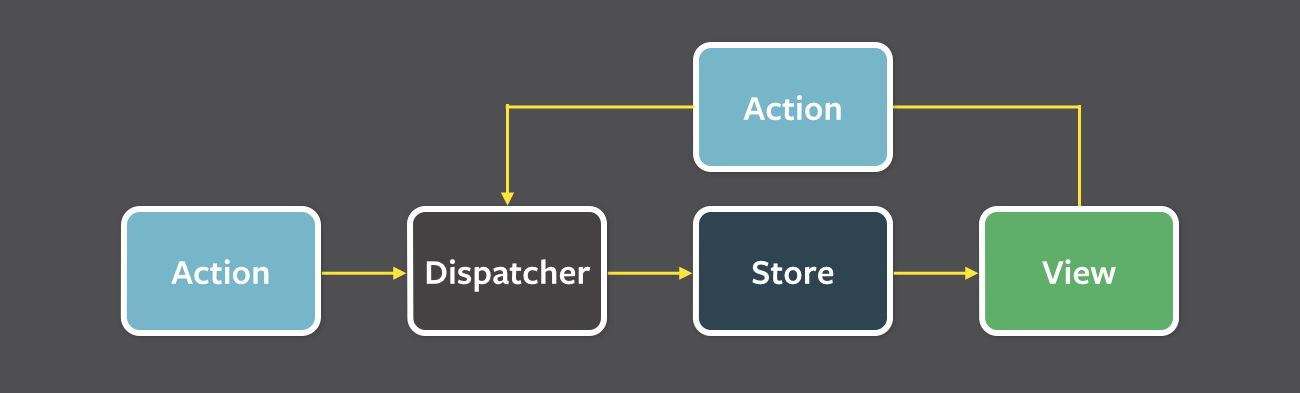
在您的Angular2应用程序中,dispatcher是在您的服务上实现的可观察性(注入服务的任何组件都可以订阅它),并且存储是数据的缓存副本,以帮助发出事件。
下面是一个实现Flux体系结构的ToDoService示例:
import { Injectable } from '@angular/core';
import {Http } from '@angular/http';
import { BehaviorSubject, Observable } from 'rxjs/Rx';
import 'rxjs/add/operator/toPromise';

export interface ToDo {
    id: number;
    name:string;
    isComplete: boolean;
    date: Date;
}

@Injectable()
export class ToDoService {
    public todoList$:Observable<ToDo[]>;
    private subject: BehaviorSubject<ToDo[]>;
    private store: {
        todos: ToDo[];
    }

    public constructor(private http:Http) {
        this.subject = new BehaviorSubject<ToDo[]>([]);
        this.todoList$ = this.subject.asObservable();
        this.store = {
            todos: []
        };
    }

    public remove(todo:ToDo) {
        this.http.delete(`http://localhost/todoservice/api/todo/${todo.id}`)
            .subscribe(t=> {
                this.store.todos.forEach((t, i) => {
                    if (t.id === todo.id) { this.store.todos.splice(i, 1); }
                });
                let copy = this.copy(this.store).todos;
                this.subject.next(copy);

            });
    }

    public update(todo:ToDo): Promise<ToDo> {
        let q = this.http.put(`http://localhost/todoservice/api/todo/${todo.id}`, todo)
            .map(t=>t.json()).toPromise();
        q.then(x=> {

                this.store.todos.forEach((t,i) => {
                    if (t.id == x.id) { Object.assign(t, x); }
                    let copy = this.copy(this.store).todos;
                    this.subject.next(copy);
                });
            });
        return q;

    }

    public getAll() {
        this.http.get('http://localhost/todoservice/api/todo/all')
            .map(t=>t.json())
            .subscribe(t=> {
                this.store.todos = t;
                let copy = Object.assign({}, this.store).todos;
                this.subject.next(copy);

            });
    }

    private copy<T>(t:T):T {
        return Object.assign({}, t);
    }

}
关于这项服务,有几件事需要注意:
- 该服务存储数据存储区
{ todos: ToDo[] }的缓存副本。 - 它公开了组件可以订阅的可观察到的(如果它们感兴趣的话)。
- 它使用一个对其实现是私有的BehaviourSubject。当订阅BehaviorSubject时,它将发出一个初始值。如果您想首先使用空数组初始化可观察到的值,这是非常方便的。
- 每当调用更改数据存储区(删除或更新)的方法时,服务发出web服务调用以更新其持久存储,然后在向所有订阅者发出更新的
ToDo[]列表之前更新其缓存的数据存储。 - 从服务中发出数据的副本,以防止意外的数据更改向相反的方向传播(这对于维护流量模式非常重要)。
DI注入服务的任何组件都有机会订阅可观察到的todoList$。
在下面的组件中,我们利用异步管道而不是直接订阅可观察到的todoList$:
Component.ts
ngOnInit() {
    this.todoList$ = this.todoService.todoList$;
}
Component.html
<li class="list-group-item" *ngFor="let item of todoList$ | async">
     {{ item.name }}
</li>
每当在修改其内部存储的服务上调用方法时,该服务都会更新其所有组件订阅服务器,而不管是哪个组件发起了更改。
Flux模式是管理复杂UI和减少组件之间耦合的优秀模式。相反,耦合是在服务和组件之间进行的,而交互主要是由组件订阅服务。
https://stackoverflow.com/questions/42219858
复制相似问题
腾讯云开发者

Copyright © 2013 - 2026 Tencent Cloud. All Rights Reserved. 腾讯云 版权所有
深圳市腾讯计算机系统有限公司 ICP备案/许可证号:粤B2-20090059  粤公网安备44030502008569号
腾讯云计算(北京)有限责任公司 京ICP证150476号 | 京ICP备11018762号