
继续触发GeoFence事件
GeoFence触发问题
我在我的应用程序中设置了geofence,我使用IntetnService作为句柄触发器事件。
我的问题是多次触发事件。
假设我位于Geofence内部的一个位置,不幸的是,有一段时间我会进入或退出事件触发器,然后我会检查geoEvent.getTriggerdLocation()属性并检查Geofence半径,
如果触发位置到地理围栏的位置距离大于geofecen半径,那么我将释放退出事件的功能,
但最终,地学触发事件2,3公里远,甚至我已经进入围栏,我的上述逻辑将失败。见附图
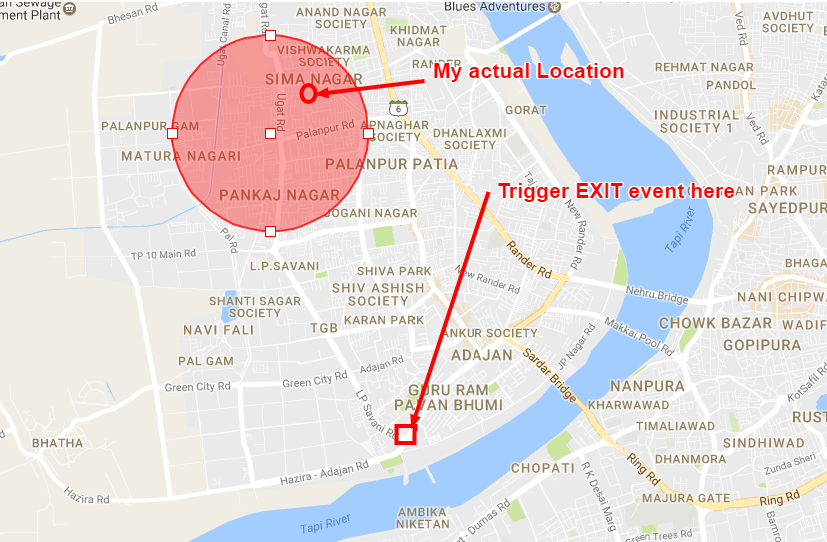
我想为这些做些实心的修复。
位置是高优先级的
当我靠近栅栏的边界时,这种情况会更多地发生。
添加地理围栏列表,现在我只使用一个围栏。
mGeofenceList.add(new Geofence.Builder().setRequestId(String.valueOf(loGeoFenceModels.liGeoFenceID))
                    .setCircularRegion(loGeoFenceModels.ldGeoLatitude, loGeoFenceModels.ldGeoLongitude,
                            loGeoFenceModels.lfRadius)
                    .setExpirationDuration(Geofence.NEVER_EXPIRE)
                    .setTransitionTypes(Geofence.GEOFENCE_TRANSITION_ENTER | Geofence.GEOFENCE_TRANSITION_EXIT)
                    .build());
PendidngIntentService
moGeofencePendingIntent = getGeofencePendingIntent();
        LocationServices.GeofencingApi
                .addGeofences(moLocationClient, getGeofencingRequest(), moGeofencePendingIntent)
                .setResultCallback(this);
getGeofencingRequest()和moGeofencePendingIntent
private GeofencingRequest getGeofencingRequest() {
    return new GeofencingRequest.Builder().setInitialTrigger(GeofencingRequest.INITIAL_TRIGGER_ENTER)
            .addGeofences(mGeofenceList).build();
}


private PendingIntent getGeofencePendingIntent() {
    // Reuse the PendingIntent if we already have it.
    if (moGeofencePendingIntent != null) {
        return moGeofencePendingIntent;
    }

    Intent intent = new Intent(moContext, GeofenceTransitionsIntentService.class);
    // We use FLAG_UPDATE_CURRENT so that we get the same pending intent
    // back when calling addgeoFences()
    return PendingIntent.getService(moContext, 0, intent, PendingIntent.FLAG_UPDATE_CURRENT);
}
GeofenceTransitionsIntentService.class
import java.util.ArrayList;
import java.util.List;
import com.google.android.gms.location.Geofence;
import com.google.android.gms.location.GeofenceStatusCodes;
import com.google.android.gms.location.GeofencingEvent;
import android.R.bool;
import android.app.IntentService;
import android.app.usage.UsageEvents.Event;
import android.content.Intent;
import android.database.Cursor;
import android.location.Location;
import android.text.TextUtils;

public class GeofenceTransitionsIntentService extends IntentService {

protected static final String TAG = "GeofenceTransitionsIS";

public GeofenceTransitionsIntentService() {
    super(TAG); // use TAG to name the IntentService worker thread
}

@Override
public void onDestroy() {
    // TODO Auto-generated method stub
    super.onDestroy();
}

private static String getGeofenceTransitionDetails(GeofencingEvent event) {
    String transitionString = GeofenceStatusCodes.getStatusCodeString(event.getGeofenceTransition());
    List<String> triggeringIDs = new ArrayList<String>();
    for (Geofence geofence : event.getTriggeringGeofences()) {
        triggeringIDs.add(geofence.getRequestId());
    }
    return String.format("%s: %s", transitionString, TextUtils.join(", ", triggeringIDs));
}

@Override
protected void onHandleIntent(Intent intent) {

    GeofencingEvent event = GeofencingEvent.fromIntent(intent);
    Log.i(TAG, "Geofencing Event : " + event);
    if (event.hasError()) {
        Log.i(TAG, "GeofencingEvent Error : " + event.getErrorCode());
        return;
    }

    // Get the type of transition (entry or exit)
    if (event.getGeofenceTransition() == Geofence.GEOFENCE_TRANSITION_ENTER) {
        Log.i(TAG, "GeofencingEvent Enter");
    }
    if (event.getGeofenceTransition() == Geofence.GEOFENCE_TRANSITION_EXIT) {
        Log.i(TAG, "GeofencingEvent Exit");
    ?
    String description = getGeofenceTransitionDetails(event);
    Log.i(TAG, "GeofencingEvent description : " + description);
}
}
权限
<uses-permission android:name="android.permission.ACCESS_FINE_LOCATION" />
<uses-permission android:name="android.permission.ACCESS_COARSE_LOCATION" />
<uses-permission android:name="android.permission.ACCESS_NETWORK_STATE" />
<uses-permission android:name="android.hardware.location.gps" />
我坚持这个问题已经很多天了,请帮助完成这个问题。
回答 2
Stack Overflow用户
发布于 2017-02-28 13:53:04
找到一个补丁,以避免不必要的或虚拟的事件。
你可以在触发时间找到位置
Location loTriggerGeoFenceLocation = moEvent.getTriggeringLocation();
long ldAccuracy = loTriggerGeoFenceLocation.getAccuracy();
现在保存你的地理围栏位置拉长和半径。不获取触发拉长,并检查触发位置和地理围栏位置之间的距离拉长。如果距离小于半径,它应该是入口,是大于半径的距离,它应该是退出事件。
 if (event.getGeofenceTransition() == Geofence.GEOFENCE_TRANSITION_EXIT) {

    ldGeoLatLong = moSharedPreferenceManager.getGeoFenceTimeLocation();
    Location loExistGeoFenceLocation = new Location("");
    loExistGeoFenceLocation.setLatitude(ldGeoLatLong[0]);
    loExistGeoFenceLocation.setLongitude(ldGeoLatLong[1]);

    String lsRadius = moSharedPreferenceManager.getGeoFenceRadius();
    float lfRadius = Float.parseFloat(lsRadius);
        Log.i(TAG, "GeofencingEvent Exit");
        float lfDistance = loTriggerGeoFenceLocation.distanceTo(loExistGeoFenceLocation);
        if (lfDistance >= lfRadius && ldAccuracy <= 100f) {
            moSharedPreferenceManager.setGeoFenceExit(true);
        }
}Stack Overflow用户
发布于 2017-02-13 13:11:57
在Geofence中使用Application时,您应该记住以下几点
来自官方文档
- 为您的地理位置选择最佳半径
为了取得最好的效果,地学的最小半径应设置在100 ~ 150米之间。当Wi可用时,定位精度通常在20-50米之间。当室内定位可用时,精度范围可小至5米。除非你知道室内的地理位置是可用的,假设Wi的定位精度在50米左右。 如果没有Wi定位(例如,当你在农村地区开车时),定位精度就会下降。精度范围可达几百米至几公里。在这种情况下,您应该使用更大的半径创建地理位置。
- 使用驻留转换类型来减少警报垃圾邮件。
如果您在开车经过地理位置时收到大量警报,减少警报的最佳方法是使用过渡类型的GEOFENCE_TRANSITION_DWELL而不是GEOFENCE_TRANSITION_ENTER。这样,只有当用户在给定的一段时间内停止在地理范围内时,才会发送住宅警报。您可以通过设置游荡延迟来选择持续时间。
https://stackoverflow.com/questions/42198718
复制相似问题
腾讯云开发者

Copyright © 2013 - 2026 Tencent Cloud. All Rights Reserved. 腾讯云 版权所有
深圳市腾讯计算机系统有限公司 ICP备案/许可证号:粤B2-20090059  粤公网安备44030502008569号
腾讯云计算(北京)有限责任公司 京ICP证150476号 | 京ICP备11018762号